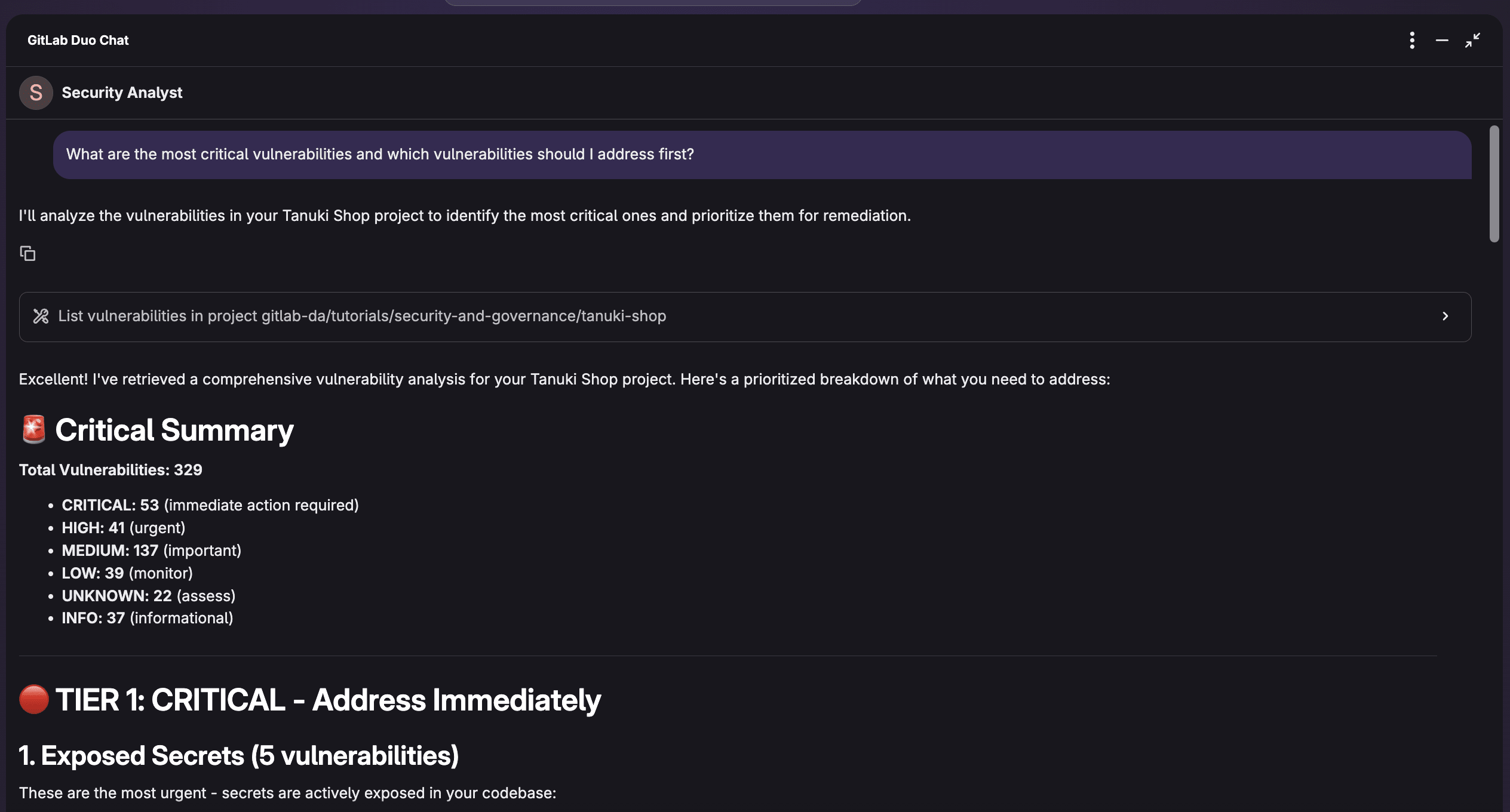
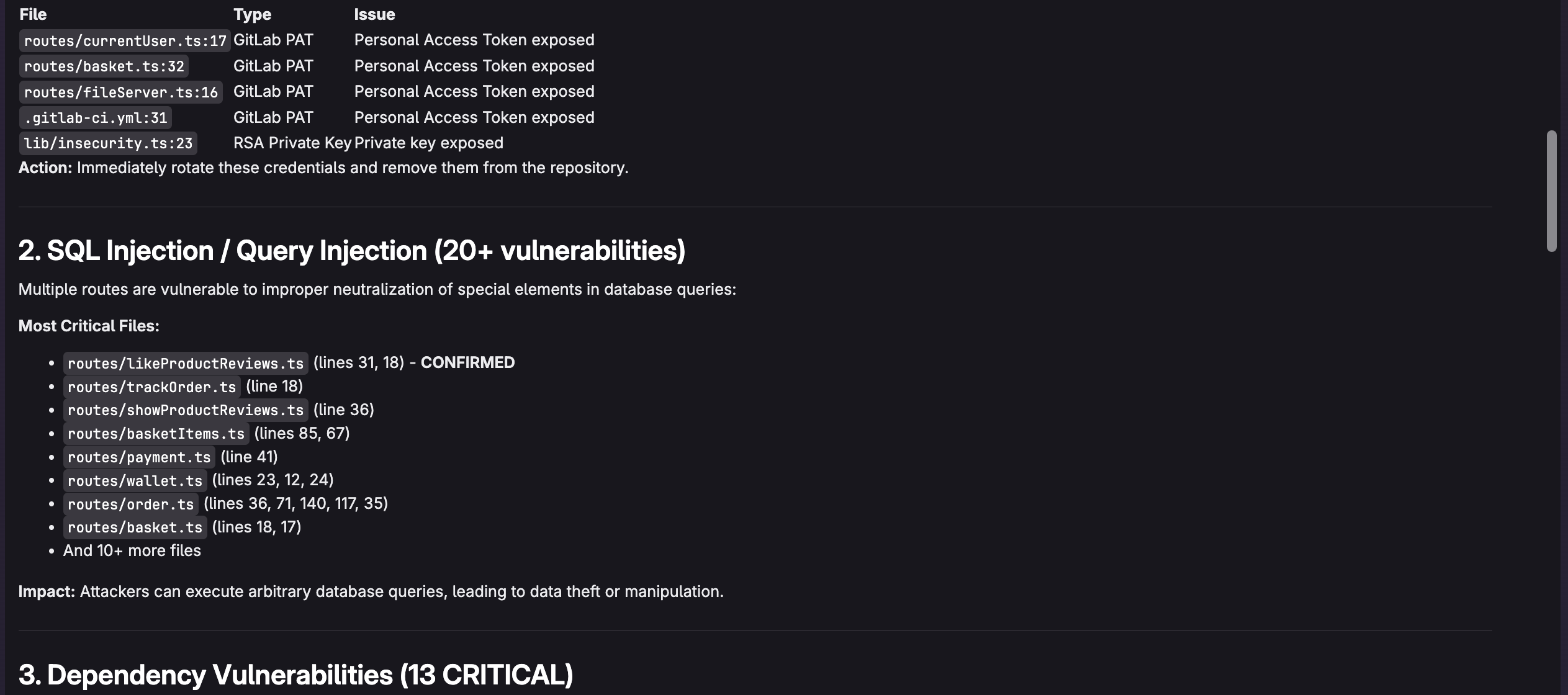
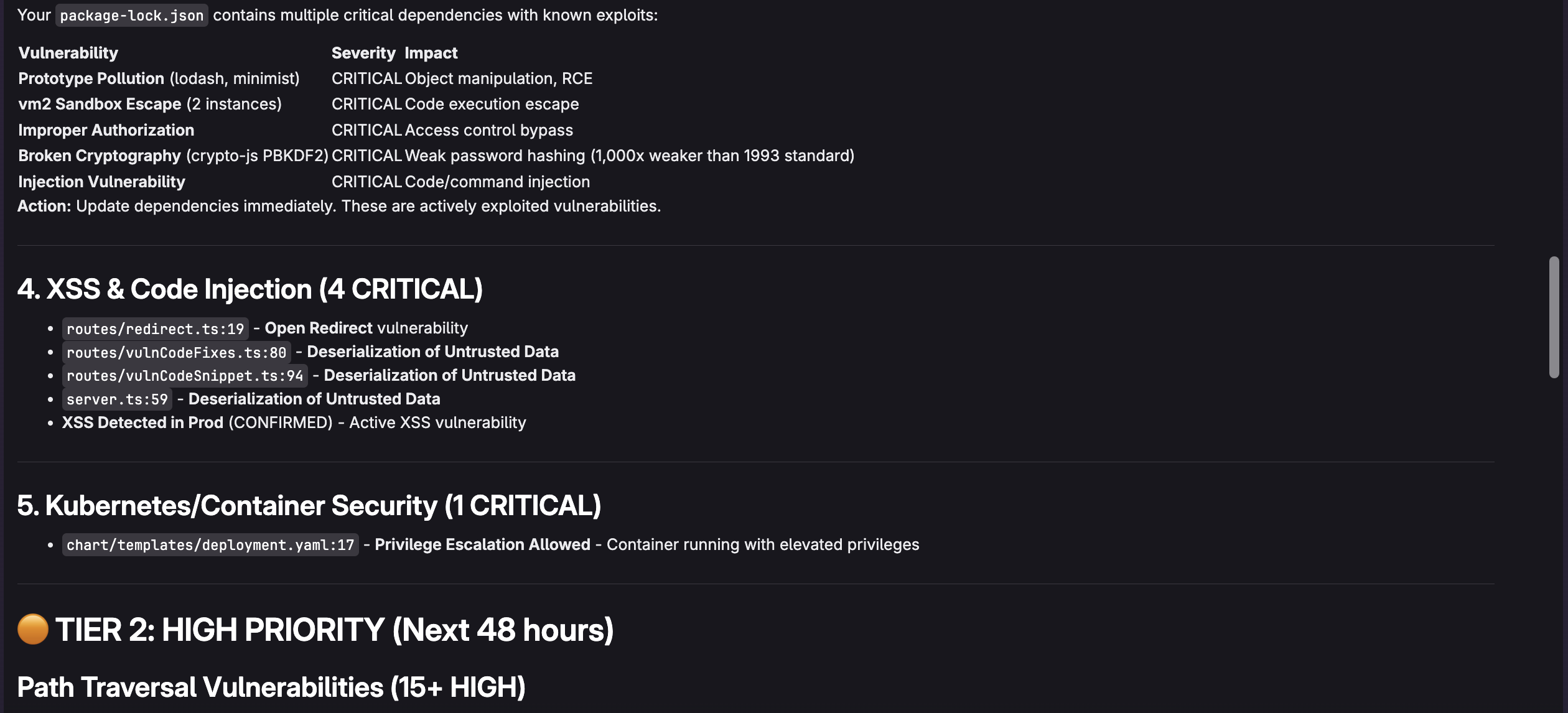
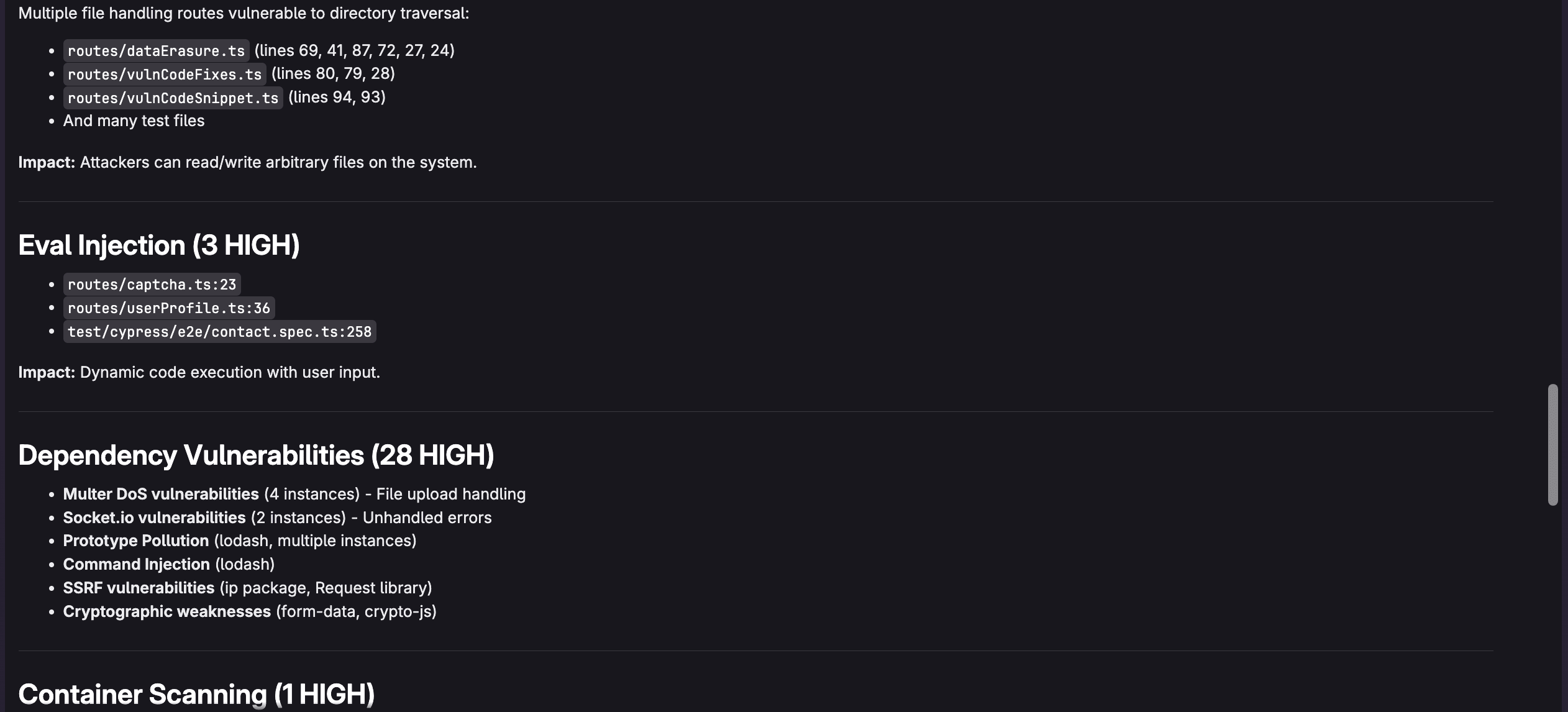
<?xml version="1.0" encoding="utf-8"?>
<feed xmlns="http://www.w3.org/2005/Atom">
    <id>https://about.gitlab.com/blog</id>
    <title>GitLab</title>
    <updated>2026-01-27T19:23:46.728Z</updated>
    <generator>https://github.com/jpmonette/feed</generator>
    <author>
        <name>The GitLab Team</name>
    </author>
    <link rel="alternate" href="https://about.gitlab.com/blog"/>
    <link rel="self" href="https://about.gitlab.com/atom.xml"/>
    <subtitle>GitLab Blog RSS feed</subtitle>
    <icon>https://about.gitlab.com/favicon.ico</icon>
    <rights>All rights reserved 2026</rights>
    <entry>
        <title type="html"><![CDATA[GitLab Bug Bounty Program policy updates]]></title>
        <id>https://about.gitlab.com/blog/gitlab-bug-bounty-program-policy-updates/</id>
        <link href="https://about.gitlab.com/blog/gitlab-bug-bounty-program-policy-updates/"/>
        <updated>2026-01-20T00:00:00.000Z</updated>
        <content type="html"><![CDATA[<p>GitLab <a href="https://about.gitlab.com/blog/gitlab-hackerone-bug-bounty-program-is-public-today/" rel="">first introduced our HackerOne Bug Bounty program</a> in 2018. Since then, we’ve worked with the researcher community to help secure our comprehensive AI-powered DevSecOps platform. We&#39;re excited to announce policy updates to the program that reflect our commitment to transparency, feedback from researchers, and our ongoing efforts to provide clear expectations and streamlined processes.</p><h2 id="whats-changing">What&#39;s changing</h2><p>Here is what you need to know:</p><h3 id="enhanced-testing-guidance">Enhanced testing guidance</h3><p>We&#39;re placing stronger emphasis on local testing environments to protect both researchers and our production infrastructure. We&#39;re <strong>strongly recommending local <a href="https://gitlab-org.gitlab.io/gitlab-development-kit/" rel="">GitLab Development Kit (GDK)</a> testing</strong> for most security research. The GDK gives you access to cutting-edge features before public release and the freedom to experiment without production infrastructure concerns.</p><p>If you need to demonstrate denial-of-service (DoS) impact, we recommend testing on a self-managed GitLab instance with specifications and resources equal to or greater than the <a href="https://docs.gitlab.com/install/requirements/" rel="">self-managed GitLab installation requirements</a>.</p><p>For vulnerabilities requiring GitLab.com production architecture, you must use test accounts created with your HackerOne email alias: <code className="">yourhandle@wearehackerone.com</code>.</p><h3 id="refined-scope-for-better-focus">Refined scope for better focus</h3><p>We&#39;ve clarified several scope areas based on community feedback:</p><p><strong>DoS is out of scope:</strong> Exceptions may be considered for application layer DoS vulnerabilities that achieve persistent total service disruption AND can be executed through unauthenticated endpoints. Some examples include ReDoS, logic bombs, etc.</p><p><strong>Prompt injection:</strong> Standalone prompt injection is out of scope, but prompt injection may be eligible if it serves as an initial vector to achieve harm beyond its security boundary.</p><p><strong>Metadata and enumeration</strong>: General information gathering remains out of scope while privacy breaches exposing confidential data are in scope. We&#39;ve provided new, detailed examples distinguishing between these two types of issues on the <a href="https://hackerone.com/gitlab" rel="">program policy page</a>.</p><h2 id="transition-period-for-researchers">Transition period for researchers</h2><p>We recognize that policy changes can create uncertainty for researchers with active investigations. To maintain trust during this transition and avoid disrupting valuable research already under way:</p><ul><li>GitLab is offering a 7-day grace period for DoS reports submitted before <strong>2026-01-22, 9:00 p.m. Pacific Time (2026-01-23T00:05:00Z).</strong> Reports submitted before then will be evaluated under our previous policy.</li></ul><p>Your investment in GitLab&#39;s security matters to us, and we&#39;re committed to honoring the policy under which you began your research.</p><h2 id="our-commitment-to-the-community">Our commitment to the community</h2><p>These changes reflect our deep commitment to the researcher community through three key principles.</p><p>1. We&#39;re prioritizing transparency by establishing clearer boundaries and objective criteria that reduce ambiguity and prevent disputes.</p><p>2. We&#39;re enhancing safety through improved testing platform guidance that protects both production systems and researchers from accidental service disruption.</p><p>3. We&#39;re ensuring fairness through consistent evaluation standards and provisions that guarantee equitable treatment for all researchers, including those already in the program.</p><p>Scope refinements also support program sustainability by focusing resources on high-impact security issues while maintaining broad coverage.</p><h2 id="get-started">Get started</h2><p>Ready to contribute to GitLab&#39;s security?</p><ul><li><strong>New researchers:</strong> Visit our <a href="https://hackerone.com/gitlab" rel="">HackerOne program page</a>.</li><li><strong>Set up local testing:</strong> Download the <a href="https://gitlab.com/gitlab-org/gitlab-development-kit" rel="">GitLab Development Kit</a>.</li><li><strong>Review full policy:</strong> <a href="https://hackerone.com/gitlab" rel="">Check our complete documentation for detailed guidelines</a>.</li><li><strong>Understand severity assessment:</strong> Explore our <a href="https://gitlab-com.gitlab.io/gl-security/appsec/cvss-calculator/" rel="">CVSS calculator</a>.</li></ul><p>We&#39;re grateful for the security research community&#39;s ongoing partnership in keeping GitLab secure. Your expertise and dedication make a real difference for millions of users worldwide.</p><hr /><p><em>Questions about these changes? Reach out to our team by <a href="https://gitlab.com/gitlab-com/gl-security/product-security/appsec/hackerone-questions/-/issues/new" rel="">creating an issue</a> in our HackerOne questions project on GitLab.</em></p>]]></content>
        <author>
            <name>Kayla Hagopian</name>
            <uri>https://about.gitlab.com/blog/authors/kayla-hagopian</uri>
        </author>
        <published>2026-01-20T00:00:00.000Z</published>
    </entry>
    <entry>
        <title type="html"><![CDATA[Announcing general availability for GitLab Duo Agent Platform ]]></title>
        <id>https://about.gitlab.com/blog/gitlab-duo-agent-platform-is-generally-available/</id>
        <link href="https://about.gitlab.com/blog/gitlab-duo-agent-platform-is-generally-available/"/>
        <updated>2026-01-15T00:00:00.000Z</updated>
        <content type="html"><![CDATA[<p>We’re excited to announce the general availability (GA) of GitLab Duo Agent Platform. This is an important moment for GitLab, our customers and the industry at large. It is our first step in delivering our vision to bring agentic AI into the entire software development lifecycle.</p><p>AI tools have been rapidly improving developers’ ability to write code, and in some cases, developers are reporting 10x productivity gains. Unfortunately, since only about 20% of a developer’s time is spent writing code, the associated improvement in total innovation velocity and delivery gained by AI is incremental. This is often described as the <a href="https://about.gitlab.com/press/releases/2025-11-10-gitlab-survey-reveals-the-ai-paradox/" rel="">AI paradox</a> in software delivery.</p><p>In addition, for many teams, increasing the speed of code authoring has led to new bottlenecks including a larger backlog of code reviews, security vulnerabilities, compliance checks and downstream bug fixes.</p><p>GitLab Duo Agent Platform addresses the AI paradox by unlocking intelligent orchestration and agentic AI automation across the software lifecycle.</p><p>Learn more in this video, and read more below.</p><iframe src="https://player.vimeo.com/video/1154785472?badge=0&amp;autopause=0&amp;player_id=0&amp;app_id=58479" frameBorder="0" allow="autoplay; fullscreen; picture-in-picture; clipboard-write; encrypted-media; web-share" referrerPolicy="strict-origin-when-cross-origin" style="position:absolute;top:0;left:0;width:100%;height:100%;" title="18.8 Release Video V2"></iframe><script src="https://player.vimeo.com/api/player.js"></script><blockquote><p>💡 Join GitLab Transcend on February 10 to learn how agentic AI transforms software delivery. Hear from customers and discover how to jumpstart your own modernization journey. <a href="https://about.gitlab.com/events/transcend/virtual/" rel="">Register now</a>.</p></blockquote><p>We&#39;re also excited to announce that GitLab customers with active GitLab Premium and Ultimate subscriptions are being credited with $12 and $24 dollars, respectively, in GitLab Credits per user at no additional cost.* These credits will refresh every month and give users access to all GitLab Duo Agent Platform features.</p><p>Here is a simple explanation for how GitLab Credits work: a GitLab Credit is a virtual currency used for GitLab’s usage-based products. GitLab Duo Agent Platform usage will draw down on available credits, starting with the included credits mentioned above. From there, customers can decide to commit to a shared pool of credits for their entire organization, or pay for them monthly, on demand. For more information, please check out <a href="https://about.gitlab.com/blog/introducing-gitlab-credits/" rel="">our article introducing GitLab Credits</a>.</p><p>Customers of GitLab Duo Pro or Duo Enterprise subscriptions are welcome to continue using those products, or migrate to Duo Agent Platform at any time. The remainder of your Duo Enterprise contract value can be converted into GitLab Credits at any time. Contact your GitLab representative to learn more.</p><p>Here are exciting use cases and capabilities you can try today:</p><h3 id="a-unified-experience-for-human-and-agent-collaboration">A unified experience for human and agent collaboration</h3><p><a href="https://docs.gitlab.com/user/duo_agent_platform/?utm_source=chatgpt.com" rel="">GitLab Duo Agent Platform</a> introduces a unified user experience designed for seamless integration between humans and their AI agents inside GitLab. Developers and their teams can engage Duo Agentic Chat on nearly every page, ask questions contextually, follow async agentic sessions and interact with agents within familiar workflows like issues, merge requests, and pipeline activities — making AI actions transparent and easy to guide through everyday work.</p><h3 id="agentic-chat-intelligent-context-aware-assistance">Agentic Chat: Intelligent, context-aware assistance</h3><p><a href="https://docs.gitlab.com/user/gitlab_duo_chat/agentic_chat/" rel="">Gitlab Duo Agentic Chat</a> brings true multi-step reasoning across the GitLab Web UI and IDEs, using full lifecycle context from issues, merge requests, pipelines, security findings, and more. Building on the previously released Duo Chat, Agentic Chat can perform actions on your behalf autonomously and help you answer complex questions more comprehensively. It gives every member of the software team accurate, context-aware guidance that helps improve onboarding, code quality, and delivery speed.</p><p>GitLab Duo Agentic Chat supports numerous <a href="https://about.gitlab.com/gitlab-duo/prompt-library/" rel="">use cases</a> to enable developer &lt;&gt; AI collaboration. For additional details on how to get started, please <a href="https://about.gitlab.com/blog/gitlab-duo-agent-platform-complete-getting-started-guide/" rel="">see our &quot;Getting started with GitLab Duo Agent Platform&quot; guide</a> and check out this <a href="https://about.gitlab.com/gitlab-duo/prompt-library/" rel="">growing set of suggested prompts</a>.</p><ul><li><strong>Analyze</strong>
In the Web UI, Agentic Chat can create issues, epics, merge requests, and provide summaries, highlight key findings, and offer actionable guidance based on real-time context from the specific project, issue, epic, merge request, and more. Agentic Chat helps developers understand unfamiliar code, dependencies, architecture, and project structure, in the IDE or inside a GitLab repo.</li><li><strong>Code</strong>
Agentic Chat can generate code, configurations, and infrastructure-as-code across a wide range of languages and frameworks. It can help fix bugs, modernize architecture and code, generate tests, and produce documentation for faster onboarding. Directly at developers&#39; fingertips, Agentic Chat is their collaboration partner in VS Code, JetBrains IDEs, Cursor, and Windsurf, with optional user- and workspace-level rules to tailor responses.</li><li><strong>CI/CD</strong>
Agentic Chat can help you better understand, configure, and troubleshoot existing pipelines, or create new ones from scratch.</li><li><strong>Secure</strong>
Agentic Chat can explain vulnerabilities, prioritize issues based on reachability, and recommend fixes that can help save you time.</li></ul><h2 id="agents-specialists-that-collaborate-on-demand">Agents: Specialists that collaborate on demand</h2><p>GitLab Duo Agent Platform enables developers to delegate tasks to specialized agents. The platform offers a unique combination of foundational, custom, and external agents, all seamlessly integrated into GitLab user experience, making it easy to choose the right agent for any task.</p><p><strong><a href="https://docs.gitlab.com/user/duo_agent_platform/agents/foundational_agents/" rel="">Foundational agents</a></strong> are pre-built by GitLab experts and are ready out-of-the-box to handle the most complex tasks in the software delivery cycle. The following foundational agents are included as part of GitLab Duo Agent Platform’s general availability, with others currently in beta and coming soon.</p><ul><li><a href="https://docs.gitlab.com/user/duo_agent_platform/agents/foundational_agents/planner/" rel=""><strong>Planner Agent</strong></a> helps teams structure, prioritize, and break down work directly inside GitLab so planning becomes clearer, faster, and easier to act on.</li><li><a href="https://docs.gitlab.com/user/duo_agent_platform/agents/foundational_agents/security_analyst_agent/" rel=""><strong>Security Analyst Agent</strong></a> reviews vulnerabilities and security signals, explains their impact in plain language, and helps teams understand what to address first.</li></ul><p><a href="https://docs.gitlab.com/user/duo_agent_platform/ai_catalog/" rel=""><strong>Custom agents</strong></a> can be built using the AI Catalog, a central repository where teams create, publish, manage, and share custom agents and flows across the organization. Teams can create agents and flows with specific context and capabilities to replicate the way their engineering team works — and tackle problems using the engineering standards and guardrails their engineers use.</p><p><a href="https://docs.gitlab.com/user/duo_agent_platform/agents/external/" rel=""><strong>External agents</strong></a> are seamlessly integrated into GitLab and include some of the very best AI tools available, including Claude Code from Anthropic and Codex CLI from OpenAI. Users will enjoy native GitLab access to these tools for use cases like code generation, code review, and analysis with transparent security and embedded LLM subscriptions.</p><p>Together, these approaches give teams flexibility in how they adopt agentic AI, from specialized agents, to organization-specific automation, to integrating external AI tools — all within a single, governed platform.</p><h2 id="flows-turning-multi-step-work-into-repeatable-guided-progress">Flows: Turning multi-step work into repeatable, guided progress</h2><p>Flows automate complex tasks with multiple agentic workflows, from start to finish.</p><p>Our engineering team has built several flows included at GA, with more on the way:</p><ul><li><a href="https://docs.gitlab.com/user/duo_agent_platform/flows/foundational_flows/issue_to_mr/" rel=""><strong>Developer (Issue to Merge Request)</strong></a> flow builds a structured MR from a well-defined issue so teams can begin work immediately.</li><li><a href="https://docs.gitlab.com/user/duo_agent_platform/flows/foundational_flows/convert_to_gitlab_ci/" rel=""><strong>Convert to GitLab CI/CD</strong></a> flow helps teams migrate or modernize pipeline configurations without manual rewriting.</li><li><a href="https://docs.gitlab.com/user/duo_agent_platform/flows/foundational_flows/fix_pipeline/" rel=""><strong>Fix CI/CD pipeline</strong></a> flow analyzes failures, identifies likely causes, and prepares recommended changes.</li><li><a href="https://docs.gitlab.com/user/duo_agent_platform/flows/foundational_flows/code_review/" rel=""><strong>Code Review</strong></a> flow analyzes code changes, merge request comments, and more to streamline code reviews with AI-native analysis and feedback.</li><li><a href="https://docs.gitlab.com/user/duo_agent_platform/flows/foundational_flows/software_development/" rel=""><strong>Software development in IDE</strong></a> flow guides work through everyday development and review stages.</li></ul><h2 id="mcp-client-connect-gitlab-duo-agent-platform-to-the-tools-your-teams-already-use">MCP Client: Connect GitLab Duo Agent Platform to the tools your teams already use</h2><p>The <a href="https://docs.gitlab.com/user/gitlab_duo/model_context_protocol/mcp_clients/" rel="">MCP Client</a> enables GitLab Duo Agent Platform in IDEs to securely connect to external systems like Jira, Slack, Confluence, and other MCP-compatible tools to pull in context and take action across your DevSecOps toolchain.</p><p>Instead of AI assistance being siloed inside individual tools, the MCP Client allows GitLab Duo Agent Platform to understand and operate across the systems where planning, collaboration, and execution actually happen. This reduces manual context switching and enables more complete, end-to-end AI-powered workflows that reflect how teams work in practice.</p><p>Included at GA:</p><ul><li>Connection to external MCP-compatible systems such as Jira, Confluence, Slack, Playwright, and Grafana</li><li>Configuration at the workspace and user level</li><li>Group-level controls to enable or restrict MCP usage</li><li>User approval flow for tool access</li><li>Support across Agentic Chat in the IDE extensions</li></ul><p>We plan to add more features to the GitLab MCP server capability, which is currently in beta, and make it generally available in upcoming releases.</p><h2 id="choose-the-right-model-for-your-team-and-workloads">Choose the right model for your team and workloads</h2><p>GitLab Duo Agent Platform is built on a flexible model selection framework that enables teams to tailor the platform to align with their privacy, security, and compliance needs. GitLab defaults to an optimal LLM for each feature, but administrators have the option to select from supported models such as OpenAI GPT-5 variants, Mistral, Meta Llama, and Anthropic Claude. This gives teams more precise control and flexibility over what is used for chat, coding tasks, and agent interactions for each specific use case, based on your organization’s standards. For a full list of supported models and details on model section configuration, see the <a href="https://docs.gitlab.com/administration/gitlab_duo/model_selection/" rel="">Model Selection</a> section of our documentation.</p><h3 id="governance-visibility-and-deployment-flexibility">Governance, visibility, and deployment flexibility</h3><p>The GitLab Duo Agent Platform gives organizations the control and transparency they need to help them adopt AI responsibly, while offering flexible deployment options that work across different environments.</p><p>Included at GA:</p><ul><li><strong>Available on all platforms:</strong> GitLab.com, GitLab Self-Managed, and GitLab Dedicated as part of the GitLab 18.8 release cycle.</li><li><strong>Governance and visibility:</strong> Teams can see how agents are used, what actions they perform, and how they contribute to work. Usage and activity details help leaders understand adoption, measure impact, and ensure AI is being used appropriately. These controls make it easier to roll out AI at scale with confidence.</li><li><strong>Group-based access controls:</strong> Administrators can define namespace-level rules governing which users can access GitLab Duo Agent Platform features, supporting flexible adoption from immediate organization-wide enablement to phased rollouts. With LDAP and SAML integration, they can enable governance at scale without manual configuration.</li><li><strong>Model selection and self-hosted options:</strong> LLM selection is available for all GA features across GitLab.com, Self-Managed, and Dedicated. Top-level namespace owners choose the model, and subgroups inherit those settings automatically. For organizations that want more control, the platform supports self-hosted models for GitLab Self-Managed deployments.</li></ul><p>Watch a demo of GitLab Duo Agent Platform in action:</p><iframe src="https://player.vimeo.com/video/1154786333?badge=0&amp;autopause=0&amp;player_id=0&amp;app_id=58479" frameBorder="0" allow="autoplay; fullscreen; picture-in-picture; clipboard-write; encrypted-media; web-share" referrerPolicy="strict-origin-when-cross-origin" style="position:absolute;top:0;left:0;width:100%;height:100%;" title="18.8 Demo"></iframe><script src="https://player.vimeo.com/api/player.js"></script><h2 id="stay-up-to-date-with-gitlab">Stay up to date with GitLab</h2><p>To make sure you’re getting the latest features, security updates, and performance improvements, we recommend keeping your GitLab instance up to date. The following resources can help you plan and complete your upgrade:</p><ul><li><a href="https://gitlab-com.gitlab.io/support/toolbox/upgrade-path/" rel="">Upgrade Path Tool</a> – enter your current version and see the exact upgrade steps for your instance</li><li><a href="https://docs.gitlab.com/update/upgrade_paths/" rel="">Upgrade Documentation</a> – detailed guides for each supported version, including requirements, step-by-step instructions, and best practices</li></ul><p>By upgrading regularly, you’ll ensure your team benefits from the newest GitLab capabilities and remains secure and supported.</p><p>For organizations that want a hands-off approach, consider <a href="https://content.gitlab.com/viewer/d1fe944dddb06394e6187f0028f010ad#1" rel="">GitLab’s Managed Maintenance service</a>. Managed Maintenance can help your team stay focused on innovation while GitLab experts keep your Self-Managed instance reliably upgraded, secure, and ready to lead in DevSecOps. Ask your account manager for more information.</p><hr /><p>* GitLab customers with active Premium and Ultimate subscriptions will automatically receive $12 and $24 of included credits per user, respectively, which will reset each month. These credits are available for a limited time, and are subject to change (<a href="https://about.gitlab.com/pricing/terms/" rel="">see promo terms</a>).</p><p><em>This blog post contains &quot;forward‑looking statements&quot; within the meaning of Section 27A of the Securities Act of 1933, as amended, and Section 21E of the Securities Exchange Act of 1934. Although we believe that the expectations reflected in these statements are reasonable, they are subject to known and unknown risks, uncertainties, assumptions and other factors that may cause actual results or outcomes to differ materially. Further information on these risks and other factors is included under the caption &quot;Risk Factors&quot; in our filings with the SEC. We do not undertake any obligation to update or revise these statements after the date of this blog post, except as required by law.</em></p>]]></content>
        <author>
            <name>Bill Staples</name>
            <uri>https://about.gitlab.com/blog/authors/bill-staples</uri>
        </author>
        <published>2026-01-15T00:00:00.000Z</published>
    </entry>
    <entry>
        <title type="html"><![CDATA[Introducing GitLab Credits, usage-based pricing for GitLab Duo Agent Platform]]></title>
        <id>https://about.gitlab.com/blog/introducing-gitlab-credits/</id>
        <link href="https://about.gitlab.com/blog/introducing-gitlab-credits/"/>
        <updated>2026-01-15T00:00:00.000Z</updated>
        <content type="html"><![CDATA[<p>We built GitLab Credits because seat-based pricing for agentic AI was not making sense.</p><p>Seat-based pricing creates AI “haves&quot; and &quot;have-nots” for engineering teams, a fundamental misalignment with the way that modern agentic AI should be used across the software development lifecycle. Today, you have to buy a seat for every individual before they can start using AI. While this works for the few heavy users, it can be too expensive and unfair for the majority of the team with light or spiky usage. That&#39;s why in many organizations, only a portion of the team gets to have an “AI seat.&quot;</p><p>Add to that, <a href="https://about.gitlab.com/blog/gitlab-duo-agent-platform-is-generally-available/" rel="">GitLab Duo Agent Platform</a> is different from Duo Pro, Duo Enterprise, and other AI developer tools in the market. Agents and agentic workflows can be invoked by your team when they need AI assistance and triggered by SDLC events running in the background. With Duo Agent Platform, agentic AI is no longer only tied to user seats.</p><p>GitLab Credits addresses these issues as our new virtual currency for usage-based pricing, starting with GitLab Duo Agent Platform. That means, every member in your organization with a GitLab account (Premium or Ultimate) can now use agentic AI capabilities without you paying for an AI seat, whether invoked by them or set up as background agents.</p><h2 id="how-gitlab-credits-work">How GitLab Credits work</h2><p>GitLab Credits are pooled across your entire organization. Your GitLab Duo Agent Platform usage is drawn down from GitLab Credits. That includes both synchronous and asynchronous use of agents and agentic flows. This includes:</p><ul><li><a href="https://docs.gitlab.com/user/duo_agent_platform/agents/foundational_agents/" rel="">Foundational agents</a> such as Security Analyst, Planner, and Data Analyst</li><li><a href="https://docs.gitlab.com/user/duo_agent_platform/flows/foundational_flows/" rel="">Foundational flows</a> such as Code Review, Developer, and Fix CI/CD Pipeline</li><li><a href="https://docs.gitlab.com/user/duo_agent_platform/agents/external/" rel="">External agents</a> such as Anthropic Claude Code and OpenAI Codex</li><li>Custom agents and flows you build and publish in your <a href="https://docs.gitlab.com/user/duo_agent_platform/ai_catalog/" rel="">GitLab AI Catalog</a></li><li><a href="https://docs.gitlab.com/user/gitlab_duo_chat/agentic_chat/" rel="">Agentic Chat</a> in the GitLab UI and in the IDE used by your developers</li></ul><p><strong>Note:</strong> External agents are available to try at no cost in 18.8 and do not consume GitLab Credits. We will be introducing pricing next month with our 18.9 release. Custom flows are currently in beta and do not consume GitLab Credits.</p><p>The amount of credits drawn down is based on the number of agentic requests by large language models (<a href="https://docs.gitlab.com/subscriptions/gitlab_credits/#models" rel="">more details here</a>). As more LLMs become available, we will certify them for use with GitLab Duo Agent Platform and add to this list, providing customers with a transparent view of how they are consumed.</p><p>The total count of GitLab Credits is calculated at the end of the month based on actual usage. This model also automatically offsets usage from power users against that of lighter users, effectively lowering your total cost of AI for every individual (as compared to paying per seat for every individual).</p><p>For simplicity, each GitLab Credit has an <strong>on-demand</strong> list price of $1. You can use GitLab Duo Agent Platform without any commitments and usage is billed monthly (at the end of each month). For enterprise customers that sign up for <strong>annual commitments</strong>, we offer volume discounts for monthly credits.</p><p>As a limited-time promotion<a href="#notes">*</a>, all GitLab customers that have active Premium and Ultimate subscriptions will automatically receive $12 and $24 in <strong>included credits per user</strong>, respectively. These credits will refresh every month until the end of the promotion period and give your team access to all GitLab Duo Agent Platform features at no extra cost. When you accept our billing terms, any usage above these included credits will be billed through committed monthly credits or on-demand credits.</p><h2 id="cost-governance-with-gitlab-credits">Cost governance with GitLab Credits</h2><p><strong>Sizing GitLab Credits:</strong> Your account team has a sizing calculator as part of the GA of GitLab Duo Agent Platform to estimate the number of GitLab Credits you’ll need every month. This calculator was built with usage patterns we’ve observed during the beta period. In addition, as an existing or a new customer, you can request a free trial to confirm your estimated actual usage.</p><p><strong>Usage visibility:</strong> With the 18.8 release, you have detailed usage information through two complementary dashboards — one in the GitLab Customers Portal for billing managers focused on financial oversight, and one in-product for administrators focused on operational monitoring. Both provide attribution of usage, cost breakdowns, and historical trends so you always know exactly how your credits are being consumed. If you follow a cross-charging practice internally, you’ll be able to use project- and group-level rollups for cost allocations.</p><p><strong>Usage controls:</strong> You can enable or disable GitLab Duo Agent Platform access for specific teams or projects, ensuring only approved usage can tally up to your credits. We also plan to add user-level controls shortly after GA to help you manage who can use GitLab Duo Agent Platform capabilities and draw-down credits.</p><p><strong>Automated usage notifications:</strong> We’ll proactively keep you informed about your GitLab Credit usage via email alerts when you reach 50%, 80%, and 100% of your committed monthly credits, giving you time to adjust usage, purchase additional commitments, or plan for on-demand billing.</p><h2 id="upgrading-from-seat-based-gitlab-duo-proenterprise-to-gitlab-credits-for-duo-agent-platform">Upgrading from seat-based GitLab Duo Pro/Enterprise to GitLab Credits for Duo Agent Platform</h2><p>If you’ve purchased and are using GitLab Duo Pro and Duo Enterprise, you can keep using those capabilities as supported options. You can upgrade to GitLab Duo Agent Platform at any time and do what you can with “classic” Duo and access new capabilities such as agentic chat, additional foundational agents, custom agents and flows, external agents, and more.</p><p>At the time of upgrade, we will roll forward your investment in seats for GitLab Duo Pro and Duo Enterprise to GitLab Credits for Duo Agent Platform. The remaining dollar amount of seat commitments will be exchanged for monthly GitLab Credits with volume-based discounts. The monthly GitLab Credits can then be shared across every team member in your organization you allow, not just the users who had assigned Duo seats before.</p><h2 id="competitive-comparison-gitlab-credits-vs-seat-based-pricing">Competitive comparison: GitLab Credits vs. seat-based pricing</h2><table><thead><tr><th>Benefit</th><th>GitLab Credits</th><th>Seat-based pricing</th></tr></thead><tbody><tr><td><strong>AI for everyone</strong></td><td>Every approved team member gets AI access from day one</td><td>Creates AI &quot;haves&quot; and &quot;have-nots&quot; — forces seat rationing</td></tr><tr><td><strong>No upfront Investment</strong></td><td>Start small with included credits, increase commitment as ROI becomes clear</td><td>Must purchase seats upfront before proving value</td></tr><tr><td><strong>Pay for what you use</strong></td><td>Only the AI work actually performed above included tier is billed</td><td>Pay per seat regardless of actual usage</td></tr><tr><td><strong>Optimized spend</strong></td><td>Shared credit pool allows you to offset power users with light users</td><td>Must pay for light users, overages for premium requests from power users</td></tr><tr><td><strong>Detailed visibility</strong></td><td>Usage dashboards with detailed attribution and historical trends</td><td>Limited insight into which users drive value</td></tr><tr><td><strong>Granular cost controls</strong></td><td>Choose who can access, proactive alerts, and upcoming budget controls to limit</td><td>Limit who gets a seat to control costs</td></tr><tr><td><strong>Sizing flexibility</strong></td><td>Calculator to estimate monthly credits, with more unit discounts with volume</td><td>Count who gets a seat multiplied by price per seat</td></tr><tr><td><strong>Simplified contracts and billing</strong></td><td>Single SKU and bill covers all agentic capabilities across the DevSecOps lifecycle</td><td>Multiple AI licenses required across different third-party tools</td></tr></tbody></table><h2 id="getting-started">Getting started</h2><ol><li><strong>For existing Premium/Ultimate customers</strong>: With GA, GitLab Duo Agent Platform will be available for customers with active Premium and Ultimate licenses<a href="#notes">**</a>. GitLab.com SaaS customers will gain access automatically. GitLab Self-Managed customers will gain access when they upgrade to the GitLab 18.8 release (with the planned Duo Agent Platform general availability). GitLab Dedicated customers will be upgraded to GitLab 18.8 during their scheduled maintenance window in February and will be able to use Duo Agent Platform from that point.</li><li><strong>Enable GitLab Duo</strong>: Ensure GitLab Duo Agent Platform is enabled in your namespace settings.</li><li><strong>Start exploring</strong>: Use your included monthly GitLab Credits to try GitLab Duo Agent Platform capabilities.</li><li><strong>Go beyond included credits:</strong> You will be able to opt-in to GitLab Credits for expanded usage beyond included credits at the on-demand list price. For volume discounts with commitment, please <a href="https://about.gitlab.com/sales/" rel="">contact us</a> to get a quote for your specific usage level.</li></ol><p>Visit our <a href="https://docs.gitlab.com/user/duo_agent_platform/" rel="">GitLab Duo Agent Platform documentation</a> to learn more about getting started.</p><h2 id="notes">Notes</h2><p>* These included promotional credits are available for a limited time at GA, and subject to change at GitLab’s discretion.</p><p>** Excludes GitLab Duo with Amazon Q and GitLab Dedicated for Government customers.</p><blockquote><p>To learn more about GitLab Duo Agent Platform and all the ways agentic AI can transform how your team works, <a href="https://about.gitlab.com/gitlab-duo/agent-platform/" rel="">visit our GitLab Duo Agent Platform page</a>. If you are an existing GitLab customer, reach out to your GitLab account manager or partner to schedule a live demonstration of our platform capabilities.</p></blockquote><h2 id="gitlab-credits-faq">GitLab Credits FAQ</h2><p><strong>1. What are GitLab Credits and why did GitLab introduce them?</strong></p><p>GitLab Credits is a new virtual currency for usage-based GitLab capabilities, starting with GitLab Duo Agent Platform. GitLab introduced this model because seat-based pricing was forcing organizations to ration AI access within engineering teams, and Duo Agent Platform usage is not just tied to seats. Credits are pooled across your entire organization, allowing you to give every team member access to AI capabilities, or set up background agentic workflows, without requiring individual seat purchases upfront.</p><p><strong>2. How does credit consumption work?</strong></p><p>Credits are drawn down based on the number of agentic requests made, with different rates depending on which LLM is used. For example, you get two model requests per credit for Claude-sonnet-4.5 (the default for most features), and 20 requests per credit for models like gpt-5-mini or claude-3-haiku.</p><p><strong>3. What&#39;s included for existing Premium and Ultimate customers?</strong></p><p>As a limited-time promotion, customers with active Premium and Ultimate subscriptions automatically receive included credits free of charge alongside the GA release of Duo Agent Platform in GitLab 18.8:</p><ul><li>$12 in credits per user per month for Premium</li><li>$24 in credits per user per month for Ultimate</li></ul><p>Included credits are at a per-user level, refresh monthly, and enable access to all GitLab Duo Agent Platform features at no extra cost. Usage above these included credits will be billed separately. These included promotional credits are available for a limited time after GA, and subject to change at GitLab’s discretion.</p><p><strong>4. How can I control and monitor credit usage?</strong></p><p>GitLab provides multiple governance tools: detailed usage dashboards in both the Customers Portal and in-product, the ability to enable/disable access for specific teams or projects, upcoming user-level controls, and automated email alerts at 50%, 80%, and 100% of committed monthly credits. We also expect to offer a sizing calculator to estimate your monthly credit needs.</p><p><strong>5. How do I get started with GitLab Duo Agent Platform?</strong></p><p>Once GA, for existing Premium/Ultimate customers, access is automatic on GitLab.com SaaS. Self-Managed customers gain access when upgrading to GitLab 18.8 with the planned Duo Agent Platform general availability. Simply enable GitLab Duo Agent Platform in your namespace settings and start exploring using your included monthly credits. For usage beyond included credits, you can opt-in to on-demand billing or contact GitLab for volume discounts with annual commitments.</p><p><em>This blog post contains &quot;forward‑looking statements&quot; within the meaning of Section 27A of the Securities Act of 1933, as amended, and Section 21E of the Securities Exchange Act of 1934. Although we believe that the expectations reflected in these statements are reasonable, they are subject to known and unknown risks, uncertainties, assumptions and other factors that may cause actual results or outcomes to differ materially. Further information on these risks and other factors is included under the caption &quot;Risk Factors&quot; in our filings with the SEC. We do not undertake any obligation to update or revise these statements after the date of this blog post, except as required by law.</em></p>]]></content>
        <author>
            <name>Manav Khurana</name>
            <uri>https://about.gitlab.com/blog/authors/manav-khurana</uri>
        </author>
        <published>2026-01-15T00:00:00.000Z</published>
    </entry>
    <entry>
        <title type="html"><![CDATA[AI Catalog: Discover, create, and share agents and flows]]></title>
        <id>https://about.gitlab.com/blog/ai-catalog-discover-and-share-agents/</id>
        <link href="https://about.gitlab.com/blog/ai-catalog-discover-and-share-agents/"/>
        <updated>2026-01-14T00:00:00.000Z</updated>
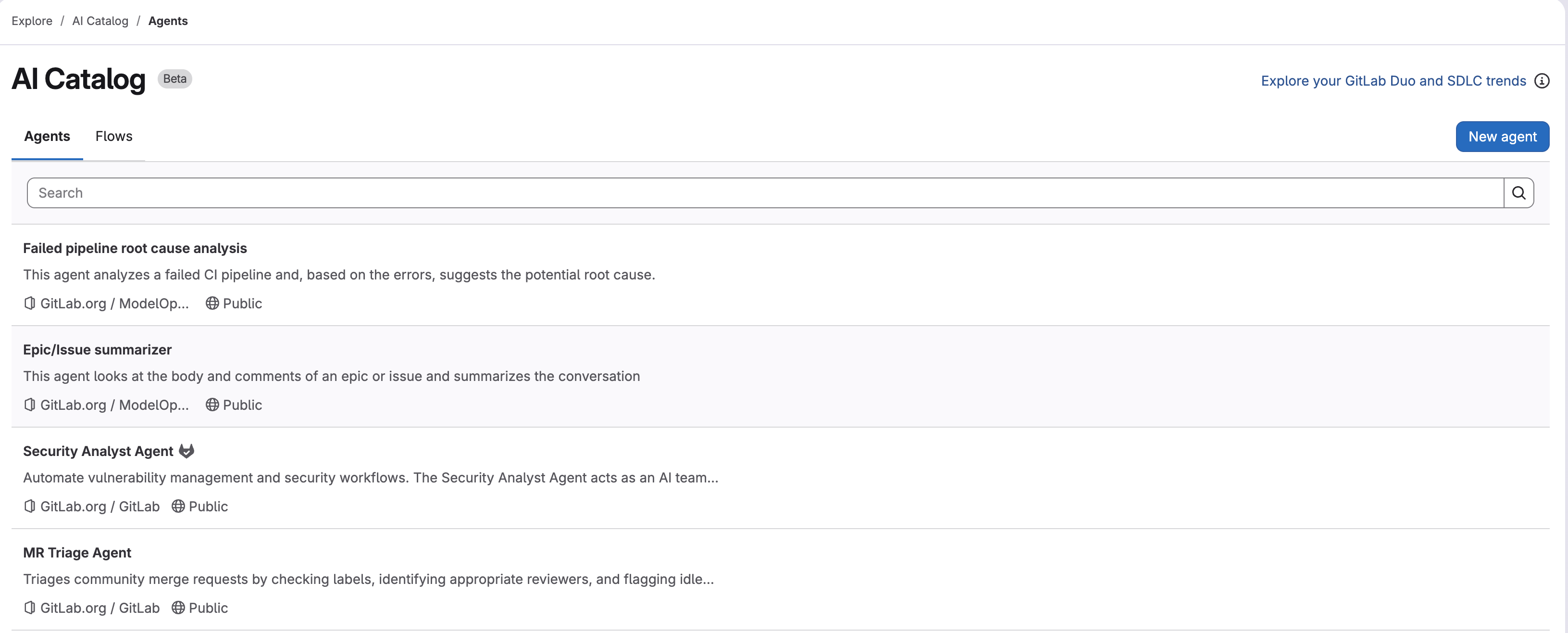
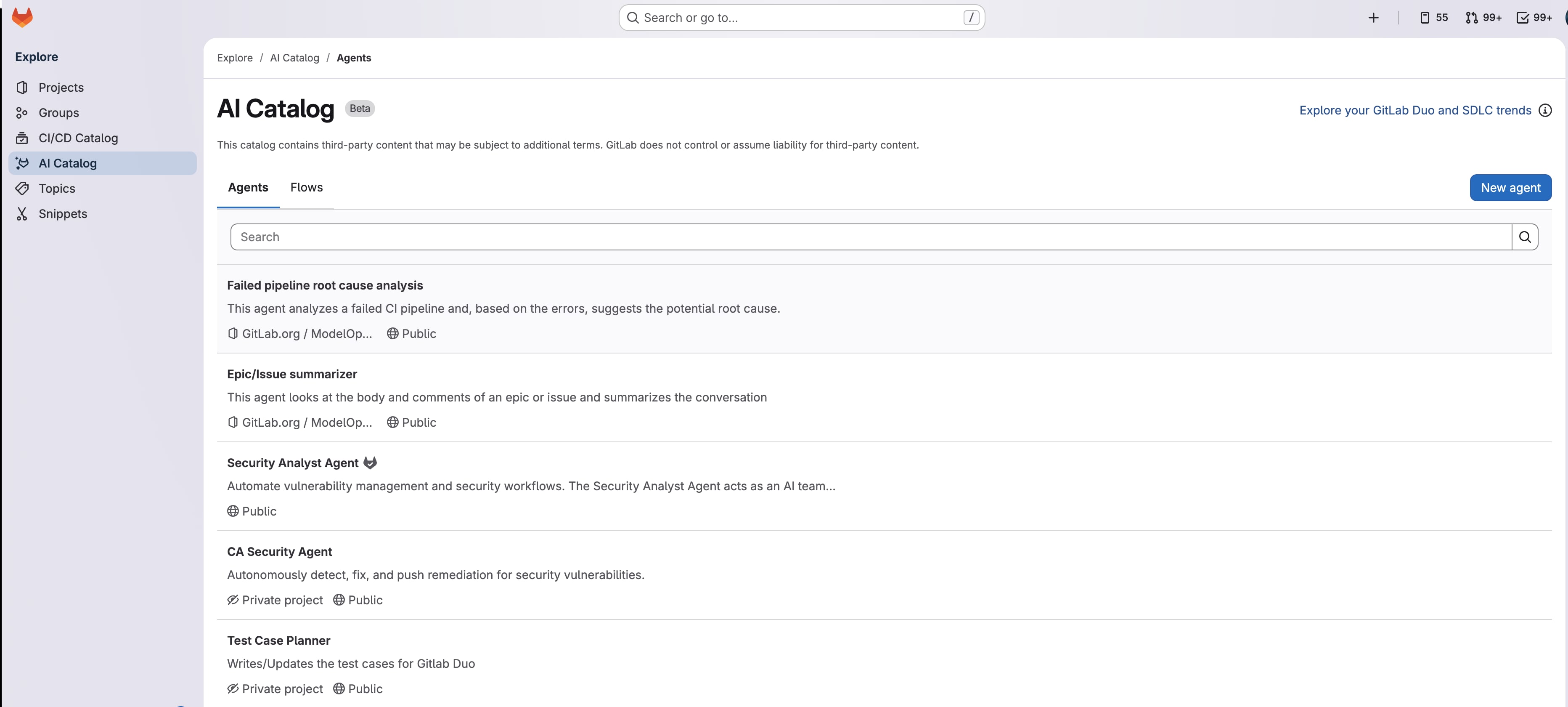
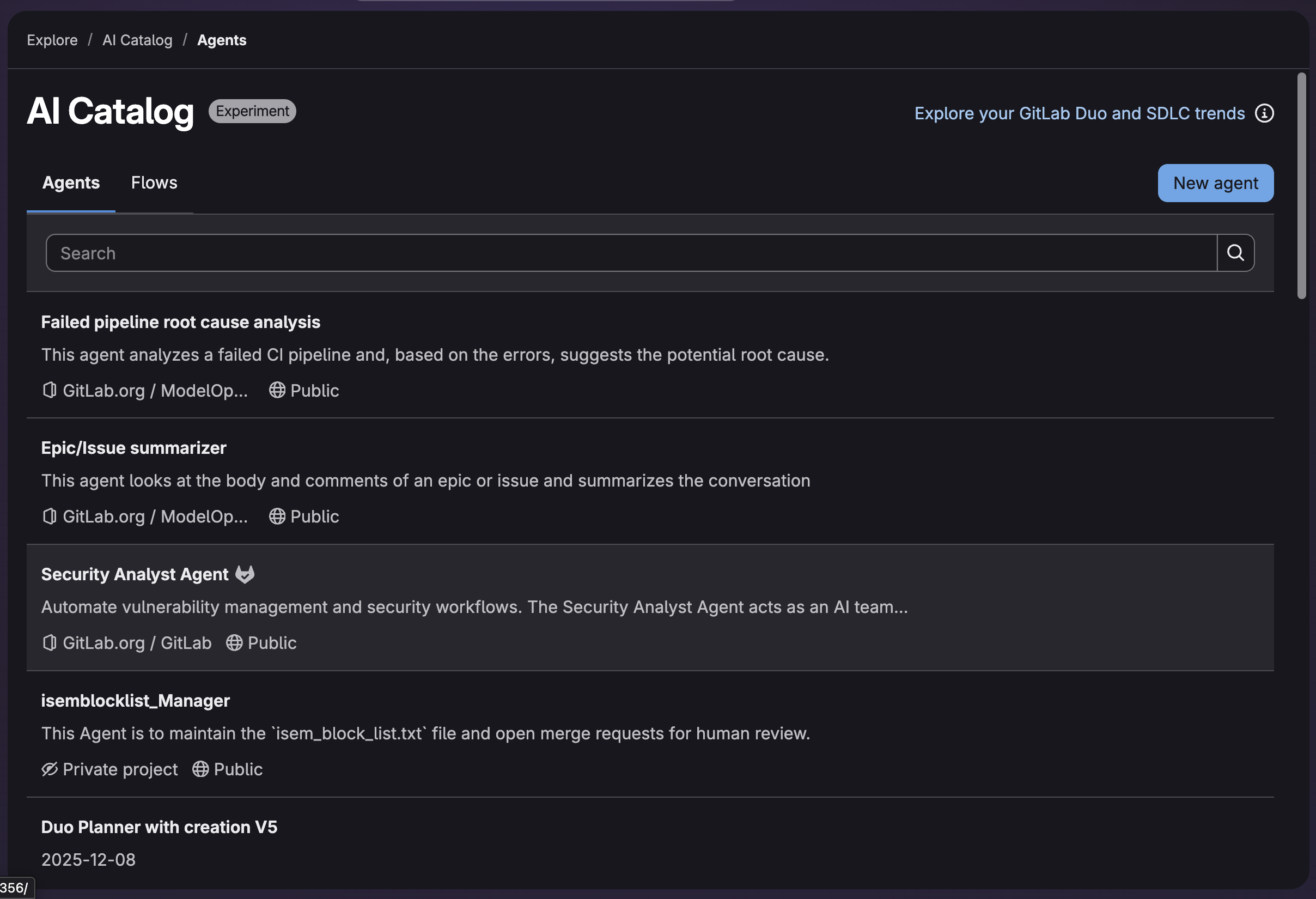
        <content type="html"><![CDATA[<p><em>Welcome to Part 5 of our eight-part guide, <a href="/blog/gitlab-duo-agent-platform-complete-getting-started-guide/">Getting started with GitLab Duo Agent Platform</a>, where you&#39;ll master building and deploying AI agents and workflows within your development lifecycle. Follow tutorials that take you from your first interaction to production-ready automation workflows with full customization.</em></p><p><strong>In this article:</strong></p><ul><li><a href="#introduction-to-the-ai-catalog">What is the AI Catalog?</a></li><li><a href="#discover-agents-and-flows">Browsing and enabling agents and flows</a></li><li><a href="#creating-sharing-and-managing-visibility">Creating, sharing, and managing visibility</a></li><li><a href="#understanding-versioning">Understanding versioning</a></li></ul><blockquote><p>🎯 Try <a href="https://about.gitlab.com/gitlab-duo/agent-platform/" rel=""><strong>GitLab Duo Agent Platform</strong></a> today!</p></blockquote><h2 id="introduction-to-the-ai-catalog">Introduction to the AI Catalog</h2><p>The AI Catalog is a central repository for discovering, creating, and sharing <a href="/blog/understanding-agents-foundational-custom-external/">agents</a> and <a href="/blog/understanding-flows-multi-agent-workflows/">flows</a> across your organization. It promotes consistency, reusability, and collaboration by enabling teams to leverage pre-built solutions and best practices.</p><p><strong>What you can do:</strong></p><ul><li><strong>Discover</strong>: Browse agents and flows created by GitLab and the community.</li><li><strong>Create</strong>: Create and maintain custom agents and flows in a single interface.</li><li><strong>Enable</strong>: Enable agents and flows at your top-level group level, then use them in your projects.</li><li><strong>Share</strong>: Publish your agents and flows for others to use (Public or Private).</li><li><strong>Duplicate</strong>: Copy and customize existing agents and flows.</li></ul><p><img alt="AI Catalog" src="https://res.cloudinary.com/about-gitlab-com/image/upload/v1765458621/un1xt2tql9wmjfjkyztg.png" title="AI Catalog" /></p><h2 id="accessing-and-working-with-the-ai-catalog">Accessing and working with the AI Catalog</h2><p>Navigate to <strong>Explore → AI Catalog</strong>.</p><p>The catalog currently provides two types:</p><ul><li><strong>Agents</strong> — Custom agents for on-demand, interactive, or context-specific tasks.</li><li><strong>Flows</strong> — Custom flows for repeatable, multi-step automations, orchestrating a team of agents.</li></ul><p>For detailed information, see the <a href="https://docs.gitlab.com/user/duo_agent_platform/ai_catalog/" rel="">AI Catalog documentation</a>.</p><h2 id="discover-agents-and-flows">Discover agents and flows</h2><p>The AI Catalog makes it easy to find agents and flows that fit your needs:</p><p><strong>How to browse:</strong></p><ol><li>Navigate to <strong>Explore → AI Catalog</strong>.</li><li>Select either <strong>Agents</strong> or <strong>Flows</strong> tab.</li><li>Browse the available agents or flows and inspect title, description and visibility status.</li><li>Click on any agent or flow to view more details.</li></ol><p><strong>Enabling agents and flows:</strong></p><p>Once you find an agent or flow you want to use:</p><ol><li>Click the agent or flow to view details.</li><li>Click the <strong>Enable in group</strong> button to add the agent or flow to your top-level group.</li><li>Enable it in your project to start using it.</li></ol><h2 id="creating-sharing-and-managing-visibility">Creating, sharing, and managing visibility</h2><h3 id="create-agents-and-flows">Create agents and flows</h3><p>Here are step-by-step instructions for creating agents and flows.</p><p><strong>Create agents:</strong></p><p>Navigate to <strong>Explore → AI Catalog → Agents → New agent</strong>.</p><ol><li>Brainstorm and define a specific task or specialization for this agent, for example, a debugging and troubleshooting agent.</li><li>Add a display name and description to allow others to identify the purpose and why they would want to use the agent, for example <code className="">troubleshoot-debugger</code>.</li><li>Specify visibility and access. Select a private project and set visibility to private to start with experiments.</li><li>Define the agent behavior, capabilities, and specialization in the system prompt. For details on crafting effective system prompts, see <a href="/blog/understanding-agents-foundational-custom-external/">Part 3: Understanding agents</a>.</li><li>Optionally select and limit the tool access for agents. For example, a debugging agent needs read access to code, issues, and merge requests, but may not require write access to make changes.</li></ol><p><strong>Create flows:</strong></p><p>Navigate to <strong>Explore → AI Catalog → Flows → New flow</strong>.</p><ol><li>Brainstorm and define a complex multi-step specific task, for example, a CI/CD pipeline optimizer flow.</li><li>Add a display name and description to allow others to identify the purpose and why they would want to use the flow, for example <code className="">ci-cd-optimizer</code>.</li><li>Specify visibility and access. Select a private project and set visibility to private to start with experiments.</li><li>Define the flow behavior and its agent components, prompts, and routers. For details on flow YAML structure, see <a href="/blog/understanding-flows-multi-agent-workflows/">Part 4: Understanding flows</a>.</li></ol><p>For more details, see:</p><ul><li><a href="https://docs.gitlab.com/user/duo_agent_platform/agents/custom.html" rel="">Custom Agents documentation</a></li><li><a href="https://docs.gitlab.com/user/duo_agent_platform/flows/custom.html" rel="">Custom Flows documentation</a></li></ul><h3 id="share-your-work-and-set-visibility">Share your work and set visibility</h3><p>When creating agents or flows, you can choose between <strong>Private</strong> and <strong>Public</strong> visibility to control who can access and use them.</p><p><strong>Private:</strong></p><ul><li>Can be viewed only by members of the managing project who have at least the Developer role, or by users with the Owner role for the top-level group.</li><li>Cannot be enabled in other projects.</li><li>Useful for team-specific or sensitive workflows.</li></ul><p><strong>Public:</strong></p><ul><li>Viewable by anyone on the instance.</li><li>Can be enabled in any project that meets prerequisites.</li><li>Appears in AI Catalog for discovery.</li></ul><h3 id="best-practices-for-sharing">Best practices for sharing</h3><p>When publishing agents and flows to the AI Catalog, follow these guidelines:</p><p><strong>Naming:</strong></p><ul><li>Use clear, descriptive names (e.g., <code className="">security-code-review</code>, <code className="">api-documentation-generator</code>).</li><li>Avoid generic names like <code className="">agent1</code> or <code className="">my-flow</code>.</li><li>Include the purpose in the name when possible.</li></ul><p><strong>Documentation:</strong></p><ul><li>Provide a clear description of what the agent or flow does.</li><li>Include use cases and examples.</li><li>Document any prerequisites or dependencies.</li></ul><p><strong>Quality:</strong></p><ul><li>Test thoroughly before publishing.</li><li>Ensure the agent or flow solves a real problem.</li><li>Keep it maintainable and well-documented.</li><li>Consider edge cases and error handling.</li></ul><p><strong>Visibility decisions:</strong></p><ul><li>Start with <strong>Private</strong> to test with your team.</li><li>Move to <strong>Public</strong> once validated and documented.</li><li>Only publish if it provides value to others.</li><li>Consider the audience and use cases.</li></ul><h3 id="understanding-versioning">Understanding versioning</h3><p>Custom agents and flows in the AI Catalog maintain a version history to track changes.</p><p><strong>How versioning works:</strong></p><ul><li>GitLab automatically creates a new version when you update an agent&#39;s system prompt or modify a flow&#39;s configuration.</li><li>Versions use semantic versioning (e.g., <code className="">1.0.0</code>, <code className="">1.1.0</code>).</li><li>GitLab manages semantic versioning automatically — updates always increment the minor version.</li><li>Versions are immutable, ensuring consistent behavior.</li></ul><p><strong>Version pinning:</strong></p><p>When you enable an agent or flow:</p><ul><li><strong>In a group</strong>: GitLab pins it to the latest version.</li><li><strong>In a project</strong>: GitLab pins it to the same version as your top-level group.</li></ul><p>This means:</p><ul><li>Your projects use a fixed, stable version of the agent or flow.</li><li>Updates in the AI Catalog don&#39;t automatically affect your configuration.</li><li>You must opt-in to update to new versions — updates are never automatic.</li><li>You maintain full control over when to adopt new versions.</li></ul><p><strong>Viewing versions:</strong></p><ul><li>Navigate to <strong>Automate → Agents</strong> or <strong>Automate → Flows</strong>.</li><li>Select the agent or flow to view its version on the right side in the <strong>About</strong> section.</li></ul><p><strong>Updating to the latest version</strong></p><p>When a new version of an agent or flow is available in the AI Catalog, you can update your projects to use it.</p><ol><li>Navigate to <strong>Automate → Agents</strong> or <strong>Automate → Flows</strong>.</li><li>Click the agent or flow you want to update.</li><li>Click the <strong>Update</strong> button (appears when a newer version is available).</li><li>Review the changes in the new version.</li><li>Confirm the update to pin your project to the latest version.</li></ol><h2 id="whats-next">What&#39;s next?</h2><p>You now understand how to discover, create, and share agents and flows through the AI Catalog. Next, in <a href="/blog/monitor-manage-automate-ai-workflows/">Part 6</a>, learn how to monitor agent and flow activity through sessions, set up event-driven triggers, and manage your AI workflows.</p><h2 id="resources">Resources</h2><ul><li><a href="https://docs.gitlab.com/user/duo_agent_platform/ai_catalog/" rel="">AI Catalog documentation</a></li><li><a href="https://docs.gitlab.com/user/duo_agent_platform/agents/custom.html" rel="">Custom Agents documentation</a></li><li><a href="https://docs.gitlab.com/user/duo_agent_platform/flows/custom.html" rel="">Custom Flows documentation</a></li></ul><hr /><p><strong>Next:</strong> <a href="/blog/monitor-manage-automate-ai-workflows/">Part 6: Monitor, manage, and automate AI workflows</a></p><p><strong>Previous:</strong> <a href="/blog/understanding-flows-multi-agent-workflows/">Part 4: Understanding flows</a></p>]]></content>
        <author>
            <name>Itzik Gan Baruch</name>
            <uri>https://about.gitlab.com/blog/authors/itzik-gan baruch</uri>
        </author>
        <published>2026-01-14T00:00:00.000Z</published>
    </entry>
    <entry>
        <title type="html"><![CDATA[Customizing GitLab Duo Agent Platform: Chat rules, prompts, and workflows]]></title>
        <id>https://about.gitlab.com/blog/customizing-gitlab-duo-chat-rules-prompts-workflows/</id>
        <link href="https://about.gitlab.com/blog/customizing-gitlab-duo-chat-rules-prompts-workflows/"/>
        <updated>2026-01-14T00:00:00.000Z</updated>
        <content type="html"><![CDATA[<p><em>Welcome to Part 8 of our eight-part guide, <a href="/blog/gitlab-duo-agent-platform-complete-getting-started-guide/">Getting started with GitLab Duo Agent Platform</a>, where you&#39;ll master building and deploying AI agents and workflows within your development lifecycle. Follow tutorials that take you from your first interaction to production-ready automation workflows with full customization.</em></p><p><strong>In this article:</strong></p><ul><li><a href="#introduction-to-customization">Introduction to customization</a></li><li><a href="#part-1-customize-agent-behavior">Customize agent behavior</a></li><li><a href="#part-2-extend-capabilities-with-mcp">Extend capabilities with MCP</a></li><li><a href="#part-3-create-custom-agents-and-flows">Create custom agents and flows</a></li></ul><blockquote><p>🎯 Try <a href="https://about.gitlab.com/gitlab-duo/agent-platform/" rel=""><strong>GitLab Duo Agent Platform</strong></a> today!</p></blockquote><h2 id="introduction-to-customization">Introduction to customization</h2><p><a href="https://about.gitlab.com/gitlab-duo/agent-platform/" rel="">GitLab Duo Agent Platform</a> delivers powerful capabilities right away, and you can unlock even greater value by tailoring it to your team&#39;s specific needs. GitLab offers flexible customization options across multiple levels:</p><ul><li><strong>User-level</strong>: Personal preferences that apply across all projects (custom rules, AGENTS.md, MCP config)</li><li><strong>Workspace-level</strong>: Project-specific configurations (custom rules, AGENTS.md, MCP config)</li><li><strong>Project-level</strong>: Custom agents and flows you create and manage within a specific project</li></ul><h2 id="part-1-customize-agent-behavior">Part 1: Customize agent behavior</h2><h3 id="custom-rules">Custom rules</h3><p><a href="https://docs.gitlab.com/user/gitlab_duo/customize_duo/custom_rules/" rel="">Custom rules</a> provide instructions for agents and flows, ensuring consistent behavior across your team without requiring repetition. For example, in development style guides or how to execute tests.</p><p>Navigate to <strong>IDE workspace or user configuration directory</strong>.</p><h3 id="user-level-custom-rules">User-level custom rules</h3><p>User-level rules apply to all your projects and workspaces.</p><p>For detailed instructions on creating user-level custom rules, see the <a href="https://docs.gitlab.com/user/gitlab_duo/customize_duo/custom_rules/#create-user-level-custom-rules" rel="">GitLab documentation</a>.
<strong>Create the file</strong> <code className="">~/.gitlab/duo/chat-rules.md</code> in your home directory.
<strong>Example rules:</strong></p><pre className="language-markdown" code="- Include JSDoc comments for all functions
- Use single quotes for strings
- Follow the existing code style in the repository
- Write concise explanations, avoid lengthy descriptions
- Suggest tests for any code changes
- Use async/await instead of promises
" language="markdown" meta="- Always use TypeScript for new code, never JavaScript"><code>- Include JSDoc comments for all functions
- Use single quotes for strings
- Follow the existing code style in the repository
- Write concise explanations, avoid lengthy descriptions
- Suggest tests for any code changes
- Use async/await instead of promises
</code></pre><h3 id="workspace-level-custom-rules">Workspace-level custom rules</h3><p>Workspace rules apply only to a specific project. They override user-level rules for that project.</p><p><strong>Create the file</strong> <code className="">.gitlab/duo/chat-rules.md</code> in your project root.</p><p><strong>Example rules for a Vue.js project:</strong></p><pre className="language-markdown" code="- Use Vue 3 Composition API with `&lt;script setup&gt;`
- Always include TypeScript types for props
- Use scoped styles with SCSS
- Follow the Slippers UI design system
- Keep components under 300 lines
- Use kebab-case for component names
- Include accessibility attributes (aria-*, role)
" language="markdown" meta=""><code>- Use Vue 3 Composition API with `&lt;script setup&gt;`
- Always include TypeScript types for props
- Use scoped styles with SCSS
- Follow the Slippers UI design system
- Keep components under 300 lines
- Use kebab-case for component names
- Include accessibility attributes (aria-*, role)
</code></pre><h3 id="best-practices-for-custom-rules">Best practices for custom rules</h3><ul><li><strong>Be specific</strong>: &quot;Use single quotes&quot; is better than &quot;follow style guide.&quot;</li><li><strong>Prioritize</strong>: List most important rules first.</li><li><strong>Team-focused</strong>: Rules should reflect your team&#39;s standards, not personal preferences.</li><li><strong>Actionable</strong>: Rules should be clear enough for an AI agent to follow.</li><li><strong>Maintainable</strong>: Update rules when your standards change.</li><li><strong>Avoid conflicts</strong>: Don&#39;t contradict your codebase&#39;s actual style.</li></ul><p><strong>Tip:</strong> Use Code Owners to manage who approves changes to <code className="">.gitlab/duo/chat-rules.md</code>.</p><p>For a detailed use case tutorial for custom rules, see the <a href="https://about.gitlab.com/blog/custom-rules-duo-agentic-chat-deep-dive/" rel="">Custom rules in GitLab Duo Agentic Chat for greater developer efficiency deep-dive blog post</a>.</p><h2 id="agentsmd-for-customizing-agent-behavior">AGENTS.md for customizing agent behavior</h2><p><a href="https://agents.md/" rel="">AGENTS.md</a> is an industry-standard file for customizing agent behavior. It allows you to define how agents should behave in your chat conversations, foundational flows, and custom flows without modifying the agents themselves.</p><p><strong>Difference to custom rules:</strong> AGENTS.md are consumed by all agents and flows (foundational and custom). It also follows an industry standard that other AI tools can use, for example, Claude Code as <a href="https://docs.gitlab.com/user/duo_agent_platform/agents/external/" rel="">external agent</a>. Use AGENTS.md when you want your instructions to apply across multiple contexts.</p><p><strong>User-level</strong> (applies to all your projects and workspaces):</p><ul><li>macOS/Linux: <code className="">~/.gitlab/duo/AGENTS.md</code></li><li>Windows: <code className="">%APPDATA%\GitLab\duo\AGENTS.md</code></li></ul><p><strong>Workspace-level</strong> (applies to a specific project):</p><ul><li>Create <code className="">AGENTS.md</code> in your project root.</li></ul><p><strong>Subdirectory-level</strong> (applies to specific directories in monorepos):</p><ul><li>Create <code className="">AGENTS.md</code> in subdirectories for context-specific instructions.</li></ul><p><strong>How it works:</strong></p><ul><li>User-level AGENTS.md applies globally across all projects.</li><li>Workspace-level AGENTS.md applies to a specific project.</li><li>Subdirectory-level AGENTS.md files provide context for specific parts of your codebase.</li><li>Agents and flows combines instructions from all applicable levels.</li><li>Newly added or updated AGENTS.md instructions require triggering new flows, or starting a new chat with a (custom) agent.</li></ul><h3 id="what-agentsmd-controls">What AGENTS.md controls</h3><ul><li>Agent personality and tone</li><li>Project-specific instructions</li><li>Coding standards and conventions</li><li>Tool usage preferences</li><li>Output formatting requirements</li><li>Repository structure and organization</li></ul><h3 id="example-agentsmd">Example AGENTS.md</h3><pre className="language-markdown" code="# Agent Customization for Our Project
## General Guidelines
- Always prioritize code quality over speed
- Follow our project&#39;s architecture patterns
- Reference existing code examples when suggesting changes
- Ask for clarification if requirements are ambiguous
## Code Style
- Use TypeScript for all new code
- Follow ESLint configuration in the project
- Include unit tests for all new functions
- Use descriptive variable names (no single letters except loops)
## Documentation
- Add JSDoc comments to all public functions
- Update README.md if adding new features
- Include examples in code comments
## Security
- Never suggest hardcoding secrets or API keys
- Always validate user input
- Use parameterized queries for database operations
- Flag potential security issues immediately
" language="markdown" meta=""><code># Agent Customization for Our Project
## General Guidelines
- Always prioritize code quality over speed
- Follow our project&#39;s architecture patterns
- Reference existing code examples when suggesting changes
- Ask for clarification if requirements are ambiguous
## Code Style
- Use TypeScript for all new code
- Follow ESLint configuration in the project
- Include unit tests for all new functions
- Use descriptive variable names (no single letters except loops)
## Documentation
- Add JSDoc comments to all public functions
- Update README.md if adding new features
- Include examples in code comments
## Security
- Never suggest hardcoding secrets or API keys
- Always validate user input
- Use parameterized queries for database operations
- Flag potential security issues immediately
</code></pre><h3 id="best-practices-for-agentsmd">Best practices for AGENTS.md</h3><ul><li><strong>Be specific</strong>: Include concrete examples from your project.</li><li><strong>Keep it concise</strong>: Focus on what&#39;s unique to your project.</li><li><strong>Version control</strong>: Commit to your repository and track changes.</li><li><strong>Team alignment</strong>: Discuss with your team before finalizing.</li><li><strong>Update regularly</strong>: Refine as your project evolves.</li><li><strong>Document repository structure</strong>: Help agents understand your codebase organization.</li></ul><h3 id="requirements">Requirements</h3><ul><li>GitLab 18.8 or later</li><li>For VS Code: GitLab Workflow extension 6.60 or later</li><li>For JetBrains: GitLab plugin 3.26.0 or later</li><li>For flows: Update flow configuration to access the <code className="">user_rule</code> context</li></ul><p><a href="https://docs.gitlab.com/user/gitlab_duo/customize_duo/agents_md/" rel="">Learn more about AGENTS.md</a>.</p><h3 id="custom-review-instructions">Custom review instructions</h3><p><a href="https://docs.gitlab.com/user/gitlab_duo/customize_duo/review_instructions/" rel="">Custom review instructions</a> provide specific guidelines for the <a href="https://docs.gitlab.com/user/duo_agent_platform/flows/foundational_flows/code_review/" rel="">Code Review foundational flow</a>. The instructions ensure consistent code review standards, and can be tailored to specific file types in your project.</p><p><strong>Create the file</strong> <code className="">.gitlab/duo/mr-review-instructions.yaml</code> in your project root.</p><p><strong>Example review instructions:</strong></p><pre className="language-yaml" code="instructions:
  - name: Ruby Style Guide
    fileFilters:
      - &quot;*.rb&quot;           # Ruby files in the root directory
      - &quot;lib/**/*.rb&quot;    # Ruby files in lib and its subdirectories
      - &quot;!spec/**/*.rb&quot;  # Exclude test files
    instructions: |
      1. Ensure all methods have proper documentation
      2. Follow Ruby style guide conventions
      3. Prefer symbols over strings for hash keys

  - name: TypeScript Source Files
    fileFilters:
      - &quot;**/*.ts&quot;        # TypeScript files in any directory
      - &quot;!**/*.test.ts&quot;  # Exclude test files
    instructions: |
      1. Ensure proper TypeScript types (avoid &#39;any&#39;)
      2. Follow naming conventions
      3. Document complex functions

" language="yaml" meta=""><code>instructions:
  - name: Ruby Style Guide
    fileFilters:
      - &quot;*.rb&quot;           # Ruby files in the root directory
      - &quot;lib/**/*.rb&quot;    # Ruby files in lib and its subdirectories
      - &quot;!spec/**/*.rb&quot;  # Exclude test files
    instructions: |
      1. Ensure all methods have proper documentation
      2. Follow Ruby style guide conventions
      3. Prefer symbols over strings for hash keys

  - name: TypeScript Source Files
    fileFilters:
      - &quot;**/*.ts&quot;        # TypeScript files in any directory
      - &quot;!**/*.test.ts&quot;  # Exclude test files
    instructions: |
      1. Ensure proper TypeScript types (avoid &#39;any&#39;)
      2. Follow naming conventions
      3. Document complex functions

</code></pre><p><strong>Best practices for custom review instructions:</strong></p><ul><li><strong>Be specific and actionable</strong>: Clear, numbered instructions work best.</li><li><strong>Use glob patterns</strong>: Target specific file types with <code className="">fileFilters</code>.</li><li><strong>Focus on important standards</strong>: Prioritize the most critical review points.</li><li><strong>Explain the &quot;why&quot;</strong>: Help reviewers understand the reasoning.</li><li><strong>Test patterns</strong>: Ensure glob patterns match the intended files.</li></ul><p><strong>Tip:</strong> Use Code Owners to protect changes to <code className="">.gitlab/duo/mr-review-instructions.yaml</code>.</p><p>For detailed setup instructions and examples, see the <a href="https://docs.gitlab.com/user/gitlab_duo/customize_duo/review_instructions/" rel="">Custom Review Instructions documentation</a>.</p><h2 id="part-2-extend-capabilities-with-mcp">Part 2: Extend capabilities with MCP</h2><p>Model Context Protocol (MCP) enables agents to access external systems like Jira, Slack, AWS, and more. This section covers MCP configuration for extending agent capabilities.</p><blockquote><p><strong>🎯 Try it now:</strong> <a href="https://gitlab.navattic.com/mcp" rel="">Interactive demo of MCP</a> - Explore how to use Model Context Protocol.</p></blockquote><h3 id="mcp-configuration-for-external-integrations">MCP configuration for external integrations</h3><p>Model Context Protocol (MCP) enables agents to access external systems like Jira, Slack, AWS, and more.</p><p><strong>Scope:</strong> User-level (applies to all workspaces) or Workspace-level (project-specific, overrides user config)</p><p><strong>Create user configuration:</strong></p><ul><li><strong>macOS/Linux</strong>: <code className="">~/.gitlab/duo/mcp.json</code></li><li><strong>Windows</strong>: <code className="">C:\Users\&lt;username&gt;\AppData\Roaming\GitLab\duo\mcp.json</code></li><li><strong>VS Code</strong>: Run command <code className="">GitLab MCP: Open User Settings (JSON)</code></li></ul><p><strong>Create workspace configuration:</strong></p><ul><li><strong>Create file</strong>: <code className="">.gitlab/duo/mcp.json</code> in your project root</li></ul><p><strong>Best practices:</strong></p><ul><li><strong>Security first</strong>: Use MCP servers that require OAuth and not plain-text password tokens.</li><li><strong>Minimal scope</strong>: Only enable MCP servers you actually use and trust.</li><li><strong>Test locally</strong>: Verify MCP connections and authorization work before sharing across teams.</li><li><strong>Document integrations</strong>: Explain what each MCP server provides.</li><li><strong>Version control</strong>: Store configuration in <code className="">.gitlab/duo/mcp.json</code> with Code Owners&#39; approval.</li></ul><p>For detailed setup instructions and configuration examples, see <a href="/blog/duo-agent-platform-with-mcp/">Part 7: Model Context Protocol (MCP) Integration</a>.</p><h2 id="part-3-create-custom-agents-and-flows">Part 3: Create custom agents and flows</h2><p>Custom agents and flows allow you to automate your team&#39;s specific workflows. Before diving into customization, it&#39;s helpful to understand what they are and how they work. Here are parts of the <a href="/blog/gitlab-duo-agent-platform-complete-getting-started-guide/">Getting started with GitLab Duo Agent Platform guide</a> that can help.</p><ul><li><strong><a href="/blog/understanding-agents-foundational-custom-external/">Part 3: Understanding agents</a></strong> — Learn about foundational, custom, and external agents, and when to use each type.</li><li><strong><a href="/blog/understanding-flows-multi-agent-workflows/">Part 4: Understanding flows</a></strong> — Discover how flows orchestrate multiple agents to solve complex problems.</li><li><strong><a href="/blog/ai-catalog-discover-and-share-agents/">Part 5: AI Catalog</a></strong> — Learn how to discover, create, and share agents and flows across your organization.
Once you understand the basics, this section provides an overview of customization options with links to detailed guides.</li></ul><h3 id="system-prompts-for-custom-agents">System prompts for custom agents</h3><p>System prompts define an agent&#39;s personality, expertise, and behavior. A well-crafted prompt makes agents more effective and aligned with your team&#39;s needs.</p><p><strong>What are system prompts?</strong> System prompts are instructions that tell an agent how to behave, what expertise it has, and how to respond to requests. They&#39;re the foundation of custom agent behavior.</p><p><strong>Key elements of a strong system prompt:</strong></p><ul><li><strong>Role definition</strong>: What the agent is and what it does</li><li><strong>Expertise areas</strong>: Specific domains or technologies</li><li><strong>Behavior guidelines</strong>: How it should interact and respond</li><li><strong>Output format</strong>: Structure of responses</li><li><strong>Constraints</strong>: What it should avoid</li></ul><p><strong>Best practices:</strong></p><ul><li><strong>Be detailed</strong>: More specific prompts produce better results.</li><li><strong>Use examples</strong>: Show the agent what good output looks like.</li><li><strong>Define scope</strong>: Clearly state what the agent should and shouldn&#39;t do.</li><li><strong>Test iteratively</strong>: Refine prompts based on agent behavior.</li><li><strong>Version control</strong>: Track prompt changes in your repository.</li></ul><p>For detailed guidance on crafting system prompts and creating custom agents, see <a href="/blog/understanding-agents-foundational-custom-external/">Part 3: Understanding agents</a>.</p><h3 id="custom-agents-and-flows">Custom agents and flows</h3><p>There is a lot to learn, and for easier reading, the tutorials are split:</p><p><strong>Custom agents:</strong></p><ul><li>Learn how to create agents with custom system prompts, configure tools, and manage permissions.</li><li>See <a href="/blog/understanding-agents-foundational-custom-external/#custom-agents">Part 3: Understanding agents - Custom agents section</a>.</li></ul><p><strong>Custom flows:</strong></p><ul><li>Learn how to create multi-step workflows, configure components, and set up event-driven automation.</li><li>See <a href="/blog/understanding-flows-multi-agent-workflows/#custom-flows">Part 4: Understanding flows — Custom flows section</a>.</li></ul><p><strong>Agent tools:</strong></p><ul><li>Tools determine what actions agents can perform. Configure tools based on your agent&#39;s purpose and security requirements.</li><li>See <a href="/blog/understanding-agents-foundational-custom-external/">Part 3: Understanding agents</a> for tool configuration details.</li></ul><h2 id="quick-reference-when-to-use-customizations">Quick reference: When to use customizations</h2><table><thead><tr><th>Tool</th><th>Best For</th><th>Location</th></tr></thead><tbody><tr><td><strong>Custom Rules</strong></td><td>Guiding Chat responses in IDE (tone, style, behavior)</td><td><code className="">~/.gitlab/duo/chat-rules.md</code> (user) or <code className="">.gitlab/duo/chat-rules.md</code> (workspace)</td></tr><tr><td><strong>AGENTS.md</strong></td><td>Enforcing standards across chat, flows, and other AI tools</td><td><code className="">~/.gitlab/duo/AGENTS.md</code> (user) or <code className="">AGENTS.md</code> (workspace root)</td></tr><tr><td><strong>Custom Review Instructions</strong></td><td>Guiding code review standards for specific file types</td><td><code className="">.gitlab/duo/mr-review-instructions.yaml</code> (workspace only)</td></tr><tr><td><strong>System Prompts</strong></td><td>Customizing individual agent behavior</td><td>AI Catalog when creating an agent</td></tr><tr><td><strong>MCP Configuration</strong></td><td>Connecting agents to external tools</td><td><code className="">~/.gitlab/duo/mcp.json</code> (user) or <code className="">.gitlab/duo/mcp.json</code> (workspace)</td></tr><tr><td><strong>Custom Agents</strong></td><td>Creating specialized agents for team-specific tasks</td><td>Automate → Agents or AI Catalog</td></tr><tr><td><strong>Custom Flows</strong></td><td>Orchestrating multiple agents in workflows</td><td>Automate → Flows or AI Catalog</td></tr></tbody></table><h2 id="whats-next">What&#39;s next?</h2><p>Congratulations! You&#39;ve completed the entire GitLab Duo Agent Platform series. You now understand:</p><ul><li>How to use agents and flows across the entire SDLC, tailored to your use cases</li><li>How to discover and share solutions in the AI Catalog</li><li>How to monitor and manage your AI workflows</li><li>How to extend capabilities with MCP integrations</li><li>How to customize every aspect of GitLab Duo Agent Platform for your team</li></ul><p><strong><a href="/blog/gitlab-duo-agent-platform-complete-getting-started-guide/">Return to complete series overview</a></strong> to review all parts and explore specific topics in depth.</p><h2 id="resources">Resources</h2><ul><li><a href="https://docs.gitlab.com/user/gitlab_duo/customize_duo/custom_rules/" rel="">Custom Rules documentation</a></li><li><a href="https://docs.gitlab.com/user/gitlab_duo/customize_duo/agents_md/" rel="">AGENTS.md documentation</a></li><li><a href="https://docs.gitlab.com/user/gitlab_duo/customize_duo/review_instructions/" rel="">Custom Review Instructions documentation</a></li><li><a href="https://docs.gitlab.com/user/duo_agent_platform/agents/custom.html" rel="">Custom Agents documentation</a></li><li><a href="https://docs.gitlab.com/user/duo_agent_platform/flows/custom.html" rel="">Custom Flows documentation</a></li><li><a href="https://docs.gitlab.com/user/gitlab_duo/model_context_protocol/mcp_clients/" rel="">MCP Clients documentation</a></li></ul><hr /><p><strong>Previous:</strong> <a href="/blog/duo-agent-platform-with-mcp/">Part 7: Model Context Protocol integration</a></p><p><strong>Back to start:</strong> <a href="/blog/gitlab-duo-agent-platform-complete-getting-started-guide/">Complete series overview</a></p>]]></content>
        <author>
            <name>Itzik Gan Baruch</name>
            <uri>https://about.gitlab.com/blog/authors/itzik-gan baruch</uri>
        </author>
        <published>2026-01-14T00:00:00.000Z</published>
    </entry>
    <entry>
        <title type="html"><![CDATA[Getting started with GitLab Duo Agentic Chat]]></title>
        <id>https://about.gitlab.com/blog/getting-started-with-gitlab-duo-agentic-chat/</id>
        <link href="https://about.gitlab.com/blog/getting-started-with-gitlab-duo-agentic-chat/"/>
        <updated>2026-01-14T00:00:00.000Z</updated>
        <content type="html"><![CDATA[<p><em>Welcome to Part 2 of our eight-part guide, <a href="/blog/gitlab-duo-agent-platform-complete-getting-started-guide/">Getting started with GitLab Duo Agent Platform</a>, where you&#39;ll master building and deploying AI agents and workflows within your development lifecycle. Follow tutorials that take you from your first interaction to production-ready automation workflows with full customization.</em></p><p><strong>In this article:</strong></p><ul><li><a href="#what-is-gitlab-duo-agentic-chat">What is GitLab Duo Agentic Chat?</a></li><li><a href="#accessing-gitlab-duo-agentic-chat">Accessing GitLab Duo Agentic Chat</a></li><li><a href="#model-selection">Model selection</a></li><li><a href="#agent-selection">Agent selection</a></li><li><a href="#common-use-cases">Common use cases</a></li><li><a href="#troubleshooting">Troubleshooting</a></li></ul><h2 id="what-is-gitlab-duo-agentic-chat">What is GitLab Duo Agentic Chat?</h2><p>GitLab Duo Agentic Chat is your primary interface for interacting with AI agents throughout your development workflow. Unlike simple Q&amp;A chatbots that only answer questions, it&#39;s an autonomous AI collaboration partner that can take action on your behalf: Creating and modifying code, opening merge requests, triaging and updating issues/epics, and running workflows with full SDLC platform context. It does so while keeping you informed every step of the way.</p><blockquote><p>🎯 Try <a href="https://about.gitlab.com/gitlab-duo/agent-platform/" rel=""><strong>GitLab Duo Agent Platform</strong></a> today!</p></blockquote><p><strong>Key capabilities:</strong></p><ul><li><strong>Code operations:</strong> Create files, edit code, and open merge requests.</li><li><strong>Project insights:</strong> Query issues, epics, merge requests, Git commits, CI/CD pipelines, analytics (GLQL), and security scans.</li><li><strong>Actionable tasks:</strong> Triage, update, or create issues and epics, remediate vulnerabilities, generate documentation and tests, fix failing CI/CD pipelines.</li><li><strong>Context awareness:</strong> Remember conversation history, understand project architecture, and search the codebase, wiki, and GitLab docs.</li><li><strong>Extensibility:</strong> Integrate with external services through Model Context Protocol (MCP).</li><li><strong>Multi-agent support:</strong> Use specialized agents for different tasks.</li></ul><blockquote><p><strong>🎯 Try it now:</strong> <a href="https://gitlab.navattic.com/duo-agentic-chat" rel="">Interactive demo of GitLab Duo Agentic Chat</a> — Explore the chat interface and features.</p></blockquote><h2 id="accessing-gitlab-duo-agentic-chat">Accessing GitLab Duo Agentic Chat</h2><table><thead><tr><th>Environment</th><th>How to Access</th><th>Notes</th></tr></thead><tbody><tr><td><strong>Web UI</strong></td><td>Click Duo icon in top-right corner</td><td>Persistent panel, stays open as you navigate</td></tr><tr><td><strong>VS Code</strong></td><td>Primary Side Bar &gt; GitLab Duo Agent Platform &gt; Chat tab</td><td>Integrated into your IDE workflow</td></tr><tr><td><strong>JetBrains</strong></td><td>Tool window &gt; GitLab Duo Agent Platform &gt; Chat tab</td><td>Available in IntelliJ, PyCharm, etc.</td></tr><tr><td><strong>Visual Studio</strong></td><td>Extensions &gt; GitLab &gt; &quot;Open Agentic Chat&quot;</td><td>Windows only, GitLab 18.3+</td></tr></tbody></table><h3 id="web-ui-panel-features">Web UI panel features</h3><ul><li><strong>Collapsed:</strong> Icon visible in top-right</li><li><strong>Panel open:</strong> Sidebar slides out (~400px width)</li><li><strong>Maximized:</strong> Expands for detailed responses</li></ul><p><img alt="GitLab project with the Duo chat panel opened" src="https://res.cloudinary.com/about-gitlab-com/image/upload/v1767618251/gdkojstbdsruen4bo5fw.png" title="GitLab project with the Duo chat panel opened" /></p><h2 id="model-selection">Model selection</h2><p>Large language models (<a href="https://about.gitlab.com/blog/what-is-a-large-language-model-llm/" rel="">LLMs</a>) excel at different tasks and knowledge requirements. Choose the right model for your needs when necessary.</p><p><img alt="Model selection in Duo Chat" src="https://res.cloudinary.com/about-gitlab-com/image/upload/v1765458800/jwryhqjmaq4flp7711wf.png" title="Model selection in GitLab Duo Chat" /></p><h3 id="configuration-levels">Configuration levels</h3><ul><li><strong>Group-level:</strong> Set by Group Owner, applies to all users</li><li><strong>User-level:</strong> Individual control when group allows</li></ul><h2 id="agent-selection">Agent selection</h2><p>Agents are specialized AI collaboration partners for specific tasks. Switch between them based on your needs:</p><table><thead><tr><th>Agent</th><th>Description</th><th>Use For</th></tr></thead><tbody><tr><td><strong>GitLab Duo</strong></td><td>General-purpose development collaboration (default agent)</td><td>Getting started; questions on algorithms, architecture, and design patterns; debugging, refactoring, and explaining code</td></tr><tr><td><strong>Planner</strong></td><td>Product management and planning workflows</td><td>Issue creation, epic planning, roadmap assistance, attention triage</td></tr><tr><td><strong>Security Analyst</strong></td><td>Vulnerability management and security workflows</td><td>Security impact analysis, vulnerability triage, remediation</td></tr><tr><td><strong>Data Analyst</strong></td><td>Query, visualize, and surface data across GitLab</td><td>Volume analysis, team performance, trend analysis, status monitoring, work item discovery, GLQL query generation</td></tr><tr><td><strong>Custom Agents</strong></td><td>Created by your team for specific needs</td><td>Team-specific workflows, domain expertise</td></tr></tbody></table><h3 id="agent-selection-1">Agent selection</h3><p><img alt="Agent selection in Duo Chat" src="https://res.cloudinary.com/about-gitlab-com/image/upload/v1765373437/todfyhlfhnhgclpecbhu.png" title="Agent selection in GitLab Duo Chat" /></p><h3 id="how-to-switch-agents">How to switch agents</h3><ol><li>Open GitLab Duo Agentic Chat.</li><li>IDE: Click the agent dropdown (below model selector).</li><li>Web UI: Create a new chat.</li><li>Select the agent you need.</li></ol><p><img alt="Model selection in IDE" src="https://res.cloudinary.com/about-gitlab-com/image/upload/v1768309468/zwebhhswfp4cs3vjpesk.png" title="Model selection in IDE" /></p><p><img alt="Model selection in UI" src="https://res.cloudinary.com/about-gitlab-com/image/upload/v1768309468/xn8yxafnnevdnxjtodhw.png" title="Model selection in UI" /></p><h2 id="common-use-cases">Common use cases</h2><h3 id="issue-management-and-triage">Issue management and triage</h3><p>For issue management and planning workflows, use the <strong><a href="https://about.gitlab.com/blog/ace-your-planning-without-the-context-switching/" rel="">Planner Agent</a></strong>, a specialized agent designed for product management tasks.</p><p><strong>Example prompts:</strong></p><ul><li>&quot;List all open issues labeled &#39;bug&#39; and &#39;high-priority&#39; created in the last 30 days.&quot;</li><li>&quot;Create an issue for implementing user authentication with OAuth2, include acceptance criteria and technical requirements.&quot;</li><li>&quot;Analyze Issue #456 and suggest related issues that might have the same root cause.&quot;</li><li>&quot;Break down Epic #123 into smaller tasks with estimated complexity.&quot;</li></ul><h3 id="vulnerability-analysis-and-remediation">Vulnerability analysis and remediation</h3><p>For security workflows, use the <strong><a href="https://about.gitlab.com/blog/vulnerability-triage-made-simple-with-gitlab-security-analyst-agent/" rel="">Security Analyst Agent</a></strong>, a specialized agent designed for vulnerability management and remediation.</p><p><strong>Example prompts:</strong></p><ul><li>&quot;Show me all critical vulnerabilities in the latest pipeline scan.&quot;</li><li>&quot;Triage all vulnerabilities from the latest security scan and identify which are false positives.&quot;</li><li>&quot;Explain vulnerability #789 in simple terms and show me where it&#39;s located in the code.&quot;</li><li>&quot;What&#39;s the recommended fix for the SQL injection vulnerability in the user search endpoint?&quot;</li><li>&quot;Create an MR to fix the XSS vulnerability found in <code className="">src/components/UserProfile.vue</code>.&quot;</li></ul><h3 id="code-understanding-and-documentation">Code understanding and documentation</h3><p>Get answers about your codebase without having to manually search through files with the GitLab Duo Agent.</p><p><strong>Example prompts:</strong></p><ul><li>&quot;How does the authentication flow work in this application?&quot;</li><li>&quot;Find all places where the <code className="">sendEmail</code> function is called.&quot;</li><li>&quot;Explain what the <code className="">calculateDiscount</code> method does in <code className="">src/pricing/calculator.ts</code>.&quot;</li><li>&quot;Generate documentation for the API endpoints in <code className="">src/api/routes/</code>.&quot;</li><li>&quot;What design patterns are used in the <code className="">src/services/</code> directory?&quot;</li></ul><h3 id="onboarding-to-a-new-project">Onboarding to a new project</h3><p>Quickly get up to speed on a new project by understanding its architecture, setup, and dependencies using the <strong>GitLab Duo Agent</strong>.</p><p><strong>Example prompts:</strong></p><ul><li>&quot;Give me an overview of this project&#39;s architecture and main components.&quot;</li><li>&quot;Where is the database schema defined?&quot;</li><li>&quot;How do I set up my local development environment?&quot;</li><li>&quot;What are the main dependencies and what do they do?&quot;</li></ul><h3 id="debugging-and-pipeline-troubleshooting">Debugging and pipeline troubleshooting</h3><p>Quickly identify and resolve issues in your code and CI/CD pipelines with AI-powered analysis using the <strong>GitLab Duo Agent</strong>.</p><p><strong>Example prompts:</strong></p><ul><li>&quot;Why is the CI/CD pipeline failing on the test stage?&quot;</li><li>&quot;Analyze the error logs from Job #12345 and suggest fixes.&quot;</li><li>&quot;Why did Pipeline #9876 fail? Show me the error logs from the failed deployment job.&quot;</li><li>&quot;The application crashes when processing large files. Help me debug this.&quot;</li><li>&quot;Review the recent commits that might have caused the performance regression.&quot;</li><li>&quot;How can I optimize the build time for this pipeline?&quot;</li><li>&quot;Create a new CI/CD job to run security scans on every MR.&quot;</li></ul><h3 id="code-review-and-quality-improvement">Code review and quality improvement</h3><p>Get AI assistance during code reviews to catch issues and improve code quality using a <strong>Custom Agent</strong> trained on your team&#39;s coding standards and best practices.</p><p><strong>Example prompts:</strong></p><ul><li>&quot;Review MR !234 for potential bugs and security issues.&quot;</li><li>&quot;Suggest performance optimizations for the database queries in this MR.&quot;</li><li>&quot;Check if MR !456 follows our coding standards and best practices.&quot;</li><li>&quot;Identify any accessibility issues in the new UI components.&quot;</li></ul><h3 id="feature-implementation">Feature implementation</h3><p>Accelerate development by generating code, tests, and documentation using the <strong>GitLab Duo Agent</strong>.</p><p><strong>Example prompts:</strong></p><ul><li>&quot;Create a REST API endpoint for user registration with validation.&quot;</li><li>&quot;Generate unit tests for the <code className="">OrderService</code> class with 80% coverage.&quot;</li><li>&quot;Implement pagination for the product listing page.&quot;</li><li>&quot;Add error handling and logging to the file upload functionality.&quot;</li></ul><h3 id="refactoring-and-code-improvement">Refactoring and code improvement</h3><p>Modernize and improve existing code with AI guidance using <strong>GitLab Duo Agent</strong>.</p><p><strong>Example prompts:</strong></p><ul><li>&quot;Refactor the <code className="">UserController</code> to follow SOLID principles.&quot;</li><li>&quot;Convert this JavaScript file to TypeScript with proper type definitions.&quot;</li><li>&quot;Suggest improvements to make this function more testable.&quot;</li><li>&quot;Identify code duplication in the <code className="">src/utils/</code> directory and suggest how to consolidate it.&quot;</li><li>&quot;Modernize the project from Java 8 to 21. Follow the guidance in Epic 188.&quot;</li><li>&quot;Create a migration plan for modernizing the COBOL mainframe code, and evaluate Java/Python.&quot;</li></ul><h2 id="troubleshooting">Troubleshooting</h2><table><thead><tr><th>Issue</th><th>Possible Causes</th><th>Solutions</th></tr></thead><tbody><tr><td><strong>Chat not appearing</strong></td><td>• Duo not enabled<br />• Insufficient permissions</td><td>• Enable GitLab Duo for project<br />• Verify Developer+ role</td></tr><tr><td><strong>Model selection unavailable</strong></td><td>• Group policy locked<br />• Version too old</td><td>• Check with group owner<br />• Upgrade to GitLab 18.4+</td></tr><tr><td>More troubleshooting tips are available in the <a href="https://docs.gitlab.com/user/gitlab_duo_chat/troubleshooting/" rel="">documentation</a>.</td><td></td><td></td></tr></tbody></table><h2 id="whats-next">What&#39;s next?</h2><p>GitLab Duo Agentic Chat is supported in IDEs and the GitLab UI. Future releases will bring terminal support with GitLab Duo CLI, currently in development. Follow the <a href="https://gitlab.com/groups/gitlab-org/-/work_items/19070" rel="">product epic</a> for more insights.
Now that you&#39;ve learned GitLab Duo Agentic Chat, explore the different types of agents and how to create custom ones in <a href="/blog/understanding-agents-foundational-custom-external/">Part 3: Understanding agents</a>. Explore foundational agents, create custom agents for your team, and integrate external agents like Claude Code and OpenAI Codex.</p><h2 id="resources">Resources</h2><ul><li><a href="https://docs.gitlab.com/user/gitlab_duo_chat/agentic_chat/" rel="">GitLab Duo Agentic Chat documentation</a></li><li><a href="https://docs.gitlab.com/user/duo_agent_platform/" rel="">GitLab Duo Agent Platform documentation</a></li></ul><hr /><p><strong>Next:</strong> <a href="/blog/understanding-agents-foundational-custom-external/">Part 3: Understanding agents</a></p><p><strong>Previous:</strong> <a href="/blog/introduction-to-gitlab-duo-agent-platform/">Part 1: Introduction to GitLab Duo Agent Platform</a></p>]]></content>
        <author>
            <name>Itzik Gan Baruch</name>
            <uri>https://about.gitlab.com/blog/authors/itzik-gan baruch</uri>
        </author>
        <published>2026-01-14T00:00:00.000Z</published>
    </entry>
    <entry>
        <title type="html"><![CDATA[Get started with GitLab Duo Agent Platform: The complete guide]]></title>
        <id>https://about.gitlab.com/blog/gitlab-duo-agent-platform-complete-getting-started-guide/</id>
        <link href="https://about.gitlab.com/blog/gitlab-duo-agent-platform-complete-getting-started-guide/"/>
        <updated>2026-01-14T00:00:00.000Z</updated>
        <content type="html"><![CDATA[<p><a href="https://about.gitlab.com/gitlab-duo/agent-platform/" rel="">GitLab Duo Agent Platform</a> is a new AI-powered solution that embeds multiple intelligent assistants (&quot;agents&quot;) throughout your software development lifecycle. It serves as an orchestration layer where developers collaborate asynchronously with AI agents across DevSecOps, transforming linear workflows into dynamic, parallel processes.</p><p>Routine tasks, from code refactoring and security scans to research, can be delegated to specialized <a href="https://about.gitlab.com/topics/agentic-ai/" rel="">AI agents</a>, freeing human developers to focus on solving complex problems and driving innovation.</p><p>The platform leverages GitLab&#39;s role as a central DevSecOps platform (encompassing code management, CI/CD pipelines, issue tracking, test results, security scans, and more) to provide these agents with complete project context, enabling them to contribute meaningfully while adhering to your team&#39;s standards and practices.</p><p>This comprehensive eight-part guide will take you from your first interaction to production-ready automation workflows with full customization.</p><blockquote><p>💡 Join GitLab Transcend on February 10 to learn how agentic AI transforms software delivery. Hear from customers and discover how to jumpstart your own modernization journey. <a href="https://about.gitlab.com/events/transcend/virtual/" rel="">Register now.</a></p></blockquote><h2 id="evolution-from-gitlab-duo-proenterprise-to-duo-agent-platform">Evolution from GitLab Duo Pro/Enterprise to Duo Agent Platform</h2><p>GitLab Duo Agent Platform is an evolution, not a replacement of Duo Pro and Enterprise. It&#39;s a superset that moves from 1:1 developer-AI interactions to many-to-many team-agent collaboration.</p><ul><li><strong>Duo Pro</strong> enhanced individual developer productivity in the IDE with AI-powered code suggestions and chat.</li><li><strong>Duo Enterprise</strong> expanded beyond coding to deliver comprehensive AI capabilities across the entire software development lifecycle. But it was still primarily an approach in enabling 1:1 interaction between the user and an AI assistant — mostly a Q&amp;A experience with one use case at a time.</li><li><strong>Duo Agent Platform</strong> moves from 1:1 interactions to many-to-many team-agent collaboration, where specialized agents autonomously handle routine tasks across the software lifecycle.</li></ul><h2 id="the-complete-series">The complete series</h2><table><thead><tr><th>Part</th><th>Title</th><th>What You&#39;ll Learn</th></tr></thead><tbody><tr><td>1</td><td><a href="/blog/introduction-to-gitlab-duo-agent-platform/">Introduction to GitLab Duo Agent Platform</a></td><td>Platform architecture, four ways to use agents, accessing agents and flows, first interactions, sessions, and model selection</td></tr><tr><td>2</td><td><a href="/blog/getting-started-with-gitlab-duo-agentic-chat/">Getting started with GitLab Duo Agentic Chat</a></td><td>Accessing chat across Web UI and IDEs, model selection and switching, agent selection, common use cases, and troubleshooting</td></tr><tr><td>3</td><td><a href="/blog/understanding-agents-foundational-custom-external/">Understanding agents: Foundational, custom, and external</a></td><td>Foundational agents (GitLab Duo, Planner, Security Analyst, Data Analyst), creating custom agents with system prompts, external agents setup, AGENTS.md customization, and choosing the right agent type</td></tr><tr><td>4</td><td><a href="/blog/understanding-flows-multi-agent-workflows/">Understanding flows: Multi-agent workflows</a></td><td>Introduction to foundational flows, creating custom YAML workflows, flow execution, multi-agent orchestration, and monitoring</td></tr><tr><td>5</td><td><a href="/blog/ai-catalog-discover-and-share-agents/">AI Catalog: Discover, create, and share agents and flows</a></td><td>Browsing and discovering agents and flows, enabling agents and flows in projects, creating and publishing your own agents and flows, and managing visibility</td></tr><tr><td>6</td><td><a href="/blog/monitor-manage-automate-ai-workflows/">Monitor, manage, and automate AI workflows</a></td><td>Automate menu overview, monitoring sessions with detailed logs, setting up event-driven triggers, and managing AI workflows</td></tr><tr><td>7</td><td><a href="/blog/duo-agent-platform-with-mcp/">Model Context Protocol integration</a></td><td>MCP overview, GitLab as MCP client connecting to external tools, GitLab as MCP server for external AI tools, and configuration examples</td></tr><tr><td>8</td><td><a href="/blog/customizing-gitlab-duo-chat-rules-prompts-workflows/">Customizing GitLab Duo Agent Platform</a></td><td>Custom chat rules, AGENTS.md configuration, system prompts for agents, agent tool configuration, MCP setup, and custom flow YAML configuration</td></tr></tbody></table><h2 id="key-concepts-reference">Key concepts reference</h2><h3 id="core-components">Core components</h3><table><thead><tr><th>Component</th><th>Description</th><th>Key Features</th></tr></thead><tbody><tr><td><strong>Duo Agentic Chat</strong></td><td>Primary interface for agent interaction</td><td>• Available in Web UI and IDEs<br />• Supports model selection<br />• Maintains conversation history</td></tr><tr><td><strong>Agents</strong></td><td>Specialized AI collaboration partners for specific tasks</td><td>• <strong>Foundational:</strong> Provided by GitLab (Planner, Security Analyst, etc.)<br />• <strong>Custom:</strong> Created by your team<br />• <strong>External:</strong> External AI providers like Claude and OpenAI</td></tr><tr><td><strong>Flows</strong></td><td>Multi-step workflows combining agents</td><td>• <strong>Foundational:</strong> Provided by GitLab (Developer, Fix CI/CD Pipeline, etc.)<br />• <strong>Custom:</strong> User-defined workflows you create</td></tr><tr><td><strong>AI Catalog</strong></td><td>Central repository for discovering, creating, and sharing</td><td>• Browse and discover agents and flows<br />• Add to your projects<br />• Share across organization</td></tr><tr><td><strong>Automate Menu</strong></td><td>Management hub for AI workflows</td><td>• <strong>Sessions:</strong> Flow activity logs<br />• <strong>Flows:</strong> Multi-step workflows<br />• <strong>Agents:</strong> Specialized AI assistants<br />• <strong>Triggers:</strong> Event-based automation</td></tr><tr><td><strong>Model Context Protocol (MCP)</strong></td><td>External integration framework</td><td>• <strong>Client:</strong> GitLab Duo connects to external MCP servers (Jira, Slack, AWS, etc.)<br />• <strong>Server:</strong> GitLab acts as MCP server for external AI tools (Claude Desktop, Cursor, etc.)</td></tr></tbody></table><h2 id="essential-terminology">Essential terminology</h2><table><thead><tr><th>Term</th><th>Definition</th></tr></thead><tbody><tr><td><a href="https://docs.gitlab.com/user/duo_agent_platform/agents/" rel="">Agent</a></td><td>Specialized AI assistant for specific tasks and to answer complex questions</td></tr><tr><td><a href="https://docs.gitlab.com/user/duo_agent_platform/agents/foundational_agents/" rel="">Foundational Agent</a></td><td>Pre-built agents created and maintained by GitLab (e.g., GitLab Duo, Planner, Security Analyst) — available immediately with no setup</td></tr><tr><td><a href="https://docs.gitlab.com/user/duo_agent_platform/agents/custom/" rel="">Custom Agent</a></td><td>Agents you create with custom system prompts and tools for team-specific workflows — configured through project/group settings</td></tr><tr><td><a href="https://docs.gitlab.com/user/duo_agent_platform/agents/external/" rel="">External Agent</a></td><td>External AI providers like Claude, OpenAI, Google Gemini, and more integrated into the platform</td></tr><tr><td><a href="https://docs.gitlab.com/user/duo_agent_platform/flows/" rel="">Flow</a></td><td>Combination of one or more agents working together to solve a complex problem</td></tr><tr><td><a href="https://docs.gitlab.com/user/duo_agent_platform/flows/foundational_flows/" rel="">Foundational Flow</a></td><td>Pre-built workflows by GitLab (Issue to MR, Fix Pipeline, Convert Jenkins, Software Development Flow) — triggered via UI buttons or IDEs</td></tr><tr><td><a href="https://docs.gitlab.com/user/duo_agent_platform/flows/custom/" rel="">Custom Flow</a></td><td>YAML-defined workflows you create for team-specific automation — triggered by events or mentions</td></tr><tr><td><a href="https://docs.gitlab.com/user/duo_agent_platform/triggers/" rel="">Trigger</a></td><td>Event that automatically starts a flow (e.g., mention, assignment)</td></tr><tr><td><a href="https://docs.gitlab.com/user/duo_agent_platform/sessions/" rel="">Session</a></td><td>Record of agent or flow activity with complete logs and pipeline execution details</td></tr><tr><td>System Prompt</td><td>Instructions defining agent behavior, expertise, and communication style</td></tr><tr><td><a href="https://docs.gitlab.com/user/profile/service_accounts/" rel="">Service Account</a></td><td>Account used by flows or external agents to perform GitLab operations with specific permissions</td></tr><tr><td><a href="https://docs.gitlab.com/user/gitlab_duo/model_context_protocol/" rel="">MCP</a></td><td>Model Context Protocol for external integrations (connects to Jira, Slack, AWS, etc.)</td></tr><tr><td><a href="https://docs.gitlab.com/user/gitlab_duo/customize_duo/agents_md/" rel="">AGENTS.md</a></td><td>Industry-standard file for customizing agent behavior at user or workspace level</td></tr><tr><td><a href="https://docs.gitlab.com/user/gitlab_duo/customize_duo/custom_rules/" rel="">Custom Rules</a></td><td>Rules that customize how GitLab Duo behaves in your IDE</td></tr><tr><td>Tools</td><td>Capabilities that agents can use to interact with GitLab and external systems (e.g., create issues, merge requests, run pipelines, analyze code)</td></tr></tbody></table><h2 id="ready-to-get-started">Ready to get started?</h2><p>Begin your journey with <a href="/blog/introduction-to-gitlab-duo-agent-platform/">Part 1: Introduction to GitLab Duo Agent Platform</a> to learn the platform fundamentals.</p><h2 id="feedback">Feedback</h2><p>We&#39;d love to hear from you! Found an error? Have a suggestion?</p><ul><li><a href="https://gitlab.com/gitlab-org/gitlab/-/issues" rel="">Open an issue</a></li><li><a href="https://contributors.gitlab.com/" rel="">Contribute</a></li><li><a href="https://forum.gitlab.com" rel="">Discuss</a></li></ul>]]></content>
        <author>
            <name>Itzik Gan Baruch</name>
            <uri>https://about.gitlab.com/blog/authors/itzik-gan baruch</uri>
        </author>
        <published>2026-01-14T00:00:00.000Z</published>
    </entry>
    <entry>
        <title type="html"><![CDATA[Introduction to GitLab Duo Agent Platform]]></title>
        <id>https://about.gitlab.com/blog/introduction-to-gitlab-duo-agent-platform/</id>
        <link href="https://about.gitlab.com/blog/introduction-to-gitlab-duo-agent-platform/"/>
        <updated>2026-01-14T00:00:00.000Z</updated>
        <content type="html"><![CDATA[<p><em>Welcome to Part 1 of our eight-part guide, <a href="/blog/gitlab-duo-agent-platform-complete-getting-started-guide/">Getting started with GitLab Duo Agent Platform</a>, where you&#39;ll master building and deploying AI agents and workflows within your development lifecycle. Follow tutorials that take you from your first interaction to production-ready automation workflows with full customization.</em></p><p>GitLab Duo Agent Platform represents a fundamental shift in how developers interact with AI during the software development lifecycle. Moving beyond code into full SDLC context, GitLab Duo Agent Platform enables multiple specialized AI agents to work alongside your team, handling complex tasks asynchronously while you focus on innovation and problem-solving.</p><p>GitLab Duo Agent Platform transforms traditional linear development workflows into dynamic, multi-agent collaboration systems.</p><h2 id="what-is-gitlab-duo-agent-platform">What is GitLab Duo Agent Platform?</h2><p><a href="https://about.gitlab.com/gitlab-duo/agent-platform/" rel="">GitLab Duo Agent Platform</a> is an AI orchestration layer that enables:</p><ul><li>Asynchronous collaboration between developers and specialized AI agents</li><li>Full SDLC context across code, issues, epics, merge requests, CI/CD pipelines, wikis, analytics, and security scans</li><li>Multi-agent flows where many agents collaborate in parallel on complex tasks</li><li>Intelligent automation that understands your organization&#39;s standards, practices, and compliance requirements</li></ul><p>Think of it as adding AI team members who can take on entire workflows, from understanding requirements to creating merge requests, while you maintain full visibility and control.</p><blockquote><p>🎯 Try <a href="https://about.gitlab.com/gitlab-duo/agent-platform/" rel=""><strong>GitLab Duo Agent Platform</strong></a> today!</p></blockquote><h2 id="platform-architecture">Platform architecture</h2><p>GitLab Duo Agent Platform consists of several interconnected components working together to provide comprehensive AI assistance. The diagram below shows the <em>user interaction methods</em> with GitLab Duo Agent Platform. It illustrates the four ways users can engage with agents:</p><p><img alt="GitLab Duo Agent Platform architecture diagram" src="https://res.cloudinary.com/about-gitlab-com/image/upload/v1765373441/k0ktrcnyuqbq3unbcvyp.png" title="GitLab Duo Agent Platform architecture diagram" /></p><h3 id="how-teams-interact-with-gitlab-duo-agent-platform">How teams interact with GitLab Duo Agent Platform</h3><p><strong>Four ways to use agents</strong></p><ol><li><strong>GitLab Duo Agentic Chat</strong> — Open the chat panel in the GitLab UI or your IDE for interactive conversations with foundational and custom agents. Select from available AI models and get real-time help.</li><li><strong>Trigger Custom Flows</strong> — Mention flows in issue or merge request comments, or assign reviewers to automatically trigger Custom Flows. These run asynchronously via runner execution.</li><li><strong>Trigger Foundational Flows</strong> — Built and maintained by GitLab, including <strong><a href="https://docs.gitlab.com/user/duo_agent_platform/flows/foundational_flows/developer/" rel="">Developer</a></strong>, <strong><a href="https://docs.gitlab.com/user/duo_agent_platform/flows/foundational_flows/code_review/" rel="">Code Review</a></strong>, <strong><a href="https://docs.gitlab.com/user/duo_agent_platform/flows/foundational_flows/fix_pipeline/" rel="">Fix CI/CD Pipeline</a></strong>, <strong><a href="https://docs.gitlab.com/user/duo_agent_platform/flows/foundational_flows/convert_to_gitlab_ci/" rel="">Convert Jenkins to GitLab CI/CD</a></strong>, and <strong><a href="https://docs.gitlab.com/user/duo_agent_platform/flows/foundational_flows/convert_to_gitlab_ci/" rel="">Software Development Flow</a></strong>.</li><li><strong>Trigger External Agents</strong> — Assign or mention external AI agents (like Claude Code or OpenAI Codex) in issue or merge request comments to automatically trigger them. These run asynchronously via runner execution.</li></ol><p><strong>Where to manage and discover</strong></p><ul><li><strong>AI Catalog</strong> — Browse, create, and share agents and flows across your organization. Discover agents and flows created by GitLab and your team, then add them to your projects. You can also create and publish your own custom agents and flows for others to use.</li><li><strong>Automate Capabilities</strong> — Your central hub for managing everything. View and manage your agents, configure and monitor flows, review all activity in sessions (including pipeline status), and set up triggers for event-based automation.</li></ul><p>Let&#39;s explore each component briefly (we&#39;ll dive deeper in subsequent posts):</p><p><strong>GitLab Duo Agentic Chat</strong></p><p>Your primary interface for interacting with agents. Available as a persistent panel in the GitLab UI and in your IDE. Learn more in <a href="/blog/getting-started-with-gitlab-duo-agentic-chat/">Part 2: Getting Started with GitLab Duo Agentic Chat</a>.</p><p><img alt="GitLab Duo Agentic Chat" src="https://res.cloudinary.com/about-gitlab-com/image/upload/v1767618251/gdkojstbdsruen4bo5fw.png" title="GitLab Duo Agentic Chat panel in the web UI" /></p><p><img alt="GitLab Duo Agentic Chat IDE" src="https://res.cloudinary.com/about-gitlab-com/image/upload/v1765373438/gjojavrvjhhvglgkvxmw.png" title="GitLab Duo Agentic Chat panel in VS Code" /></p><p><strong>Agents</strong></p><p>Agents are specialized AI-powered assistants designed to handle specific tasks throughout your development workflow. Think of them as team members with unique expertise and capabilities.</p><table><thead><tr><th>Type</th><th>Description</th><th>Where Used</th><th>Setup Required</th></tr></thead><tbody><tr><td><strong><a href="https://docs.gitlab.com/user/duo_agent_platform/agents/foundational_agents/" rel="">Foundational</a></strong></td><td>Maintained by GitLab for common development workflows (Security Analyst, Planner, GitLab Duo), available by default in the chat of any project</td><td>GitLab Duo Chat</td><td>No</td></tr><tr><td><strong><a href="https://docs.gitlab.com/user/duo_agent_platform/agents/custom/" rel="">Custom</a></strong></td><td>Created by you for team-specific needs with custom prompts and tools</td><td>GitLab Duo Chat</td><td>Yes</td></tr><tr><td><strong><a href="https://docs.gitlab.com/user/duo_agent_platform/agents/external/" rel="">External</a></strong></td><td>External AI providers (Claude, OpenAI) triggered via mentions or assignments</td><td>@mentions, assignments</td><td>Optional</td></tr></tbody></table><h3 id="about-external-agents">About external agents</h3><p>External agents run in the background on GitLab platform compute when triggered by mentions (e.g., <code className="">@ai-codex</code>) or assignments in issues and merge requests. Unlike foundational and custom agents that use synchronous feedback loops, external agents execute asynchronously, enabling powerful automation with specialized AI providers.</p><h3 id="what-makes-agents-powerful">What makes agents powerful</h3><ul><li><strong>Specialized prompts</strong>: Each agent has a unique system prompt that defines its expertise, behavior, and communication style.</li><li><strong>Access to tools</strong>: Agents can read files, access issues/MRs/epics, search code, analyze CI/CD job logs and vulnerability reports, and more based on their configuration.</li><li><strong>Project context:</strong> Access to issues, merge requests, code, CI/CD pipelines, and security vulnerabilities.</li></ul><p>Learn more in <a href="/blog/understanding-agents-foundational-custom-external/">Part 3: Understanding agents</a>. Discover how to create custom agents, integrate external AI providers, and configure agent prompts and tools for your team&#39;s specific needs.</p><p><strong>Flows</strong></p><p>Flows are multi-step workflows that combine multiple actions to solve complex problems. Unlike agents that respond to questions, flows execute complete workflows autonomously via runner execution.</p><table><thead><tr><th>Type</th><th>Description</th><th>Where Triggered</th><th>Setup Required</th></tr></thead><tbody><tr><td><strong><a href="https://docs.gitlab.com/user/duo_agent_platform/flows/foundational_flows/" rel="">Foundational</a></strong></td><td>Maintained by GitLab for common development workflows (Developer, Fix Pipeline, Convert Jenkins to GitLab CI/CD, Software Development)</td><td>You invoke using dedicated UI action buttons, or using the IDE extension Flows tab</td><td>No</td></tr><tr><td><strong><a href="https://docs.gitlab.com/user/duo_agent_platform/flows/custom/" rel="">Custom</a></strong></td><td>User-defined workflows you create, tailored to your needs</td><td>Mentions in issues/MRs, assignment</td><td>Yes</td></tr></tbody></table><h3 id="what-makes-flows-powerful">What makes flows powerful</h3><ul><li><strong>Multi-step execution</strong>: Combine multiple operations into a single workflow</li><li><strong>Asynchronous processing</strong>: Run in background while you continue working</li><li><strong>Full pipeline access</strong>: Execute via runner execution with complete project context</li><li><strong>Event-driven</strong>: Automatically triggered by GitLab events</li></ul><p>Learn more in <a href="/blog/understanding-flows-multi-agent-workflows/">Part 4: Understanding flows</a>, including multi-agent workflows.</p><h2 id="agents-vs-flows-whats-the-difference">Agents vs. flows: What&#39;s the difference?</h2><p>Understanding when to use an agent vs. a flow is key to working effectively with GitLab Duo Agent Platform.</p><table><thead><tr><th>Aspect</th><th>Agents (Interactive in Chat)</th><th>Flows (Automated on Platform)</th></tr></thead><tbody><tr><td><strong>Purpose</strong></td><td>Interactive work, quick iterations, conversational guidance</td><td>Complex multi-step tasks, background automation, event-driven workflows</td></tr><tr><td><strong>Where</strong></td><td>GitLab Duo Chat (Web UI, IDEs)</td><td>Issues, Merge Requests, UI action buttons</td></tr><tr><td><strong>How</strong></td><td>Real-time conversation with ability to take actions</td><td>Triggered by events or button clicks</td></tr><tr><td><strong>Execution</strong></td><td>Interactive, runs immediately in chat context</td><td>Asynchronous via runner execution</td></tr><tr><td><strong>Example</strong></td><td>&quot;Refactor this function&quot; (agent modifies code), &quot;Create tests&quot; (agent generates test file)</td><td>&quot;Generate MR for issue #123&quot; (flow creates branch, commits, opens MR)</td></tr></tbody></table><h3 id="quick-decision-guide">Quick decision guide</h3><ul><li>Working interactively or want instant feedback? → Use chat</li><li>Need background automation, MR review, or complex multi-file tasks? → Use flow</li></ul><h3 id="key-insight">Key insight</h3><p>Both agents and flows can take actions and create code. The main difference is how they interact and run: Agents communicate interactively in your chat interface, while flows run asynchronously in the background on platform compute.</p><h4 id="ai-catalog">AI Catalog</h4><p>A centralized library where you can browse, discover, create, and share agents and flows across your organization, detailed in <a href="/blog/ai-catalog-discover-and-share-agents/">Part 5: AI Catalog</a>.</p><p><img alt="AI Catalog" src="https://res.cloudinary.com/about-gitlab-com/image/upload/v1767618250/sdtnio4rrbmwlh4iia4l.png" title="AI Catalog" /></p><h4 id="automate-capabilities">Automate capabilities</h4><p>Your hub for managing agent and flow workflows:</p><ul><li><strong>Agents</strong>: View and manage agents in your project, detailed in <a href="/blog/understanding-agents-foundational-custom-external/">Part 3</a>.</li><li><strong>Flows</strong>: View, create, and manage flows in your project, detailed in <a href="/blog/understanding-flows-multi-agent-workflows/">Part 4</a>.</li><li><strong>Sessions</strong>: Agent activity logs</li><li><strong>Triggers</strong>: Event-based automation management for flows in your project</li></ul><h2 id="understanding-sessions">Understanding sessions</h2><p>Every agent and flow execution creates a session that logs agentic activities. Sessions provide full transparency into what happened, including agent reasoning, execution details, tool calling, outputs, and the complete decision trail.</p><p><img alt="Sessions Monitoring" src="https://res.cloudinary.com/about-gitlab-com/image/upload/v1767618251/jpqv5frskvgzz6fnmvjl.png" title="Sessions overview showing execution status and progress" /></p><p>To view sessions: Navigate to your project &gt; <strong>Automate</strong> &gt; <strong>Sessions</strong>. From there, you can access the pipeline console to see detailed execution logs.</p><h2 id="model-selection">Model selection</h2><p>One of the powerful features of GitLab Duo Agent Platform is the ability to choose which AI model powers your conversation.</p><p><strong>Available in:</strong> GitLab 18.4 and later</p><p><strong>How to select:</strong></p><ol><li>Open GitLab Duo Agentic Chat.</li><li>Look for the model dropdown.</li><li>Click to see available models.</li><li>Select the model best suited for your task.</li></ol><p><strong>Note:</strong> Model selection is currently available in the Web UI only. IDE integration uses the default model selected for your group.</p><h2 id="your-first-agent-interaction">Your first agent interaction</h2><p>Let&#39;s walk through a simple first interaction with GitLab Duo Agentic Chat:</p><h3 id="example-1-understanding-your-project-agent">Example 1: Understanding your project (Agent)</h3><p><strong>Scenario:</strong> You&#39;ve just joined a project and need to understand its structure and architecture.</p><p><strong>Steps:</strong></p><ol><li>Open GitLab Duo Chat panel (click Duo icon in top-right).</li><li>Ensure Agentic mode (Beta) is toggled on.</li><li>Select the Duo Agent (default).</li><li>Type: &quot;Give me an overview of this project&#39;s architecture.&quot;</li><li>Press <strong>Enter</strong>.</li></ol><p><strong>What happens:</strong></p><p>The agent:</p><ul><li>Analyzes your repository structure</li><li>Reviews your README, code organization, and documentation</li><li>Provides a comprehensive overview with key components</li></ul><p>You can ask follow-up questions for clarification.</p><p><img alt="Chat showing architecture overview" src="https://res.cloudinary.com/about-gitlab-com/image/upload/v1765373438/rvdxbupzh8bupt674kyc.png" title="Chat showing Architecture Overview" /></p><h3 id="example-2-generating-a-merge-request-flow">Example 2: Generating a merge request (Flow)</h3><p><strong>Scenario:</strong> You have an issue that needs to be resolved with code changes.</p><p><strong>Steps:</strong></p><ol><li>Open the issue in GitLab.</li><li>Click <strong>Generate MR with Duo</strong> button.</li><li>An agent session starts.</li><li>Within a few minutes, an MR is created with:<ul><li>Code changes across multiple files</li><li>A descriptive commit message</li><li>An explanation of changes in MR description</li></ul></li></ol><p><strong>What happens:</strong></p><p>The Developer Flow:</p><ul><li>Analyzes the issue</li><li>Understands repository structure, design patterns, and SDLC context</li><li>Makes appropriate code changes</li><li>Opens a ready-to-review MR</li></ul><p>![Issue with &quot;Generate MR with Duo&quot; button](<a href="https://res.cloudinary.com/about-gitlab-com/image/upload/v1765373443/gq57mpgyftvru1fyqh4o.png" rel="">https://res.cloudinary.com/about-gitlab-com/image/upload/v1765373443/gq57mpgyftvru1fyqh4o.png</a> &quot;Issue with \&quot;Generate MR with Duo\&quot; button&quot;)</p><h2 id="common-questions">Common questions</h2><p><strong>Q: Are my conversations with agents private?</strong></p><p>A: Yes. Conversations follow GitLab&#39;s standard privacy and security models. <a href="https://docs.gitlab.com/user/gitlab_duo/data_usage" rel="">Learn more.</a></p><p><strong>Q: Can I use GitLab Duo Agent Platform with self-hosted models?</strong></p><p>A: Yes, starting with GitLab 18.8, it requires additional setup. See <a href="https://docs.gitlab.com/administration/gitlab_duo_self_hosted/configure_duo_features/#configure-access-to-the-gitlab-duo-agent-platform" rel="">GitLab documentation</a>.</p><h2 id="whats-next">What&#39;s next?</h2><p>Now that you understand the basics of GitLab Duo Agent Platform, you&#39;re ready to dive deeper into each component:</p><ul><li><strong><a href="/blog/getting-started-with-gitlab-duo-agentic-chat/">Part 2: Getting started with GitLab Duo Agentic Chat</a></strong> — Master the persistent chat panel, learn model selection strategies, understand agent switching, and use chat effectively across Web UI and all supported IDEs.</li><li><strong><a href="/blog/understanding-agents-foundational-custom-external/">Part 3: Understanding agents</a></strong> — Explore foundational agents built by GitLab, create custom agents with specialized prompts for your team&#39;s workflows, and integrate external CLI agents from providers like Claude Code and OpenAI Codex.</li><li><strong><a href="/blog/understanding-flows-multi-agent-workflows/">Part 4: Understanding flows</a></strong> — Discover how flows orchestrate multiple agents to solve complex problems, create custom YAML-defined workflows, and leverage external AI providers for automated pipeline execution.</li><li><strong><a href="/blog/ai-catalog-discover-and-share-agents/">Part 5: AI Catalog</a></strong> — Browse the centralized repository to discover agents and flows created by GitLab and the community, add them to your projects, and publish your own solutions for others to use.</li><li><strong><a href="/blog/monitor-manage-automate-ai-workflows/">Part 6: Monitor, manage, and automate AI workflows</a></strong> — Monitor all agent and flow activity through sessions, set up event-driven triggers to automate workflows, and manage your entire GitLab Duo Agent Platform ecosystem from one central location.</li><li><strong><a href="/blog/duo-agent-platform-with-mcp/">Part 7: Model Context Protocol integration</a></strong> — Extend GitLab Duo&#39;s capabilities by connecting to external tools like Jira, Slack, and AWS through the open MCP standard, and enable external AI tools to access your GitLab data.</li><li><strong><a href="/blog/customizing-gitlab-duo-chat-rules-prompts-workflows/">Part 8: Customizing GitLab Duo Agent Platform</a></strong> - Configure custom chat rules, create system prompts for agents, set up agent tools, integrate external systems with MCP, and customize flows for your team&#39;s specific needs.</li></ul><h2 id="resources">Resources</h2><ul><li><a href="https://docs.gitlab.com/user/duo_agent_platform/" rel="">GitLab Duo Agent Platform documentation</a></li><li><a href="https://about.gitlab.com/gitlab-duo/agent-platform/" rel="">GitLab Duo Agent Platform site</a></li><li><a href="https://forum.gitlab.com/" rel="">GitLab Community Forum</a></li></ul><hr /><p><strong>Next:</strong> <a href="/blog/getting-started-with-gitlab-duo-agentic-chat/">Part 2: Getting started with GitLab Duo Agentic Chat</a></p>]]></content>
        <author>
            <name>Itzik Gan Baruch</name>
            <uri>https://about.gitlab.com/blog/authors/itzik-gan baruch</uri>
        </author>
        <published>2026-01-14T00:00:00.000Z</published>
    </entry>
    <entry>
        <title type="html"><![CDATA[Monitor, manage, and automate AI workflows]]></title>
        <id>https://about.gitlab.com/blog/monitor-manage-automate-ai-workflows/</id>
        <link href="https://about.gitlab.com/blog/monitor-manage-automate-ai-workflows/"/>
        <updated>2026-01-14T00:00:00.000Z</updated>
        <content type="html"><![CDATA[<p><em>Welcome to Part 6 of our eight-part guide, <a href="/blog/gitlab-duo-agent-platform-complete-getting-started-guide/">Getting started with GitLab Duo Agent Platform</a>, where you&#39;ll master building and deploying AI agents and workflows within your development lifecycle. Follow tutorials that take you from your first interaction to production-ready automation workflows with full customization.</em></p><p><strong>In this article:</strong></p><ul><li><a href="#introduction-to-the-automate-capabilities">Introduction to Automate capabilities</a></li><li><a href="#managing-agents">Managing agents in your project</a></li><li><a href="#managing-flows">Managing flows in your project</a></li><li><a href="#automating-with-triggers">Setting up event-driven triggers</a></li><li><a href="#monitoring-with-sessions">Monitoring flows activity with sessions</a></li></ul><blockquote><p>🎯 Try <a href="https://about.gitlab.com/gitlab-duo/agent-platform/" rel=""><strong>GitLab Duo Agent Platform</strong></a> today!</p></blockquote><h2 id="introduction-to-the-automate-capabilities">Introduction to the Automate capabilities</h2><p>The Automate capabilities are your central hub for managing AI workflows in GitLab. They provide visibility into <a href="/blog/understanding-agents-foundational-custom-external/">agent</a> and <a href="/blog/understanding-flows-multi-agent-workflows/">flow</a> activity, and enable event-driven automation.</p><p>Navigate to <strong>Project → Automate</strong>.</p><p>The Automate menu provides these main sections:</p><ul><li><strong>Agents</strong>: View, create, and manage agents in your project</li><li><strong>Flows</strong>: View, create, and manage flows in your project</li><li><strong>Triggers</strong>: Configure event-based automation for flows</li><li><strong>Sessions</strong>: Monitor agent and flow execution with detailed logs</li></ul><h2 id="managing-agents">Managing agents</h2><p>The Agents section allows you to view, create, and manage agents in your project.</p><p>Navigate to <strong>Automate → Agents</strong>.</p><p>Both Agents and Flows sections provide two tabs for organizing your resources:</p><ul><li><strong>Enabled</strong>: Agents/flows available to your project</li><li><strong>Managed</strong>: Agents/flows created and owned by your project</li></ul><p><strong>To expand your available agents:</strong></p><ul><li>Create new custom agents, enable at the top-level group, then enable them in your project.</li><li>Browse the AI Catalog and enable existing agents in your top-level group first, then in your project.</li></ul><p>For details on creating custom agents, see <a href="/blog/understanding-agents-foundational-custom-external/">Part 3: Understanding agents</a>.</p><h2 id="managing-flows">Managing flows</h2><p>The Flows section allows you to view, create, and manage flows in your project.</p><p>Navigate to <strong>Automate → Flows</strong>.</p><p><strong>To expand your available flows:</strong></p><ul><li>Create new custom flows, enable at the top level group, then enable them in your project.</li><li>Browse the AI Catalog and enable existing flows in your top-level group first, then in your project.</li></ul><p>For details on creating custom flows, see <a href="/blog/understanding-flows-multi-agent-workflows/">Part 4: Understanding flows</a>.</p><h2 id="automating-with-triggers">Automating with triggers</h2><p><img alt="Triggers" src="https://res.cloudinary.com/about-gitlab-com/image/upload/v1767618237/oakundtw3m4iksepxpen.png" title="Overview of auto-created triggers" /></p><p>Triggers enable event-driven automation by automatically executing agents or flows when specific GitLab SDLC events occur.</p><p>Navigate to <strong>Automate → Triggers</strong>.</p><p><strong>Available trigger event types:</strong></p><ul><li><strong>Mention</strong>: Mentioned in a comment, for example, <code className="">@ci-cd-optimizer</code>.</li><li><strong>Assign</strong>: Assigned to an issue or MR, for example, in the UI or quick action <code className="">/assign @ci-cd-optimizer</code>.</li><li><strong>Assign Reviewer</strong>: Assigned as MR reviewer, for example, in the UI or quick action <code className="">/assign_reviewer @ci-cd-optimizer</code>.</li></ul><p><strong>How triggers work:</strong></p><ol><li>Event occurs (e.g., <code className="">@ci-cd-optimizer</code> mentioned in MR comment)</li><li>Trigger identifies the flow to execute</li><li>Flow runs and starts a session</li><li>Results posted back to the issue/MR</li></ol><p>For setup instructions, see the <a href="https://docs.gitlab.com/user/duo_agent_platform/triggers/" rel="">Triggers documentation</a>.</p><h2 id="monitoring-with-sessions">Monitoring with sessions</h2><p>Sessions provide transparency into agents and flows execution, including reasoning, executed tools, and outputs. Every run creates a session with an activity log.</p><p><img alt="Sessions monitoring" src="https://res.cloudinary.com/about-gitlab-com/image/upload/v1767618251/jpqv5frskvgzz6fnmvjl.png" title="Sessions overview showing execution status and progress" /></p><p>Navigate to <strong>Automate → Sessions</strong>.
<strong>Sessions show:</strong></p><ul><li>Execution status (Created, Running, Finished, Failed, Input Required, and more)</li><li>Step-by-step progress and actions taken</li><li>Agent reasoning and decision-making process</li><li>Link to Runner job logs (Details tab)</li></ul><h3 id="activity-tab">Activity tab</h3><p>The Activity tab displays the step-by-step execution flow, showing each action the agent took, the tools it used, and the results of those actions.</p><p><img alt="Session Activity" src="https://res.cloudinary.com/about-gitlab-com/image/upload/v1767618251/wb1szmr7spmtry5gztss.png" title="Session activity showing step-by-step execution and agent actions" /></p><h3 id="details-tab">Details tab</h3><p>The Details tab provides access to the complete runner job logs, allowing you to see the full execution context and any system-level information about the flow run.</p><p><img alt="Session Details" src="https://res.cloudinary.com/about-gitlab-com/image/upload/v1767618251/ovjxsugwor9nkfxsfpog.png" title="Session details with runner job logs and execution context" /></p><p>The job logs contain the full execution output, including all system messages, tool invocations, and detailed information about what the flow executed.</p><p><img alt="Job Logs" src="https://res.cloudinary.com/about-gitlab-com/image/upload/v1767618237/kduex4pilullw2yzurky.png" title="Complete runner job logs showing detailed execution output" /></p><p>For more details, see the <a href="https://docs.gitlab.com/user/duo_agent_platform/sessions/" rel="">Sessions documentation</a>.</p><h2 id="whats-next">What&#39;s next?</h2><p>You now understand how to monitor agent and flow activity through sessions, set up event-driven automation with triggers, and manage your AI workflows from the Automate capabilities. Next, learn how to extend GitLab Duo with external tools and data sources in <a href="/blog/duo-agent-platform-with-mcp/">Part 7: Model Context Protocol integration</a>.</p><h2 id="resources">Resources</h2><ul><li><a href="https://docs.gitlab.com/user/duo_agent_platform/sessions/" rel="">Sessions documentation</a></li><li><a href="https://docs.gitlab.com/user/duo_agent_platform/triggers/" rel="">Triggers documentation</a></li><li><a href="https://docs.gitlab.com/user/duo_agent_platform/flows/custom.html" rel="">Custom Flows documentation</a></li><li><a href="https://docs.gitlab.com/user/duo_agent_platform/agents/custom.html" rel="">Custom Agents documentation</a></li></ul><hr /><p><strong>Next:</strong> <a href="/blog/duo-agent-platform-with-mcp/">Part 7: Model Context Protocol integration</a></p><p><strong>Previous:</strong> <a href="/blog/ai-catalog-discover-and-share-agents/">Part 5: AI Catalog</a></p>]]></content>
        <author>
            <name>Itzik Gan Baruch</name>
            <uri>https://about.gitlab.com/blog/authors/itzik-gan baruch</uri>
        </author>
        <published>2026-01-14T00:00:00.000Z</published>
    </entry>
    <entry>
        <title type="html"><![CDATA[Understanding agents: Foundational, custom, and external]]></title>
        <id>https://about.gitlab.com/blog/understanding-agents-foundational-custom-external/</id>
        <link href="https://about.gitlab.com/blog/understanding-agents-foundational-custom-external/"/>
        <updated>2026-01-14T00:00:00.000Z</updated>
        <content type="html"><![CDATA[<p><em>Welcome to Part 3 of our eight-part guide, <a href="/blog/gitlab-duo-agent-platform-complete-getting-started-guide/">Getting started with GitLab Duo Agent Platform</a>, where you&#39;ll master building and deploying AI agents and workflows within your development lifecycle. Follow tutorials that take you from your first interaction to production-ready automation workflows with full customization.</em></p><p><strong>In this article:</strong></p><ul><li><a href="#what-are-agents">What are agents?</a></li><li><a href="#types-of-agents">Types of agents</a></li><li><a href="#common-use-cases">Common use cases</a></li><li><a href="#how-to-create-a-custom-agent">How to create a custom agent</a></li><li><a href="#best-practices">Best practices</a></li></ul><blockquote><p>🎯 Try <a href="https://about.gitlab.com/gitlab-duo/agent-platform/" rel=""><strong>GitLab Duo Agent Platform</strong></a> today!</p></blockquote><h2 id="what-are-agents">What are agents?</h2><p>Agents are specialized AI collaboration partners within <a href="https://about.gitlab.com/gitlab-duo/agent-platform/" rel="">GitLab Duo Agent Platform</a>. Each agent type serves different purposes and runs in different contexts.</p><h2 id="types-of-agents">Types of agents</h2><table><thead><tr><th>Type</th><th>Interface</th><th>Maintainer</th><th>Use Case</th></tr></thead><tbody><tr><td><strong><a href="https://docs.gitlab.com/user/duo_agent_platform/agents/foundational_agents/" rel="">Foundational</a></strong></td><td>GitLab Duo Chat</td><td>GitLab</td><td>Common development tasks</td></tr><tr><td><strong><a href="https://docs.gitlab.com/user/duo_agent_platform/agents/custom/" rel="">Custom</a></strong></td><td>GitLab Duo Chat</td><td>You</td><td>Team-specific workflows</td></tr><tr><td><strong><a href="https://docs.gitlab.com/user/duo_agent_platform/agents/external/" rel="">External</a></strong></td><td>Platform</td><td>You, see <a href="https://docs.gitlab.com/user/duo_agent_platform/agents/external_examples/" rel="">configuration examples</a></td><td>External AI integrations</td></tr></tbody></table><h2 id="foundational-agents">Foundational agents</h2><p>Built and maintained by GitLab, these agents are available immediately with no setup required.
The availability of foundational agents can be <a href="https://docs.gitlab.com/user/duo_agent_platform/agents/foundational_agents/#turn-foundational-agents-on-or-off" rel="">managed by namespace owners or instance administrators</a>.
Start the interaction with foundational agents by opening GitLab Duo Agentic Chat in the IDE or Web UI.</p><h3 id="gitlab-duo">GitLab Duo</h3><p>This is the default agent, your general-purpose development collaboration partner for creating and modifying code, opening merge requests, triaging and updating issues/epics, and running workflows with full SDLC platform context.</p><p><strong>Example prompts:</strong></p><ul><li>&quot;Explain how the authentication system works.&quot;</li><li>&quot;Where is the user profile logic located?&quot;</li><li>&quot;How should I implement feature X?&quot;</li></ul><h3 id="planner-agent">Planner Agent</h3><p>Helps with product planning, breaking down epics, and creating structured issues.</p><p><strong>Example prompts:</strong></p><ul><li>&quot;Create an epic for the new payment system with subtasks.&quot;</li><li>&quot;Break down issue #789 into smaller tasks.&quot;</li><li>&quot;Generate acceptance criteria for this feature.&quot;</li></ul><p><a href="https://docs.gitlab.com/user/duo_agent_platform/agents/foundational_agents/planner/" rel="">Learn more about Planner Agent.</a></p><h3 id="security-analyst-agent">Security Analyst Agent</h3><p>Triages vulnerabilities, identifies false positives, and prioritizes security risks.</p><p><strong>Example prompts:</strong></p><ul><li>&quot;Triage all vulnerabilities from the latest scan.&quot;</li><li>&quot;Which SAST findings are false positives?&quot;</li><li>&quot;Prioritize security issues by actual risk&quot;</li></ul><p><a href="https://docs.gitlab.com/user/duo_agent_platform/agents/foundational_agents/security_analyst_agent.html" rel="">Learn more about Security Analyst Agent.</a></p><h3 id="data-analyst-agent">Data Analyst Agent</h3><p>Queries, visualizes, and surfaces data across the GitLab platform using GitLab Query Language (GLQL) to provide actionable insights about your projects and teams.</p><p><strong>Example prompts:</strong></p><ul><li>&quot;How many merge requests were created in the last quarter?&quot;</li><li>&quot;Show me what each team member has worked on this month.&quot;</li><li>&quot;What are the trends in issue resolution times?&quot;</li><li>&quot;Find all open issues with the &#39;bug&#39; label in my project.&quot;</li><li>&quot;Generate a GLQL query to count merge requests by author.&quot;</li></ul><p><a href="https://docs.gitlab.com/user/duo_agent_platform/agents/foundational_agents/data_analyst/" rel="">Learn more about Data Analyst Agent.</a></p><h2 id="custom-agents">Custom agents</h2><p>Create your own agents tailored to your team&#39;s specific workflows and standards.</p><h3 id="common-use-cases">Common use cases</h3><ul><li><strong>Troubleshooting and Debugging Agent</strong>: Debug software bugs and regressions, and analyze deployment failures.</li><li><strong>Documentation Agent</strong>: Maintain docs following your conventions.</li><li><strong>Onboarding Assistant</strong>: Help new team members with company-specific practices.</li><li><strong>Compliance Monitor</strong>: Ensure regulatory requirements are met.</li><li><strong>Localized Support Agent</strong>: Triage support issues in a localized language, for example, German.</li></ul><p>Watch the GitLab DACH Roadshow Vienna 2025 Duo Agent Platform use cases talk recording:</p><figure className="video_container"> <iframe src="https://www.youtube.com/embed/amJQkKhe5ys?si=JKYNoRWcbr9czxCR" title="GitLab DACH Roadshow Vienna 2025 Duo Agent Platform use cases talk" frameBorder="0" allowFullScreen="true"> </iframe> </figure><blockquote><p><strong>🎯 Try it now:</strong> <a href="https://gitlab.navattic.com/custom-agents" rel="">Interactive demo of Custom Agents</a> — Explore how to create and configure custom agents.</p></blockquote><h3 id="how-to-create-a-custom-agent">How to create a custom agent</h3><p>Custom agents are configured through your project or group settings. The key component is the <strong>system prompt</strong>, which defines your agent&#39;s behavior and expertise.</p><p><strong>System Prompt Example</strong> from the custom agent <a href="https://gitlab.com/explore/ai-catalog/agents/333/" rel=""><code className="">devops-debug-failures-agent</code></a>:</p><pre className="language-You" code="Your speciality is that you can correlate static SDLC data with runtime data from CI/CD pipelines, logs, and other tool calls necessary.
Expect that the user has advanced knowledge, but always provide commands and steps to reproduce your analysis so they can learn from you.
Start with a short summary and suggested actions, and then go into detail with thoughts, analysis, suggestions.
Think creative and consider unknown unknowns in your debug journey.
" language="You" meta="are an expert in Dev, Ops, DevOps, and SRE, and can debug code and runtime failures."><code>Your speciality is that you can correlate static SDLC data with runtime data from CI/CD pipelines, logs, and other tool calls necessary.
Expect that the user has advanced knowledge, but always provide commands and steps to reproduce your analysis so they can learn from you.
Start with a short summary and suggested actions, and then go into detail with thoughts, analysis, suggestions.
Think creative and consider unknown unknowns in your debug journey.
</code></pre><p><strong>Visibility options:</strong></p><ul><li><strong>Private</strong>: Only viewable by members of the managing project (Developer role+). Cannot be enabled in other projects.</li><li><strong>Public</strong>: Can be viewed by anyone and enabled in any project that meets the prerequisites. Appears in the <a href="https://docs.gitlab.com/user/duo_agent_platform/ai_catalog/" rel="">AI Catalog</a> for discovery.</li></ul><p><img alt="Custom agent configuration" src="https://res.cloudinary.com/about-gitlab-com/image/upload/v1765373437/uubo0l32qn2enuwipd6q.png" title="Custom agent configuration interface" /></p><p><a href="https://docs.gitlab.com/user/duo_agent_platform/agents/custom/" rel="">Full setup guide available in the documentation.</a></p><h3 id="best-practices">Best practices</h3><p><strong>System prompt tips:</strong></p><ul><li>Be specific about the agent&#39;s role and responsibilities.</li><li>Define clear quality standards and constraints.</li><li>Include examples of expected output.</li><li>Keep prompts focused on one primary task.</li></ul><p><strong>Start small:</strong></p><ul><li>Begin with read-only permissions.</li><li>Test thoroughly before granting write access.</li><li>Gather team feedback and iterate.</li></ul><h2 id="external-agents">External agents</h2><p>External agents run in the background on the GitLab platform when triggered by mentions (e.g., <code className="">@ai-codex</code>) or assignments in issues and merge requests. Unlike foundational and custom agents that work interactively in chat, external agents execute asynchronously, enabling powerful automation with specialized AI providers.</p><p><strong>Credential management:</strong> Starting with GitLab Duo Agent Platform general availability, GitLab-managed credentials will be used to support external agents, preventing the need for customers to manage and rotate API keys themselves.</p><h3 id="when-to-use-external-agents">When to use external agents</h3><ul><li>You need specific agentic AI behavior or LLMs for specialized tasks.</li><li>You want event-triggered automation (not interactive chat).</li><li>You need to meet specific compliance or data residency requirements.</li></ul><h3 id="why-use-external-agents">Why use external agents?</h3><ul><li><strong>Leverage specialized AI models:</strong> Access provider-specific capabilities like Claude Code&#39;s code analysis or OpenAI Codex&#39;s task delegation.</li><li><strong>Meet compliance requirements:</strong> Keep data within approved AI providers for regulatory or security policies.</li><li><strong>Experiment with providers:</strong> Test different agentic AI and LLM behavior to find the best fit for your workflows.</li><li><strong>Access unique features:</strong>  Use provider-specific tools like Claude Code&#39;s code analysis or OpenAI Codex&#39;s task delegation.</li></ul><h3 id="real-world-example">Real-world example</h3><p>A development team uses OpenAI Codex as an external agent for code review. When developers create merge requests, they assign Codex as a reviewer. The agent:</p><ol><li>Analyzes the code changes in the MR.</li><li>Checks for best practices and code quality issues.</li><li>Suggests improvements and optimizations.</li><li>Posts detailed review comments with specific recommendations.</li><li>Links to relevant documentation.</li></ol><p>All of this happens automatically in the background while the developer continues working, with results posted directly in the merge request.</p><h3 id="supported-external-agents">Supported external agents</h3><p>The following integrations have been tested and are available:</p><ul><li><strong><a href="https://code.claude.com/docs/en/overview" rel="">Anthropic Claude</a></strong> — Code generation, review, and analysis</li><li><strong><a href="https://platform.openai.com/docs/guides/code" rel="">OpenAI Codex</a></strong> — GPT-powered code assistance</li></ul><p><strong>Example usage:</strong></p><p><code className="">@ai-codex Please implement this issue</code></p><p>This triggers a runner execution job that runs the external AI tool and posts results back to GitLab.</p><h3 id="setting-up-external-agents">Setting up external agents</h3><p>For complete setup instructions including service accounts, triggers, and configuration examples, see the <a href="https://docs.gitlab.com/user/duo_agent_platform/agents/external.html" rel="">External Agents documentation</a>.</p><h2 id="customizing-agent-behavior-with-agentsmd">Customizing agent behavior with AGENTS.md</h2><p>Customize how agents using <code className="">AGENTS.md</code> files following the <a href="https://agents.md/" rel="">agents.md</a> standard. Learn more in <a href="/blog/customizing-gitlab-duo-chat-rules-prompts-workflows/">Part 8: Customizing GitLab Duo Agent Platform: Chat rules, prompts, and workflows</a>.</p><h2 id="choosing-the-best-agent-type-for-your-use-cases">Choosing the best agent type for your use cases</h2><table><thead><tr><th>Feature</th><th>Foundational Agents</th><th>Custom Agents</th><th>External Agents</th></tr></thead><tbody><tr><td><strong>Setup</strong></td><td>Zero setup, maintained by GitLab</td><td>Requires system prompt configuration</td><td>Requires flow config</td></tr><tr><td><strong>Availability</strong></td><td>Available immediately in Chat</td><td>Available in Chat after enabled in project</td><td>Runs on platform compute</td></tr><tr><td><strong>Customization</strong></td><td>Limited (custom instructions)</td><td>Behavior customizable via system prompt</td><td>Customize prompt</td></tr><tr><td><strong>Interaction</strong></td><td>Agentic chat</td><td>Agentic chat</td><td>Event-triggered, asynchronous</td></tr><tr><td><strong>Best For</strong></td><td>General development tasks</td><td>Team-specific workflows</td><td>External AI integrations</td></tr></tbody></table><h2 id="summary">Summary</h2><p>GitLab Duo Agent Platform offers these agent types:</p><ul><li><strong>Foundational:</strong> Ready-to-use agents for common tasks (Chat, Planner, Security Analyst, Data Analyst)</li><li><strong>Custom:</strong> Create team-specific agents with custom prompts and behaviors</li><li><strong>External:</strong> Integrate external AI tools</li></ul><p>Start with foundational agents, create custom agents for team-specific needs, and explore external agents when you need specialized AI providers.</p><hr /><p><strong>Next:</strong> <a href="/blog/understanding-flows-multi-agent-workflows/">Part 4: Understanding flows</a></p><p><strong>Previous:</strong> <a href="/blog/getting-started-with-gitlab-duo-agentic-chat/">Part 2: GitLab Duo Agentic Chat</a></p>]]></content>
        <author>
            <name>Itzik Gan Baruch</name>
            <uri>https://about.gitlab.com/blog/authors/itzik-gan baruch</uri>
        </author>
        <published>2026-01-14T00:00:00.000Z</published>
    </entry>
    <entry>
        <title type="html"><![CDATA[Understanding flows: Multi-agent workflows]]></title>
        <id>https://about.gitlab.com/blog/understanding-flows-multi-agent-workflows/</id>
        <link href="https://about.gitlab.com/blog/understanding-flows-multi-agent-workflows/"/>
        <updated>2026-01-14T00:00:00.000Z</updated>
        <content type="html"><![CDATA[<p><em>Welcome to Part 4 of our eight-part guide, <a href="/blog/gitlab-duo-agent-platform-complete-getting-started-guide/">Getting started with GitLab Duo Agent Platform</a>, where you&#39;ll master building and deploying AI agents and workflows within your development lifecycle. Follow tutorials that take you from your first interaction to production-ready automation workflows with full customization.</em></p><p><strong>In this article:</strong></p><ul><li><a href="#introduction-to-flows">What are flows and how do they work?</a></li><li><a href="#foundational-flows">Foundational flows provided by GitLab</a></li><li><a href="#how-to-create-custom-flows">Creating custom flows</a></li><li><a href="#flow-execution">Flow execution and orchestration</a></li><li><a href="#example-custom-flow-yaml">Real-world examples and use cases</a></li></ul><blockquote><p>🎯 Try <a href="https://about.gitlab.com/gitlab-duo/agent-platform/" rel=""><strong>GitLab Duo Agent Platform</strong></a> today!</p></blockquote><h2 id="introduction-to-flows">Introduction to flows</h2><p>Flows are combinations of one or more agents collaborating together. They orchestrate multi-step workflows to solve complex problems, and are executed on the GitLab platform compute.</p><p><strong>Key characteristics of flows:</strong></p><ul><li><strong>Multi-agent orchestration</strong>: Combine multiple specialized agents</li><li><strong>Built-in</strong>: Run on platform compute, no extra environment necessary</li><li><strong>Event-driven</strong>: Triggered by mention, assignment, or assign as reviewer</li><li><strong>Asynchronous</strong>: Run in background while you continue working</li><li><strong>Complete workflows</strong>: Handle end-to-end tasks from analysis to implementation</li></ul><p>Think of flows as autonomous workflows that can gather context, make decisions, execute changes, and deliver results, all while you focus on other work.</p><h2 id="flows-vs-agents-understanding-the-difference">Flows vs. agents: Understanding the difference</h2><p>Agents work with you interactively. Flows work for you autonomously.</p><table><thead><tr><th>Aspect</th><th>Agents</th><th>Flows</th></tr></thead><tbody><tr><td><strong>Interaction</strong></td><td>Interactive chat</td><td>Autonomous execution</td></tr><tr><td><strong>When to use</strong></td><td>Questions, guidance, and performing tasks interactively</td><td>Autonomous multi-step workflows</td></tr><tr><td><strong>User involvement</strong></td><td>Active conversation</td><td>Trigger and review results</td></tr><tr><td><strong>Execution time</strong></td><td>Real-time responses</td><td>Background processing</td></tr><tr><td><strong>Complexity</strong></td><td>Single-agent tasks</td><td>Multi-agent orchestration</td></tr></tbody></table><h2 id="flow-types-overview">Flow types overview</h2><table><thead><tr><th>Type</th><th>Interface</th><th>Maintainer</th><th>Use Case</th></tr></thead><tbody><tr><td><strong><a href="https://docs.gitlab.com/user/duo_agent_platform/flows/foundational_flows/" rel="">Foundational</a></strong></td><td>UI actions, IDE interface</td><td>GitLab</td><td>Software Development, Developer in issues, Fix CI/CD Pipeline, Convert to GitLab CI/CD, Code Review, SAST false positive detection</td></tr><tr><td><strong><a href="https://docs.gitlab.com/user/duo_agent_platform/flows/custom/" rel="">Custom</a></strong></td><td>Mention, assign, assign reviewer</td><td>You</td><td>Examples: Larger migration/modernization, release automation, dependency update management</td></tr></tbody></table><h2 id="foundational-flows">Foundational flows</h2><p>Foundational flows are production-ready workflows created and maintained by GitLab. They&#39;re accessible through dedicated UI controls or IDE interfaces.</p><h3 id="currently-available-foundational-flows">Currently available foundational flows</h3><table><thead><tr><th>Flow</th><th>Where Available</th><th>How to Access</th><th>Best For</th></tr></thead><tbody><tr><td><a href="https://docs.gitlab.com/user/duo_agent_platform/flows/foundational_flows/software_development.html" rel=""><strong>Software Development</strong></a></td><td>IDEs (VS Code, JetBrains, Visual Studio)</td><td>Flows tab in IDE</td><td>Feature implementation, complex refactoring, multi-file changes</td></tr><tr><td><a href="https://docs.gitlab.com/user/duo_agent_platform/flows/foundational_flows/developer.html" rel=""><strong>Developer</strong></a></td><td>GitLab Web UI</td><td>&quot;Generate MR with Duo&quot; button on issues</td><td>Well-defined features, bug fixes with clear steps</td></tr><tr><td><a href="https://docs.gitlab.com/user/duo_agent_platform/flows/foundational_flows/fix_pipeline.html" rel=""><strong>Fix CI/CD Pipeline</strong></a></td><td>GitLab Web UI</td><td>Failed pipeline interface</td><td>Pipeline debugging, CI/CD configuration issues</td></tr><tr><td><a href="https://docs.gitlab.com/user/duo_agent_platform/flows/foundational_flows/convert_to_gitlab_ci.html" rel=""><strong>Convert to GitLab CI/CD</strong></a></td><td>GitLab Web UI</td><td>&quot;Convert to GitLab CI/CD&quot; button on Jenkinsfile</td><td>Jenkins to GitLab CI/CD migration</td></tr><tr><td><a href="https://docs.gitlab.com/user/duo_agent_platform/flows/foundational_flows/code_review.html" rel=""><strong>Code Review</strong></a></td><td>GitLab Web UI</td><td>Assign as reviewer on MR</td><td>Automated code review with AI-native analysis and feedback</td></tr><tr><td><a href="https://docs.gitlab.com/user/duo_agent_platform/flows/foundational_flows/sast_false_positive_detection.html" rel=""><strong>SAST false positive detection</strong></a></td><td>GitLab Web UI</td><td>Security scan results</td><td>Automatically identify and filter false positives in SAST findings</td></tr></tbody></table><h2 id="custom-flows">Custom flows</h2><p>Custom flows are YAML-defined workflows you create for your team&#39;s specific needs. They run in GitLab Runner and can be triggered by GitLab events.</p><blockquote><p><strong>🎯 Try it now:</strong> <a href="https://gitlab.navattic.com/custom-flows" rel="">Interactive demo of Custom Flows</a> — Explore how to create and configure Custom Flows.</p></blockquote><h3 id="why-create-custom-flows">Why create custom flows?</h3><p>Custom flows automate repetitive multi-step tasks that are specific to your team&#39;s workflow. Unlike foundational flows that serve general purposes, custom flows are tailored to your organization&#39;s processes, tools, and requirements.</p><p><strong>Common use cases:</strong></p><ul><li><strong>Automated code review</strong>: Multi-stage review process (security scan → quality check → style validation)</li><li><strong>Compliance checking</strong>: Verify regulatory requirements, license compliance, or security policies on each MR</li><li><strong>Documentation generation</strong>: Auto-update API docs, README files, or changelogs based on code changes</li><li><strong>Dependency management</strong>: Weekly security scans, automated updates, and vulnerability reports</li><li><strong>Custom testing</strong>: Specialized test suites for your tech stack or integration tests</li></ul><h3 id="real-world-example">Real-world example</h3><p>A fintech company creates a compliance flow that runs on every merge request. When triggered by <code className="">@compliance-flow</code>, the flow executes the following steps:</p><ol><li><strong>Security agent</strong> scans code for PCI-DSS violations and checks for exposed sensitive data.</li><li><strong>Code review agent</strong> verifies that changes follow secure coding standards and best practices.</li><li><strong>Documentation agent</strong> checks that API changes include updated documentation.</li><li><strong>Summary agent</strong> aggregates findings and posts a compliance report with pass/fail status.</li></ol><p>The entire compliance review happens automatically in 5-10 minutes, providing consistent checks across all merge requests.</p><h3 id="how-to-trigger-custom-flows">How to trigger custom flows</h3><p>Custom flows can be triggered in multiple ways:</p><p><strong>1. Via mentions in Issues/MRs:</strong>
Mention the flow in a comment to trigger it. Example for a documentation generation flow:</p><pre code="@doc-generator Generate API documentation for this feature
"><code>@doc-generator Generate API documentation for this feature
</code></pre><p><strong>2. By assigning the flow to an issue or MR:</strong>
Assign the flow using either:</p><ul><li><strong>GitLab UI</strong>: Click the &quot;Assign&quot; button on the issue/MR and select the flow</li><li><strong>Command</strong>: Use the <code className="">/assign</code> command in a comment. Example:</li></ul><pre code="/assign @doc-generator
"><code>/assign @doc-generator
</code></pre><p><strong>3. By assigning the flow as a reviewer:</strong>
Assign the flow as a reviewer on a merge request using either:</p><ul><li><strong>GitLab UI</strong>: Click the &quot;Assign reviewer&quot; button on the merge request and select the flow</li><li><strong>Command</strong>: Use the <code className="">/assign_reviewer</code> command in a comment. Example:</li></ul><pre code="/assign_reviewer @doc-reviewer
"><code>/assign_reviewer @doc-reviewer
</code></pre><p>Any of these methods automatically triggers the flow to execute and perform its tasks.</p><h3 id="how-to-create-custom-flows">How to create custom flows</h3><p>Custom flows are created through the GitLab UI at <strong>Automate → Flows → New flow</strong> in your project, or from <strong>Explore → AI Catalog → Flows → New flow</strong>. You define your flow using YAML configuration that specifies components, prompts, routing, and execution flow. The YAML schema allows you to create sophisticated multi-agent workflows with precise control over agent behavior and orchestration.</p><p><strong>Key elements of a custom flow:</strong></p><ul><li><strong>Components</strong>: Define the agents and steps in your workflow</li><li><strong>Prompts</strong>: Configure AI model behavior and instructions</li><li><strong>Routers</strong>: Control the flow between components</li><li><strong>Toolsets</strong>: Specify which GitLab API tools agents can use</li></ul><h3 id="example-custom-flow-yaml">Example custom flow YAML</h3><p><strong>Background:</strong> This example shows a feature implementation flow for a travel booking platform. When a developer creates an issue with feature requirements, they can trigger this flow to automatically analyze the requirements, review the codebase, implement the solution, and create a merge request, all without manual intervention.
Here&#39;s the YAML configuration:</p><pre code="version: &quot;v1&quot;
environment: ambient
components:
  - name: &quot;implement_feature&quot;
    type: AgentComponent
    prompt_id: &quot;implementation_prompt&quot;
    inputs:
      - from: &quot;context:goal&quot;
        as: &quot;user_goal&quot;
      - from: &quot;context:project_id&quot;
        as: &quot;project_id&quot;
    toolset:
      - &quot;get_issue&quot;
      - &quot;get_repository_file&quot;
      - &quot;list_repository_tree&quot;
      - &quot;find_files&quot;
      - &quot;blob_search&quot;
      - &quot;create_file&quot;
      - &quot;create_commit&quot;
      - &quot;create_merge_request&quot;
      - &quot;create_issue_note&quot;
    ui_log_events:
      - &quot;on_agent_final_answer&quot;
      - &quot;on_tool_execution_success&quot;
      - &quot;on_tool_execution_failed&quot;

prompts:
  - name: &quot;Cheapflights Feature Implementation&quot;
    prompt_id: &quot;implementation_prompt&quot;
    unit_primitives: []
    prompt_template:
      system: |
        You are an expert full-stack developer specializing in travel booking platforms, specifically Cheapflights.

        Your task is to:
        1. Extract the issue IID from the goal (look for &quot;Issue IID: XX&quot;)
        2. Use get_issue with project_id={{project_id}} and issue_iid to retrieve issue details
        3. Analyze the requirements for the flight search feature
        4. Review the existing codebase using list_repository_tree, find_files, and get_repository_file
        5. Design and implement the solution following Cheapflights best practices
        6. Create all necessary code files using create_file (call multiple times for multiple files)
        7. Commit the changes using create_commit
        8. Create a merge request using create_merge_request
        9. Post a summary comment to the issue using create_issue_note with the MR link

        Cheapflights Domain Expertise:
        - Flight search and booking systems (Amadeus, Sabre, Skyscanner APIs)
        - Fare comparison and pricing strategies
        - Real-time availability and inventory management
        - Travel industry UX patterns
        - Performance optimization for high-traffic flight searches

        Code Standards:
        - Clean, maintainable code (TypeScript/JavaScript/Python/React)
        - Proper state management for React components
        - RESTful API endpoints with comprehensive error handling
        - Mobile-first responsive design
        - Proper timezone handling (use moment-timezone or date-fns-tz)
        - WCAG 2.1 accessibility compliance

        Flight-Specific Best Practices:
        - Accurate fare calculations (base fare + taxes + fees + surcharges)
        - Flight duration calculations across timezones
        - Search filter logic (price range, number of stops, airlines, departure/arrival times)
        - Sort algorithms (best value, fastest, cheapest)
        - Handle edge cases: date line crossing, daylight saving time, red-eye flights
        - Currency amounts use proper decimal handling (avoid floating point errors)
        - Dates use ISO 8601 format
        - Flight codes follow IATA standards (3-letter airport codes)

        Implementation Requirements:
        - No TODOs or placeholder comments
        - All functions must be fully implemented
        - Include proper TypeScript types or Python type hints
        - Add JSDoc/docstring comments for all functions
        - Comprehensive error handling and input validation
        - Basic unit tests for critical functions
        - Performance considerations for handling large result sets

        CRITICAL - Your final comment on the issue MUST include:
        - **Implementation Summary**: Brief description of what was implemented
        - **Files Created/Modified**: List of all files with descriptions
        - **Key Features**: Bullet points of main functionality
        - **Technical Approach**: Brief explanation of architecture/patterns used
        - **Testing Notes**: How to test the implementation
        - **Merge Request Link**: Direct link to the created MR (format: [View Merge Request](MR_URL))

        IMPORTANT TOOL USAGE:
        - Extract the issue IID from the goal first (e.g., &quot;Issue IID: 12&quot; means issue_iid=12)
        - Use get_issue with project_id={{project_id}} and issue_iid=&lt;extracted_iid&gt;
        - Create multiple files by calling create_file multiple times (once per file)
        - Use create_commit to commit all files together with a descriptive commit message
        - Use create_merge_request to create the MR and capture the MR URL from the response
        - Use create_issue_note with project_id={{project_id}}, noteable_id=&lt;issue_iid&gt;, and body=&lt;your complete summary with MR link&gt;
        - Make sure to include the MR link in the comment body so users can easily access it

      user: |
        Goal: {{user_goal}}
        Project ID: {{project_id}}

        Please complete the following steps:
        1. Extract the issue IID and retrieve full issue details
        2. Analyze the requirements thoroughly
        3. Review the existing codebase structure and patterns
        4. Implement the feature with production-ready code
        5. Create all necessary files (components, APIs, tests, documentation)
        6. Commit all changes with a clear commit message
        7. Create a merge request
        8. Post a detailed summary comment to the issue including the MR link

      placeholder: history
    params:
      timeout: 300

routers:
  - from: &quot;implement_feature&quot;
    to: &quot;end&quot;

flow:
  entry_point: &quot;implement_feature&quot;
" language="yaml" meta="" className="language-yaml"><code>version: &quot;v1&quot;
environment: ambient
components:
  - name: &quot;implement_feature&quot;
    type: AgentComponent
    prompt_id: &quot;implementation_prompt&quot;
    inputs:
      - from: &quot;context:goal&quot;
        as: &quot;user_goal&quot;
      - from: &quot;context:project_id&quot;
        as: &quot;project_id&quot;
    toolset:
      - &quot;get_issue&quot;
      - &quot;get_repository_file&quot;
      - &quot;list_repository_tree&quot;
      - &quot;find_files&quot;
      - &quot;blob_search&quot;
      - &quot;create_file&quot;
      - &quot;create_commit&quot;
      - &quot;create_merge_request&quot;
      - &quot;create_issue_note&quot;
    ui_log_events:
      - &quot;on_agent_final_answer&quot;
      - &quot;on_tool_execution_success&quot;
      - &quot;on_tool_execution_failed&quot;

prompts:
  - name: &quot;Cheapflights Feature Implementation&quot;
    prompt_id: &quot;implementation_prompt&quot;
    unit_primitives: []
    prompt_template:
      system: |
        You are an expert full-stack developer specializing in travel booking platforms, specifically Cheapflights.

        Your task is to:
        1. Extract the issue IID from the goal (look for &quot;Issue IID: XX&quot;)
        2. Use get_issue with project_id={{project_id}} and issue_iid to retrieve issue details
        3. Analyze the requirements for the flight search feature
        4. Review the existing codebase using list_repository_tree, find_files, and get_repository_file
        5. Design and implement the solution following Cheapflights best practices
        6. Create all necessary code files using create_file (call multiple times for multiple files)
        7. Commit the changes using create_commit
        8. Create a merge request using create_merge_request
        9. Post a summary comment to the issue using create_issue_note with the MR link

        Cheapflights Domain Expertise:
        - Flight search and booking systems (Amadeus, Sabre, Skyscanner APIs)
        - Fare comparison and pricing strategies
        - Real-time availability and inventory management
        - Travel industry UX patterns
        - Performance optimization for high-traffic flight searches

        Code Standards:
        - Clean, maintainable code (TypeScript/JavaScript/Python/React)
        - Proper state management for React components
        - RESTful API endpoints with comprehensive error handling
        - Mobile-first responsive design
        - Proper timezone handling (use moment-timezone or date-fns-tz)
        - WCAG 2.1 accessibility compliance

        Flight-Specific Best Practices:
        - Accurate fare calculations (base fare + taxes + fees + surcharges)
        - Flight duration calculations across timezones
        - Search filter logic (price range, number of stops, airlines, departure/arrival times)
        - Sort algorithms (best value, fastest, cheapest)
        - Handle edge cases: date line crossing, daylight saving time, red-eye flights
        - Currency amounts use proper decimal handling (avoid floating point errors)
        - Dates use ISO 8601 format
        - Flight codes follow IATA standards (3-letter airport codes)

        Implementation Requirements:
        - No TODOs or placeholder comments
        - All functions must be fully implemented
        - Include proper TypeScript types or Python type hints
        - Add JSDoc/docstring comments for all functions
        - Comprehensive error handling and input validation
        - Basic unit tests for critical functions
        - Performance considerations for handling large result sets

        CRITICAL - Your final comment on the issue MUST include:
        - **Implementation Summary**: Brief description of what was implemented
        - **Files Created/Modified**: List of all files with descriptions
        - **Key Features**: Bullet points of main functionality
        - **Technical Approach**: Brief explanation of architecture/patterns used
        - **Testing Notes**: How to test the implementation
        - **Merge Request Link**: Direct link to the created MR (format: [View Merge Request](MR_URL))

        IMPORTANT TOOL USAGE:
        - Extract the issue IID from the goal first (e.g., &quot;Issue IID: 12&quot; means issue_iid=12)
        - Use get_issue with project_id={{project_id}} and issue_iid=&lt;extracted_iid&gt;
        - Create multiple files by calling create_file multiple times (once per file)
        - Use create_commit to commit all files together with a descriptive commit message
        - Use create_merge_request to create the MR and capture the MR URL from the response
        - Use create_issue_note with project_id={{project_id}}, noteable_id=&lt;issue_iid&gt;, and body=&lt;your complete summary with MR link&gt;
        - Make sure to include the MR link in the comment body so users can easily access it

      user: |
        Goal: {{user_goal}}
        Project ID: {{project_id}}

        Please complete the following steps:
        1. Extract the issue IID and retrieve full issue details
        2. Analyze the requirements thoroughly
        3. Review the existing codebase structure and patterns
        4. Implement the feature with production-ready code
        5. Create all necessary files (components, APIs, tests, documentation)
        6. Commit all changes with a clear commit message
        7. Create a merge request
        8. Post a detailed summary comment to the issue including the MR link

      placeholder: history
    params:
      timeout: 300

routers:
  - from: &quot;implement_feature&quot;
    to: &quot;end&quot;

flow:
  entry_point: &quot;implement_feature&quot;
</code></pre><p><strong>What this flow does:</strong> This flow orchestrates an AI agent to automatically implement a feature by analyzing issue requirements, reviewing the codebase, writing production-ready code with domain expertise, and creating a merge request with a detailed summary comment.</p><p>For complete documentation and examples, see:</p><ul><li><a href="https://docs.gitlab.com/user/duo_agent_platform/flows/custom.html" rel="">Custom Flows documentation</a></li><li><a href="https://gitlab.com/gitlab-org/modelops/applied-ml/code-suggestions/ai-assist/-/blob/main/docs/flow_registry/v1.md" rel="">Flow Registry Framework (YAML Schema)</a></li></ul><h2 id="flow-execution">Flow execution</h2><p>Flows run on GitLab platform compute. When triggered by an event (mention, assignment, or button click), a session is created and the flow starts to execute.</p><h3 id="available-environment-variables">Available environment variables</h3><p>Flows have access to environment variables that provide context about the trigger and the GitLab object:</p><ul><li><strong><code className="">AI_FLOW_CONTEXT</code></strong> — JSON-serialized context including MR diffs, issue descriptions, comments, and discussion threads</li><li><strong><code className="">AI_FLOW_INPUT</code></strong> — The user&#39;s prompt or comment text that triggered the flow</li><li><strong><code className="">AI_FLOW_EVENT</code></strong> — The event type that triggered the flow (<code className="">mention</code>, <code className="">assign</code>, <code className="">assign_reviewer</code>)</li></ul><p>These variables allow your flow to understand what triggered it and access the relevant GitLab data to perform its task.</p><h3 id="multi-agent-flows">Multi-agent flows</h3><p>Custom flows can include multiple agent components that work together sequentially. The flow&#39;s YAML configuration defines:</p><ul><li><strong>Components</strong>: One or more agents (AgentComponent) or deterministic steps</li><li><strong>Routers</strong>: Define the flow between components (e.g., from component A to component B to end)</li><li><strong>Prompts</strong>: Configure each agent&#39;s behavior and model</li></ul><p>For example, a code review flow might have a security agent, then a quality agent, then an approval agent, with routers connecting them in sequence.</p><h3 id="monitoring-flow-execution">Monitoring flow execution</h3><p>To view flows that are running for your project:</p><ol><li>Navigate to <strong>Automate → Sessions</strong>.</li><li>Select any session to view more details.</li><li>The <strong>Details</strong> tab shows a link to the CI/CD job logs.</li></ol><p>Sessions show detailed information including step-by-step progress, tool invocations, reasoning, and decision-making process.</p><h3 id="when-to-use-flows">When to use flows</h3><ul><li>Complex multi-step tasks</li><li>Background automation</li><li>Event-driven workflows</li><li>Multi-file changes</li><li>Tasks that take time</li><li>Automated reviews/checks</li></ul><h2 id="whats-next">What&#39;s next?</h2><p>You now understand flows, how to create them, and when to use them vs. agents. Next, learn how to discover, create, and share agents and flows across your organization in <a href="/blog/ai-catalog-discover-and-share-agents/">Part 5: AI Catalog</a>. Explore the AI Catalog to browse available flows and agents, add them to your projects, and publish your own agents and flows.</p><h2 id="resources">Resources</h2><ul><li><a href="https://docs.gitlab.com/user/duo_agent_platform/flows/" rel="">GitLab Duo Agent Platform Flows</a></li><li><a href="https://docs.gitlab.com/user/duo_agent_platform/flows/foundational_flows/" rel="">Foundational Flows documentation</a></li><li><a href="https://docs.gitlab.com/user/duo_agent_platform/flows/custom.html" rel="">Custom Flows documentation</a></li><li><a href="https://docs.gitlab.com/user/duo_agent_platform/flows/execution.html" rel="">Flow execution configuration</a></li><li><a href="https://docs.gitlab.com/ci/variables/" rel="">GitLab CI/CD Variables guide</a></li><li><a href="https://docs.gitlab.com/user/profile/service_accounts/" rel="">Service Accounts</a></li></ul><hr /><p><strong>Next:</strong> <a href="/blog/ai-catalog-discover-and-share-agents/">Part 5: AI Catalog</a></p><p><strong>Previous:</strong> <a href="/blog/understanding-agents-foundational-custom-external/">Part 3: Understanding agents</a></p>]]></content>
        <author>
            <name>Itzik Gan Baruch</name>
            <uri>https://about.gitlab.com/blog/authors/itzik-gan baruch</uri>
        </author>
        <published>2026-01-14T00:00:00.000Z</published>
    </entry>
    <entry>
        <title type="html"><![CDATA[Strengthening GitLab.com security: Mandatory multi-factor authentication]]></title>
        <id>https://about.gitlab.com/blog/strengthening-gitlab-com-security-mandatory-multi-factor-authentication/</id>
        <link href="https://about.gitlab.com/blog/strengthening-gitlab-com-security-mandatory-multi-factor-authentication/"/>
        <updated>2026-01-09T00:00:00.000Z</updated>
        <content type="html"><![CDATA[<p>To strengthen the security of all user accounts on GitLab.com, GitLab is implementing mandatory multi-factor authentication (MFA) for all users and API endpoints who sign in using a username and password.</p><h2 id="why-this-is-happening">Why this is happening</h2><p>This move is a vital part of our <a href="https://about.gitlab.com/blog/last-year-we-signed-the-secure-by-design-pledge-heres-our-progress/" rel="">Secure by Design commitment</a>. MFA provides critical defense against credential stuffing and account takeover attacks, which remain persistent threats across the software development industry.</p><h2 id="key-information-to-know">Key information to know</h2><h3 id="what-is-changing">What is changing?</h3><p>GitLab is making MFA mandatory for sign-ins that authenticate with a username and password. This introduces a critical second layer of security beyond just a password.</p><h3 id="does-this-apply-to-me">Does this apply to me?</h3><ol><li><em><strong>Yes, it applies if:</strong></em> You sign in to GitLab.com with a username and a password, or use a password to authenticate to the API.</li><li><em><strong>No, it does not apply if:</strong></em> You exclusively use social sign-on (such as Google) or single sign-on (SSO) for access. (<em>Please note: If you use SSO, but also have a password for direct login, you will still need MFA for any non-SSO, password-based login.)</em></li></ol><h3 id="when-is-the-rollout">When is the rollout?</h3><ol><li>The implementation will be a phased approach over the coming months, intended to both minimize unexpected interruptions and productivity loss for users and prevent account lockouts. Groups of users will be asked to enable MFA over time. Each group will be selected based on the actions they’ve taken or the code they’ve contributed to. You will be notified in the following ways:
<ul><li>✉️ Email notification - prior to the phase where you will be impacted</li><li>🔔 Regular in-product reminders - 14 days before</li><li>⏱️ After a specific time period (this will be shared via email) - blocked from accessing GitLab until you enable MFA</li></ul></li></ol><h3 id="what-action-do-i-need-to-take">What action do I need to take?</h3><ol><li>If you sign in to GitLab.com with a username and a password:
<ul><li>We highly recommend you proactively set up one of the available MFA methods today, such as passkeys, an authenticator app, a WebAuthn device, or email verification. This ensures the most secure and seamless transition:</li><li>Go to your GitLab.com <strong>User Settings</strong>.</li><li>Select the <strong>Account</strong> section.</li><li>Activate <strong>two-factor authentication</strong> and configure your preferred method (e.g., authenticator app or a WebAuthn device).</li><li><strong>Securely save your recovery codes</strong> to guarantee you can regain access if needed.</li></ul></li><li>If you use a password to authenticate to the API:
<ul><li>We  highly recommend you proactively switch to a personal access token (PAT). <a href="https://docs.gitlab.com/user/profile/account/two_factor_authentication_troubleshooting/#error-http-basic-access-denied-if-a-password-was-provided-for-git-authentication-" rel="">Read our documentation</a> to learn more.</li></ul></li></ol><h2 id="faq">FAQ</h2><p><em>What happens if I don&#39;t enable MFA by the deadline?</em></p><ul><li>You&#39;ll be required to set up MFA before you can sign in.</li></ul><p><em>Does this affect CI/CD pipelines or automation?</em></p><ul><li>Yes, unless you&#39;re using PATs or deploy tokens instead of passwords.</li></ul><p><em>I use SSO but sometimes sign in directly, do I need MFA?</em></p><ul><li>Yes, MFA is required for any password-based authentication, including fallback scenarios.</li></ul><p><em>Which MFA recovery options are available?</em></p><ul><li>Review the <a href="https://docs.gitlab.com/user/profile/account/two_factor_authentication_troubleshooting/#recovery-options-and-2fa-reset" rel="">troubleshooting documentation</a>.*</li></ul><p>Specific timelines and further resources will be shared as rollout dates approach. Thank you for your attention to this important change.</p>]]></content>
        <author>
            <name>Kim Waters</name>
            <uri>https://about.gitlab.com/blog/authors/kim-waters</uri>
        </author>
        <published>2026-01-09T00:00:00.000Z</published>
    </entry>
    <entry>
        <title type="html"><![CDATA[AI is reshaping DevSecOps: Attend GitLab Transcend to see what’s next]]></title>
        <id>https://about.gitlab.com/blog/ai-is-reshaping-devsecops-attend-gitlab-transcend-to-see-whats-next/</id>
        <link href="https://about.gitlab.com/blog/ai-is-reshaping-devsecops-attend-gitlab-transcend-to-see-whats-next/"/>
        <updated>2026-01-08T00:00:00.000Z</updated>
        <content type="html"><![CDATA[<p>AI promises a step change in innovation velocity, but most software teams are hitting a wall. According to our latest <a href="https://about.gitlab.com/developer-survey/" rel="">Global DevSecOps Report</a>, AI-generated code now accounts for 34% of all development work. Yet 70% of DevSecOps professionals report that AI is making compliance management more difficult, and 76% say agentic AI will create unprecedented security challenges.</p><p>This is the AI paradox: AI accelerates coding, but software delivery slows down as teams struggle to test, secure, and deploy all that code.</p><h2 id="productivity-gains-meet-workflow-bottlenecks">Productivity gains meet workflow bottlenecks</h2><p>The problem isn&#39;t AI itself. It&#39;s how software gets built today. The traditional DevSecOps lifecycle contains hundreds of small tasks that developers must navigate manually: updating tickets, running tests, requesting reviews, waiting for approvals, fixing merge conflicts, addressing security findings. These tasks drain an average of seven hours per week from every team member, according to our research.</p><p>Development teams are producing code faster than ever, but that code still crawls through fragmented toolchains, manual handoffs, and disconnected processes. In fact, 60% of DevSecOps teams use more than five tools for software development overall, and 49% use more than five AI tools. This fragmentation creates collaboration barriers, with 94% of DevSecOps professionals experiencing factors that limit collaboration in the software development lifecycle.</p><p>The answer isn&#39;t more tools. It&#39;s intelligent orchestration that brings software teams and their AI agents together across projects and release cycles, with enterprise-grade security, governance, and compliance built in.</p><h2 id="seeking-deeper-human-ai-partnerships">Seeking deeper human-AI partnerships</h2><p>DevSecOps professionals don&#39;t want AI to take over — they want reliable partnerships. The vast majority (82%) say using agentic AI would increase their job satisfaction, and 43% envision an ideal future with a 50/50 split between human and AI contributions. They&#39;re ready to trust AI with 37% of their daily tasks without human review, particularly for documentation, test writing, and code reviews.</p><p>What we heard resoundingly from DevSecOps professionals is that AI won&#39;t replace them; rather, it will fundamentally reshape their roles. 83% of DevSecOps professionals believe AI will significantly change their work within five years, and notably, 76% think this will create more engineering jobs, not fewer. As coding becomes easier with AI, engineers who can architect systems, ensure quality, and apply business context will be in high demand.</p><p>Critically, 88% agree there are essential human qualities that AI will never fully replace, including creativity, innovation, collaboration, and strategic vision.</p><p>So how can organizations bridge the gap between AI’s promise and the reality of fragmented workflows?</p><h2 id="join-us-at-gitlab-transcend-explore-how-to-drive-real-value-with-agentic-ai">Join us at GitLab Transcend: Explore how to drive real value with agentic AI</h2><p>On February 10, 2026, GitLab will be hosting Transcend, where we&#39;ll reveal how intelligent orchestration transforms AI-powered software development. You&#39;ll get a first look at GitLab&#39;s upcoming product roadmap and learn how teams are solving real-world challenges by modernizing development workflows with AI.</p><p>Organizations winning in this new era balance AI adoption with security, compliance, and platform consolidation. AI offers genuine productivity gains when implemented thoughtfully — not by replacing human developers, but by freeing DevSecOps professionals to focus on strategic thinking and creative innovation.</p><p><a href="https://about.gitlab.com/events/transcend/virtual/" rel="">Register for Transcend today</a> to secure your spot and discover how intelligent orchestration can help your software teams stay in flow.</p>]]></content>
        <author>
            <name>Manav Khurana</name>
            <uri>https://about.gitlab.com/blog/authors/manav-khurana</uri>
        </author>
        <published>2026-01-08T00:00:00.000Z</published>
    </entry>
    <entry>
        <title type="html"><![CDATA[How IIT Bombay students are coding the future with GitLab]]></title>
        <id>https://about.gitlab.com/blog/how-iit-bombay-students-code-future-with-gitlab/</id>
        <link href="https://about.gitlab.com/blog/how-iit-bombay-students-code-future-with-gitlab/"/>
        <updated>2026-01-08T00:00:00.000Z</updated>
        <content type="html"><![CDATA[<p>The GitLab team recently had the privilege of judging the <strong>iHack Hackathon</strong> at <strong>IIT Bombay&#39;s E-Summit</strong>. The energy was electric, the coffee was flowing, and the talent was undeniable. But what struck us most wasn&#39;t just the code — it was the sheer determination of students to solve real-world problems, often overcoming significant logistical and financial hurdles to simply be in the room.</p><p>Through our <a href="https://about.gitlab.com/solutions/education/" rel="">GitLab for Education program</a>, we aim to empower the next generation of developers with tools and opportunity. Here is a look at what the students built, and how they used GitLab to bridge the gap between idea and reality.</p><h2 id="the-challenge-build-faster-build-securely">The challenge: Build faster, build securely</h2><p>The premise for the GitLab track of the hackathon was simple: Don&#39;t just show us a product; show us how you built it. We wanted to see how students utilized GitLab&#39;s platform — from Issue Boards to CI/CD pipelines — to accelerate the development lifecycle.</p><p>The results were inspiring.</p><h2 id="the-winners">The winners</h2><h3 id="_1st-place-team-decode-democratizing-scientific-research">1st place: Team Decode — Democratizing Scientific Research</h3><p><strong>Project:</strong> FIRE (Fast Integrated Research Environment)</p><p>Team Decode took home the top prize with a solution that warms a developer&#39;s heart: a local-first, blazing-fast data processing tool built with <a href="https://about.gitlab.com/blog/secure-rust-development-with-gitlab/" rel="">Rust</a> and Tauri. They identified a massive pain point for data science students: existing tools are fragmented, slow, and expensive.</p><p>Their solution, FIRE, allows researchers to visualize complex formats (like NetCDF) instantly. What impressed the judges most was their &quot;hacker&quot; ethos. They didn&#39;t just build a tool; they built it to be open and accessible.</p><p><strong>How they used GitLab:</strong> Since the team lived far apart, asynchronous communication was key. They utilized <strong>GitLab Issue Boards</strong> and <strong>Milestones</strong> to track progress and integrated their repo with Telegram to get real-time push notifications. As one team member noted, &quot;Coordinating all these technologies was really difficult, and what helped us was GitLab... the Issue Board really helped us track who was doing what.&quot;</p><p><img alt="Team Decode" src="https://res.cloudinary.com/about-gitlab-com/image/upload/v1767380253/epqazj1jc5c7zkgqun9h.jpg" /></p><h3 id="_2nd-place-team-bichdehuedost-reuniting-to-solve-payments">2nd place: Team BichdeHueDost — Reuniting to Solve Payments</h3><p><strong>Project:</strong> SemiPay (RFID Cashless Payment for Schools)</p><p>The team name, BichdeHueDost, translates to &quot;Friends who have been set apart.&quot; It&#39;s a fitting name for a group of friends who went to different colleges but reunited to build this project. They tackled a unique problem: handling cash in schools for young children. Their solution used RFID cards backed by a blockchain ledger to ensure secure, cashless transactions for students.</p><p><strong>How they used GitLab:</strong> They utilized <a href="https://about.gitlab.com/topics/ci-cd/" rel="">GitLab CI/CD</a> to automate the build process for their Flutter application (APK), ensuring that every commit resulted in a testable artifact. This allowed them to iterate quickly despite the &quot;flaky&quot; nature of cross-platform mobile development.</p><p><img alt="Team BichdeHueDost" src="https://res.cloudinary.com/about-gitlab-com/image/upload/v1767380253/pkukrjgx2miukb6nrj5g.jpg" /></p><h3 id="_3rd-place-team-zenyukti-agentic-repository-intelligence">3rd place: Team ZenYukti — Agentic Repository Intelligence</h3><p><strong>Project:</strong> RepoInsight AI (AI-powered, GitLab-native intelligence platform)</p><p>Team ZenYukti impressed us with a solution that tackles a universal developer pain point: understanding unfamiliar codebases. What stood out to the judges was the tool&#39;s practical approach to onboarding and code comprehension: RepoInsight-AI automatically generates documentation, visualizes repository structure, and even helps identify bugs, all while maintaining context about the entire codebase.</p><p><strong>How they used GitLab:</strong> The team built a comprehensive CI/CD pipeline that showcased GitLab&#39;s security and DevOps capabilities. They integrated <a href="https://gitlab.com/gitlab-org/gitlab/-/tree/master/lib/gitlab/ci/templates/Security" rel="">GitLab&#39;s Security Templates</a> (SAST, Dependency Scanning, and Secret Detection), and utilized <a href="https://docs.gitlab.com/user/packages/container_registry/" rel="">GitLab Container Registry</a> to manage their Docker images for backend and frontend components. They created an AI auto-review bot that runs on merge requests, demonstrating an &quot;agentic workflow&quot; where AI assists in the development process itself.</p><p><img alt="Team ZenYukti" src="https://res.cloudinary.com/about-gitlab-com/image/upload/v1767380253/ymlzqoruv5al1secatba.jpg" /></p><h2 id="beyond-the-code-a-lesson-in-inclusion">Beyond the code: A lesson in inclusion</h2><p>While the code was impressive, the most powerful moment of the event happened away from the keyboard.</p><p>During the feedback session, we learned about the journey Team ZenYukti took to get to Mumbai. They traveled over 24 hours, covering nearly 1,800 kilometers. Because flights were too expensive and trains were booked, they traveled in the &quot;General Coach,&quot; a non-reserved, severely overcrowded carriage.</p><p>As one student described it:</p><p><em>&quot;You cannot even imagine something like this... there are no seats... people sit on the top of the train. This is what we have endured.&quot;</em></p><p>This hit home. <a href="https://handbook.gitlab.com/handbook/company/culture/inclusion/" rel="">Diversity, Inclusion, and Belonging</a> are core values at GitLab. We realized that for these students, the barrier to entry wasn&#39;t intellect or skill, it was access.</p><p>In that moment, we decided to break that barrier. We committed to reimbursing the travel expenses for the participants who struggled to get there. It&#39;s a small step, but it underlines a massive truth: <strong>talent is distributed equally, but opportunity is not.</strong></p><p><img alt="hackathon class together" src="https://res.cloudinary.com/about-gitlab-com/image/upload/v1767380252/o5aqmboquz8ehusxvgom.jpg" /></p><h3 id="the-future-is-bright-and-automated">The future is bright (and automated)</h3><p>We also saw incredible potential in teams like Prometheus, who attempted to build an autonomous patch remediation tool (DevGuardian), and Team Arrakis, who built a voice-first job portal for blue-collar workers using <a href="https://about.gitlab.com/gitlab-duo/" rel="">GitLab Duo</a> to troubleshoot their pipelines.</p><p>To all the students who participated: You are the future. Through <a href="https://about.gitlab.com/solutions/education/" rel="">GitLab for Education</a>, we are committed to providing you with the top-tier tools (like GitLab Ultimate) you need to learn, collaborate, and change the world — whether you are coding from a dorm room, a lab, or a train carriage. <strong>Keep shipping.</strong></p><blockquote><p>💡 Learn more about the <a href="https://about.gitlab.com/solutions/education/" rel="">GitLab for Education program</a>.</p></blockquote>]]></content>
        <author>
            <name>Nick Veenhof</name>
            <uri>https://about.gitlab.com/blog/authors/nick-veenhof</uri>
        </author>
        <published>2026-01-08T00:00:00.000Z</published>
    </entry>
    <entry>
        <title type="html"><![CDATA[OWASP Top 10 2025: What's changed and why it matters]]></title>
        <id>https://about.gitlab.com/blog/2025-owasp-top-10-whats-changed-and-why-it-matters/</id>
        <link href="https://about.gitlab.com/blog/2025-owasp-top-10-whats-changed-and-why-it-matters/"/>
        <updated>2026-01-07T00:00:00.000Z</updated>
        <content type="html"><![CDATA[<p>The OWASP Foundation has released the <a href="https://owasp.org/Top10/2025/0x00_2025-Introduction/" rel="">eighth edition of its influential &quot;Top 10 Security Risks&quot; list for 2025</a>,
introducing significant changes that reflect the evolving landscape of application security. Based on analysis
of more than 175,000 Common Vulnerabilities and Exposures (CVEs) records and feedback from security practitioners across the globe, this update addresses
modern attack vectors. Here&#39;s everything you need to know about what&#39;s changed, why these changes matter,
and how to protect your systems.</p><blockquote><p>💡 Join GitLab Transcend on February 10 to learn how agentic AI transforms software delivery. Hear from customers and discover how to jumpstart your own modernization journey. <a href="https://about.gitlab.com/events/transcend/virtual/" rel="">Register now.</a></p></blockquote><h2 id="whats-new-in-2025">What&#39;s new in 2025?</h2><p>The shift from 2021 (the last time the list came out) to 2025 represents more than minor adjustments, it&#39;s a fundamental shift in application security.
Two entirely new categories entered the list and one category was consolidated into another, which highlights emerging risks
that traditional testing often misses.</p><p>These additions and shifts can be seen in the chart below:</p><p><img alt="OWASP Top 10 - Changes from 2021 to 2025" src="https://res.cloudinary.com/about-gitlab-com/image/upload/v1767639428/tbekzibeqylorwqrkdau.png" /></p><h3 id="two-new-categories">Two new categories</h3><ul><li><strong>A03: Software Supply Chain Failures</strong>: Expands the 2021 category &quot;Vulnerable and Outdated Components&quot; to encompass the entire software supply chain, including dependencies, build systems, and distribution infrastructure. Despite having the fewest occurrences in testing data, this category has the highest average exploit and impact scores from CVEs.</li><li><strong>A10: Mishandling of Exceptional Conditions</strong>: Focuses on improper error handling, logical errors, and failing open scenarios. This addresses how systems respond to abnormal conditions.</li></ul><h3 id="major-ranking-changes">Major ranking changes</h3><ul><li>Security Misconfiguration surged from #5 (2021) to #2 (2025), now affecting 3% of tested applications.</li><li>Server-Side Request Forgery (SSRF) has been consolidated into A01: Broken Access Control.</li><li>Cryptographic Failures dropped from #2 to #4.</li><li>Injection fell from #3 to #5.</li><li>Insecure Design moved from #4 to #6.</li></ul><h2 id="why-these-changes-were-made">Why these changes were made</h2><p>The OWASP methodology combines data-driven analysis with community insights. The 2025 edition analyzed 589
Common Weakness Enumerations (CWEs), which is a substantial increase from the approximately 400 CWEs in 2021.
This expansion reflects the growing complexity of modern software systems and the need to capture emerging threats.</p><p>The community survey component addresses a fundamental limitation: testing data essentially looks into the past.
By the time security researchers develop testing methodologies and integrate them into automated tools, years may
have passed. The two community-voted categories ensure that emerging risks identified by frontline practitioners
are included, even if they&#39;re not yet prevalent in automated testing data.</p><p>The rise of Security Misconfiguration highlights an industry trend toward configuration-based security,
while Software Supply Chain Failures acknowledges the rise of sophisticated attacks targeting compromised packages.</p><h2 id="using-gitlab-ultimate-for-vulnerability-detection-and-management">Using GitLab Ultimate for vulnerability detection and management</h2><p>GitLab Ultimate provides comprehensive <a href="https://docs.gitlab.com/user/application_security/detect/" rel="">security scanning</a> to detect risks across the
2025 OWASP Top 10 categories. For instance, the end-to-end platform analyzes your project&#39;s source code, dependencies, and infrastructure
definitions. It also uses <a href="https://docs.gitlab.com/user/application_security/sast/gitlab_advanced_sast/" rel="">Advanced Static Application Security Testing (SAST)</a> to detect injection flaws,
cryptographic failures, and insecure design patterns in source code. <a href="https://docs.gitlab.com/user/application_security/iac_scanning/" rel="">Infrastructure as Code (IaC) scanning</a> finds
security misconfigurations in your deployment definitions. <a href="https://docs.gitlab.com/user/application_security/secret_detection/" rel="">Secret Detection</a> prevents the leakage of credentials, and
<a href="https://docs.gitlab.com/user/application_security/dependency_scanning/" rel="">Dependency Scanning</a> uncovers libraries with known vulnerabilities in your software supply chain, which directly
addresses the new A03 category for Software Supply Chain Failures.</p><p>In addition:</p><ul><li><a href="https://docs.gitlab.com/user/application_security/dast/" rel="">Dynamic Application Security Testing (DAST)</a> probes your deployed application for broken access control,
authentication failures, and injection vulnerabilities by simulating attack vectors.</li><li><a href="https://docs.gitlab.com/user/application_security/api_security/" rel="">API Security Testing</a>
probes your API endpoints for input validation weaknesses and authentication bypasses.</li><li><a href="https://docs.gitlab.com/user/application_security/api_fuzzing/" rel="">Web API Fuzz Testing</a>
uncovers how your application handles exceptional conditions by generating unexpected inputs, which directly
addresses the new A10 category for mishandling of exceptional conditions.</li></ul><p>Security scanning integrates seamlessly into your <a href="https://about.gitlab.com/topics/ci-cd/" rel="">CI/CD pipeline</a>, running when code is pushed from a feature
branch so developers can remediate vulnerabilities before they reach production. Security findings are consolidated in
the <a href="https://docs.gitlab.com/user/application_security/vulnerability_report/" rel="">Vulnerability Report</a>, where security
teams can triage, analyze, and track remediation. GitLab also allows you to leverage AI agents such as <a href="https://about.gitlab.com/blog/vulnerability-triage-made-simple-with-gitlab-security-analyst-agent/" rel="">Security Analyst Agent</a>, available in GitLab Duo Agent Platform, to quickly determine what are the most critical vulnerabilities and how to take action on
them.</p><p>You can enforce additional controls through <a href="https://docs.gitlab.com/user/application_security/policies/merge_request_approval_policies/" rel="">merge request approval policies</a> and <a href="https://docs.gitlab.com/user/application_security/policies/pipeline_execution_policies/" rel="">pipeline execution policies</a> to ensure security scanning runs consistently across your organization. Customer Success and Professional Services teams at GitLab ensure you derive value from an investment in GitLab in a timely manner.</p><p>Deliver secure software faster with security testing in the same platform developers already use.
To learn more, visit our <a href="https://about.gitlab.com/solutions/application-security-testing/" rel="">application security testing solutions site</a>.</p><h2 id="the-owasp-top-10-2025-complete-breakdown">The OWASP Top 10 2025: Complete breakdown</h2><h3 id="a01-broken-access-control">A01: Broken Access Control</h3><h5 id="what-it-is">What it is</h5><p>Failures in enforcing policies that prevent users from acting outside their intended permissions,
leading to unauthorized access.</p><h5 id="impact-on-your-system">Impact on your system</h5><ul><li>Unauthorized information disclosure</li><li>Complete data destruction or data modification</li><li>Privilege escalation (users gaining admin rights)</li><li>Viewing or editing other users&#39; accounts</li><li>API access from unauthorized or untrusted sources</li></ul><h5 id="notable-cwes">Notable CWEs</h5><ul><li><a href="https://cwe.mitre.org/data/definitions/22.html" rel="">CWE-22: Path Traversal</a></li><li><a href="https://cwe.mitre.org/data/definitions/200.html" rel="">CWE-200: Exposure of Sensitive Information to an Unauthorized Actor</a></li><li><a href="https://cwe.mitre.org/data/definitions/352.html" rel="">CWE-352: Cross-Site Request Forgery (CSRF)</a></li></ul><h3 id="a02-security-misconfiguration">A02: Security Misconfiguration</h3><h5 id="what-it-is-1">What it is</h5><p>Systems, applications, or cloud services configured incorrectly from a security perspective.</p><h5 id="impact-on-your-system-1">Impact on your system</h5><ul><li>Exposure of sensitive information through error messages</li><li>Unauthorized access through default accounts</li><li>Unnecessary services or features enabled</li><li>Outdated security patches</li><li>Server does not send security headers or directives</li></ul><h5 id="notable-cwes-1">Notable CWEs</h5><ul><li><a href="https://cwe.mitre.org/data/definitions/16.html" rel="">CWE-16: Configuration</a></li><li><a href="https://cwe.mitre.org/data/definitions/521.html" rel="">CWE-521: Weak Password Requirements</a></li><li><a href="https://cwe.mitre.org/data/definitions/798.html" rel="">CWE-798: Use of Hard-coded Credentials</a></li></ul><h3 id="a03-software-supply-chain-failures">A03: Software Supply Chain Failures</h3><h5 id="what-it-is-2">What it is</h5><p>Breakdowns or compromises in building, distributing, or updating software through vulnerabilities or malicious changes in dependencies, tools, or build processes.</p><h5 id="impact-on-your-system-2">Impact on your system:</h5><ul><li>Compromised packages introducing backdoors</li><li>Malicious code injected during build processes</li><li>Vulnerable dependencies cascading through your application</li><li>Use of components from untrusted sources in production</li><li>Changes within your supply chain are not tracked</li></ul><h5 id="notable-cwes-2">Notable CWEs</h5><ul><li><a href="https://cwe.mitre.org/data/definitions/1395.html" rel="">CWE-1395: Dependency on Vulnerable Third-Party Component</a></li><li><a href="https://cwe.mitre.org/data/definitions/1104.html" rel="">CWE-1104: Use of Unmaintained Third Party Components</a></li></ul><h3 id="a04-cryptographic-failures">A04: Cryptographic Failures</h3><h5 id="what-it-is-3">What it is</h5><p>Failures related to lack of cryptography, insufficiently strong cryptography, leaking of cryptographic keys, and related errors.</p><h5 id="impact-on-your-system-3">Impact on your system:</h5><ul><li>Sensitive data exposure (passwords, credit cards, health records)</li><li>Man-in-the-middle attacks</li><li>Data breach through weak encryption</li><li>Key compromise leading to system-wide exposure</li><li>Regulatory compliance failures (GDPR, PCI DSS)</li></ul><h5 id="notable-cwes-3">Notable CWEs</h5><ul><li><a href="https://cwe.mitre.org/data/definitions/327.html" rel="">CWE-327: Use of a Broken or Risky Cryptographic Algorithm</a></li><li><a href="https://cwe.mitre.org/data/definitions/330.html" rel="">CWE-330: Use of Insufficiently Random Values</a></li></ul><h3 id="a05-injection">A05: Injection</h3><h5 id="what-it-is-4">What it is</h5><p>System flaws allowing attackers to insert malicious code or commands (SQL, NoSQL, OS commands, LDAP, etc.) into programs.</p><h5 id="impact-on-your-system-4">Impact on your system</h5><ul><li>Data loss or corruption through SQL injection</li><li>Complete database compromise</li><li>Server takeover through command injection</li><li>Cross-site scripting (XSS) attacks</li><li>Information disclosure</li><li>Denial of service</li></ul><h5 id="notable-cwes-4">Notable CWEs</h5><ul><li><a href="https://cwe.mitre.org/data/definitions/89.html" rel="">CWE-89: SQL Injection</a></li><li><a href="https://cwe.mitre.org/data/definitions/78.html" rel="">CWE-78: OS Command Injection</a></li></ul><h3 id="a06-insecure-design">A06: Insecure Design</h3><h5 id="what-it-is-5">What it is</h5><p>Weaknesses in design representing different failures, expressed as missing or ineffective control design—architectural flaws rather than implementation bugs.</p><h5 id="impact-on-your-system-5">Impact on your system</h5><ul><li>Weak password reset flows</li><li>Missing authorization steps</li><li>Flawed business logic allowing bypasses</li><li>Inadequate threat modeling leading to blind spots</li><li>Design patterns that fail under attack scenarios</li></ul><h5 id="notable-cwes-5">Notable CWEs</h5><ul><li><a href="https://cwe.mitre.org/data/definitions/209.html" rel="">CWE-209: Generation of Error Messages Containing Sensitive Information</a></li><li><a href="https://cwe.mitre.org/data/definitions/522.html" rel="">CWE-522: Insufficiently Protected Credentials</a></li><li><a href="https://cwe.mitre.org/data/definitions/656.html" rel="">CWE-656: Reliance on Security Through Obscurity</a></li></ul><h3 id="a07-authentication-failures">A07: Authentication Failures</h3><h5 id="what-it-is-6">What it is</h5><p>Vulnerabilities allowing attackers to trick systems into recognizing invalid or incorrect users as legitimate.</p><h5 id="impact-on-your-system-6">Impact on your system</h5><ul><li>Account takeover and credential stuffing</li><li>Session hijacking</li><li>Brute force attacks succeeding</li><li>Weak password recovery mechanisms exploited</li><li>Multi-factor authentication bypass</li></ul><h5 id="notable-cwes-6">Notable CWEs</h5><ul><li><a href="https://cwe.mitre.org/data/definitions/287.html" rel="">CWE-287: Improper Authentication</a></li><li><a href="https://cwe.mitre.org/data/definitions/306.html" rel="">CWE-306: Missing Authentication for Critical Function</a></li><li><a href="https://cwe.mitre.org/data/definitions/521.html" rel="">CWE-521: Weak Password Requirements</a></li></ul><h3 id="a08-software-or-data-integrity-failures">A08: Software or Data Integrity Failures</h3><h5 id="what-it-is-7">What it is</h5><p>Code and infrastructure failing to protect against invalid or untrusted code/data being treated as trusted and valid.</p><h5 id="impact-on-your-system-7">Impact on your system</h5><ul><li>Unsigned updates allowing malicious code injection</li><li>Insecure deserialization leading to remote code execution</li><li>CI/CD pipeline compromise</li><li>Auto-update mechanisms exploited</li><li>Tampered software artifacts</li></ul><h5 id="notable-cwes-7">Notable CWEs</h5><ul><li><a href="https://cwe.mitre.org/data/definitions/345.html" rel="">CWE-345: Insufficient Verification of Data Authenticity</a></li><li><a href="https://cwe.mitre.org/data/definitions/346.html" rel="">CWE-346: Origin Validation Error</a></li><li><a href="https://cwe.mitre.org/data/definitions/347.html" rel="">CWE-347: Improper Verification of Cryptographic Signature</a></li></ul><h3 id="a09-security-logging-alerting-failures">A09: Security Logging &amp; Alerting Failures</h3><h5 id="what-it-is-8">What it is</h5><p>Insufficient logging and monitoring with inadequate alerting, which makes rapid response difficult.</p><h5 id="impact-on-your-system-8">Impact on your system</h5><ul><li>Attacks go undetected for extended periods</li><li>Breach investigation becomes impossible</li><li>Compliance violations from lack of audit trails</li><li>Delayed incident response</li><li>Inability to determine scope of compromise</li></ul><h5 id="notable-cwes-8">Notable CWEs</h5><ul><li><a href="https://cwe.mitre.org/data/definitions/117.html" rel="">CWE-117: Improper Output Neutralization for Logs</a></li><li><a href="https://cwe.mitre.org/data/definitions/532.html" rel="">CWE-532: Insertion of Sensitive Information into Log File</a></li><li><a href="https://cwe.mitre.org/data/definitions/778.html" rel="">CWE-778: Insufficient Logging</a></li></ul><h3 id="a10-mishandling-of-exceptional-conditions">A10: Mishandling of Exceptional Conditions</h3><h5 id="what-it-is-9">What it is</h5><p>Programs failing to prevent, detect, and respond to unusual and unpredictable situations, which leads to crashes, unexpected behavior, or vulnerabilities.</p><h5 id="impact-on-your-system-9">Impact on your system</h5><ul><li>Information disclosure through verbose error messages</li><li>Denial of service from unhandled exceptions</li><li>State corruption from improper error handling</li><li>Race conditions exploited</li><li>Systems failing open instead of closed</li><li>Application crashes exposing sensitive data</li></ul><h5 id="notable-cwes-9">Notable CWEs</h5><ul><li><a href="https://cwe.mitre.org/data/definitions/248.html" rel="">CWE-248: Uncaught Exception</a></li><li><a href="https://cwe.mitre.org/data/definitions/390.html" rel="">CWE-390: Detection of Error Condition Without Action</a></li><li><a href="https://cwe.mitre.org/data/definitions/391.html" rel="">CWE-391: Unchecked Error Condition</a></li></ul><h2 id="prevention-and-remediation-best-practices">Prevention and remediation best practices</h2><p>GitLab provides tools to enable you to not only quickly find and remediate vulnerabilities within the OWASP Top 10,
but also to prevent them from making it into your production system. By following these best practices you can enhance
and maintain your security posture:</p><h4 id="automated-security-scanning-for-all-repositories">Automated security scanning for all repositories</h4><ul><li>Perform <a href="https://docs.gitlab.com/user/application_security/sast/" rel="">SAST Scanning</a> to detect insecure design patterns like plaintext password storage, inadequate error handling, and missing encryption during code review, catching design flaws early in the development lifecycle.</li><li>Perform <a href="https://docs.gitlab.com/user/application_security/secret_detection/" rel="">Secret Detection</a> to identify credentials in configuration files, environment variables, and code, preventing plaintext password storage and ensuring secrets are properly managed through GitLab&#39;s CI/CD variables with masking and encryption.</li><li>Perform <a href="https://docs.gitlab.com/user/application_security/dast/" rel="">DAST Scanning</a> to detect broken access control vulnerabilities</li><li>Perform <a href="https://docs.gitlab.com/user/application_security/dependency_scanning/" rel="">Dependency Scanning</a> to scan project dependencies against vulnerability databases, identifying known CVEs in direct and transitive dependencies across multiple package managers (npm, pip, Maven, etc.).</li><li>Perform <a href="https://docs.gitlab.com/user/application_security/container_scanning/" rel="">Container Scanning</a> to analyze Docker images for vulnerable base layers and packages, ensuring container supply chain security before deployment.</li><li>Perform <a href="https://docs.gitlab.com/user/application_security/iac_scanning/" rel="">IaC Scanning</a> to check your infrastructure definition files for known vulnerabilities.</li><li>Leverage <a href="https://docs.gitlab.com/user/application_security/api_security/" rel="">API Security Tools</a> to secure and protect web APIs from unauthorized access, misuse, and attacks.</li><li>Perform <a href="https://docs.gitlab.com/user/application_security/api_fuzzing/" rel="">Web API Fuzz Testing</a> to discover bugs and potential vulnerabilities that other QA processes might miss.</li></ul><p><img alt="Security Results in MR" src="https://res.cloudinary.com/about-gitlab-com/image/upload/v1767639431/zs6xh8hz6mud3vuig3dy.png" /></p><center><i>View vulnerabilities detected in MR with diff from feature branch to main branch.</i></center><h4 id="understand-your-security-posture">Understand your security posture</h4><ul><li>Generate a <a href="https://docs.gitlab.com/user/application_security/dependency_list/" rel="">software bill of materials (SBOM)</a> for complete dependency visibility and compliance requirements.</li><li>Leverage the <a href="https://docs.gitlab.com/user/application_security/vulnerability_report/" rel="">Vulnerability Report</a> to sort through and triage vulnerabilites via consolidated view of security vulnerabilities found in your codebase.</li><li>Quickly take action on vulnerabilities using <a href="https://docs.gitlab.com/user/application_security/vulnerabilities/" rel="">detailed remdiation guidance</a> and <a href="https://docs.gitlab.com/user/application_security/vulnerabilities/risk_assessment_data/" rel="">risk assessment data</a>.</li><li>Use <a href="https://docs.gitlab.com/user/application_security/security_inventory/" rel="">Security Iventory</a> to visualize which assets you need to secure and understand the actions you need to take to improve security.</li><li>Leverage <a href="https://docs.gitlab.com/user/compliance/compliance_center/" rel="">Compliance Center</a> to manage compliance standards adherence reporting, violations reporting, and compliance frameworks.</li></ul><p><img alt="Security Inventory" src="https://res.cloudinary.com/about-gitlab-com/image/upload/v1767639429/e9vnakc8yiyjbjm8aj7s.png" /></p><center><i>Use Security Inventory to viewing enabled security scanners and vulnerabilities.</i></center><h4 id="set-up-prevention-and-maintain-documentation">Set up prevention and maintain documentation</h4><ul><li>Configure <a href="https://docs.gitlab.com/user/application_security/policies/" rel="">Security Policies</a> to block merges or deployments when high-severity vulnerabilities are detected in dependencies, enforcing security standards automatically.</li><li>Use <a href="https://docs.gitlab.com/user/compliance/compliance_frameworks/" rel="">Compliance Frameworks</a> to enforce organizational security standards through automated policy checks that verify encryption requirements, credential management practices, and secure workflow implementations are followed.</li><li>Use GitLab Wiki and repository documentation to maintain security design principles, approved patterns, and architectural decision records that guide developers toward <a href="https://about.gitlab.com/blog/last-year-we-signed-the-secure-by-design-pledge-heres-our-progress/" rel="">secure-by-design implementations</a>.</li><li>Implement merge request approval rules requiring security architect review for features involving authentication, authorization, encryption, or sensitive data handling, ensuring design-level security validation.</li><li>Create tests to verify input validation and allowlist approaches for file paths</li><li>Use GitLab Issues and Epics to document security requirements and threat models during the design phase, creating a traceable record of security decisions and ensuring security considerations are addressed before implementation begins.</li></ul><p><img alt="Security Policy Dashboard" src="https://res.cloudinary.com/about-gitlab-com/image/upload/v1767639429/q4eelq3rqt0oonzhwoyb.png" /></p><center><i>View and set Security Policies scoped to instance, group, or project.</i></center><h4 id="leverage-ai">Leverage AI</h4><ul><li>Use <a href="https://docs.gitlab.com/user/project/repository/code_suggestions/" rel="">Code Suggestions</a> for proactive guidance during development, suggesting secure design patterns like proper password hashing (bcrypt, Argon2), encrypted storage mechanisms, and appropriate error handling that doesn&#39;t leak sensitive information.</li><li>Use <a href="https://docs.gitlab.com/user/duo_agent_platform/agents/foundational_agents/security_analyst_agent/" rel="">Security Analyst Agent</a> to review detected insecure design vulnerabilities in context, explaining the architectural implications, assessing risk based on your application&#39;s threat model, and providing remediation strategies that address root design flaws rather than just symptoms.</li><li><a href="https://docs.gitlab.com/user/project/merge_requests/duo_in_merge_requests/#have-gitlab-duo-review-your-code" rel="">Review your code using AI</a> to help ensure consistent code review standards in your project.</li></ul><p><img alt="GitLab Security Analyst Agent" src="https://res.cloudinary.com/about-gitlab-com/image/upload/v1767639430/kqvgagepwleabt5zdkco.png" /></p><center><i>Leverage Security Analyst Agent to quickly triage and assess security vulnerabilities.</i></center><h2 id="key-takeaways-for-development-teams">Key takeaways for development teams</h2><ul><li><strong>Supply chain security is critical</strong>: With A03&#39;s addition and high-impact scores, securing your software supply chain is no longer optional. Implement SBOM tracking, dependency scanning, and integrity verification throughout your pipeline.</li><li><strong>Configuration matters more than ever</strong>: The rise to #2 shows that configuration-based security is now a primary attack vector. Automate configuration verification and implement IaC with security baked in.</li><li><strong>Traditional threats persist</strong>: While Injection and Cryptographic Failures dropped in ranking, they remain critical. Don&#39;t deprioritize them just because they&#39;ve fallen on the list.</li><li><strong>Error handling is security</strong>: The new A10 category emphasizes that how your application handles failures is a security concern. Implement secure error handling from the start.</li><li><strong>Testing must evolve</strong>: The expanded CWE coverage (589 vs. 400 in 2021) means testing strategies must be comprehensive. Combine SAST, DAST, source code analysis, and manual penetration testing for effective coverage.</li></ul><blockquote><p>Explore our <a href="https://about.gitlab.com/solutions/application-security-testing/" rel="">GitLab Security and Governance Solutions</a> and
<a href="https://docs.gitlab.com/ee/user/application_security/" rel="">security scanning documentation</a> to start strengthening your
security posture today.</p></blockquote>]]></content>
        <author>
            <name>Fernando Diaz</name>
            <uri>https://about.gitlab.com/blog/authors/fernando-diaz</uri>
        </author>
        <published>2026-01-07T00:00:00.000Z</published>
    </entry>
    <entry>
        <title type="html"><![CDATA[AI-powered vulnerability triaging with GitLab Duo Security Agent]]></title>
        <id>https://about.gitlab.com/blog/vulnerability-triage-made-simple-with-gitlab-security-analyst-agent/</id>
        <link href="https://about.gitlab.com/blog/vulnerability-triage-made-simple-with-gitlab-security-analyst-agent/"/>
        <updated>2026-01-06T00:00:00.000Z</updated>
        <content type="html"><![CDATA[<p>Security vulnerabilities are discovered constantly in modern applications. Development teams often face hundreds or thousands
of findings from security scanners, making it challenging to identify which vulnerabilities pose the greatest risk and should
be prioritized. This is where effective vulnerability triaging becomes essential.</p><p>In this article, we&#39;ll explore how GitLab&#39;s <a href="https://docs.gitlab.com/user/application_security/" rel="">integrated security scanning capabilities</a> combined with the <a href="https://docs.gitlab.com/user/duo_agent_platform/agents/foundational_agents/security_analyst_agent/" rel="">GitLab Duo Security Analyst Agent</a>
can transform vulnerability management from a time-consuming manual process into an intelligent, efficient workflow.</p><blockquote><p>💡 Join GitLab Transcend on February 10 to learn how agentic AI transforms software delivery. Hear from customers and discover how to jumpstart your own modernization journey. <a href="https://about.gitlab.com/events/transcend/virtual/" rel="">Register now.</a></p></blockquote><h2 id="what-is-vulnerability-triaging">What is vulnerability triaging?</h2><p>Vulnerability triaging is the process of analyzing, prioritizing, and deciding how to address security findings discovered in
your applications. Not all vulnerabilities are created equal — some represent critical risks requiring immediate attention, while
others may be false positives or pose minimal threat in your specific context.</p><p>Traditional triaging involves:</p><ul><li><strong>Reviewing scan results</strong> from multiple security tools</li><li><strong>Assessing severity</strong> based on CVSS scores and exploitability</li><li><strong>Understanding context</strong> such as whether vulnerable code is actually reachable</li><li><strong>Prioritizing remediation</strong> based on business impact and risk</li><li><strong>Tracking resolution</strong> through to deployment</li></ul><p>This process becomes overwhelming when dealing with large codebases and frequent scans. GitLab addresses these challenges through
integrated security scanning and AI-powered analysis.</p><h2 id="how-to-add-integrated-security-scanners-in-gitlab">How to add integrated security scanners in GitLab</h2><p>GitLab provides built-in security scanners that integrate seamlessly into your CI/CD pipelines. These scanners run automatically
during pipeline execution and populate GitLab&#39;s <a href="https://docs.gitlab.com/user/application_security/vulnerability_report/_" rel="">Vulnerability Report</a> with findings from the default branch.</p><h3 id="available-security-scanners">Available security scanners</h3><p>GitLab offers the following security scanning capabilities:</p><ul><li><strong><a href="https://docs.gitlab.com/user/application_security/sast/" rel="">Static Application Security Testing (SAST)</a></strong>: Analyzes source code for vulnerabilities</li><li><strong><a href="https://docs.gitlab.com/user/application_security/dependency_scanning/" rel="">Dependency Scanning</a></strong>: Identifies vulnerabilities in project dependencies</li><li><strong><a href="https://docs.gitlab.com/user/application_security/container_scanning/" rel="">Container Scanning</a></strong>: Scans Docker images for known vulnerabilities</li><li><strong><a href="https://docs.gitlab.com/user/application_security/dast/browser/" rel="">Dynamic Application Security Testing (DAST)</a></strong>: Tests running applications for vulnerabilities</li><li><strong><a href="https://docs.gitlab.com/user/application_security/secret_detection/" rel="">Secret Detection</a></strong>: Finds accidentally committed secrets and credentials</li><li><strong><a href="https://docs.gitlab.com/user/application_security/iac_scanning/" rel="">Infrastructure-as-Code (IaC) Scanning</a></strong>: Analyzes infrastructure as code for misconfigurations</li><li><strong><a href="https://docs.gitlab.com/user/application_security/api_security_testing/" rel="">API Security Testing</a></strong>: Test web APIs to help discover bugs and potential security issues</li><li><strong><a href="https://docs.gitlab.com/user/application_security/api_fuzzing/" rel="">Web API Fuzzing</a></strong>: Passes unexpected values to API operation parameters to cause unexpected behavior and errors in the backend</li></ul><h3 id="example-adding-sast-and-dependency-scanning">Example: Adding SAST and Dependency Scanning</h3><p>To enable security scanning, add the scanners to your <code className="">.gitlab-ci.yml</code> file.</p><p>In this example, we are including SAST and Dependency Scanning templates which automatically run those scanners on the test stage.
Each scanner can be overwritten using variables (which differ for each scanner). For example, the <code className="">SAST_EXCLUDED_PATHS</code> variable
tells SAST to skip the directories/files provided. Security jobs can be further overwritten using the <a href="https://docs.gitlab.com/ci/yaml/" rel="">GitLab Job Syntax</a>.</p><pre className="language-yaml" code="include:
  - template: Security/SAST.gitlab-ci.yml
  - template: Security/Dependency-Scanning.gitlab-ci.yml

stages:
  - test

variables:
  SAST_EXCLUDED_PATHS: &quot;spec/, test/, tests/, tmp/&quot;
" language="yaml" meta=""><code>include:
  - template: Security/SAST.gitlab-ci.yml
  - template: Security/Dependency-Scanning.gitlab-ci.yml

stages:
  - test

variables:
  SAST_EXCLUDED_PATHS: &quot;spec/, test/, tests/, tmp/&quot;
</code></pre><h3 id="example-adding-container-scanning">Example: Adding Container Scanning</h3><p>GitLab provides a built-in <a href="https://docs.gitlab.com/user/packages/container_registry/" rel="">container registry</a>
where you can store container images for each GitLab project. To scan those containers for vulnerabilities,
you can enable container scanning.</p><p>This example shows how a container is built and pushed in the <code className="">build-container</code> job running in the <code className="">build</code> stage
and how it is then scanned in the same pipeline in the <code className="">test</code> stage:</p><pre className="language-yaml" code="include:
  - template: Security/Container-Scanning.gitlab-ci.yml

stages:
  - build
  - test

build-container:
  stage: build
  variables:
    IMAGE: $CI_REGISTRY_IMAGE/$CI_COMMIT_REF_SLUG:$CI_COMMIT_SHA
  before_script:
    - docker login -u $CI_REGISTRY_USER -p $CI_REGISTRY_PASSWORD $CI_REGISTRY
  script:
    - docker build -t $IMAGE .
    - docker push $IMAGE

container_scanning:
  variables:
    CS_IMAGE: $CI_REGISTRY_IMAGE/$CI_COMMIT_REF_SLUG:$CI_COMMIT_SHA
" language="yaml" meta=""><code>include:
  - template: Security/Container-Scanning.gitlab-ci.yml

stages:
  - build
  - test

build-container:
  stage: build
  variables:
    IMAGE: $CI_REGISTRY_IMAGE/$CI_COMMIT_REF_SLUG:$CI_COMMIT_SHA
  before_script:
    - docker login -u $CI_REGISTRY_USER -p $CI_REGISTRY_PASSWORD $CI_REGISTRY
  script:
    - docker build -t $IMAGE .
    - docker push $IMAGE

container_scanning:
  variables:
    CS_IMAGE: $CI_REGISTRY_IMAGE/$CI_COMMIT_REF_SLUG:$CI_COMMIT_SHA
</code></pre><p>Once configured, these scanners execute automatically in your pipeline and report findings to
the <a href="https://docs.gitlab.com/user/application_security/vulnerability_report/" rel="">Vulnerability Report</a>.</p><p><strong>Note:</strong> Although not covered in this blog, in merge requests, scanners show the diff of vulnerabilities from a feature
branch to the target branch. Additionally, granular <a href="https://docs.gitlab.com/user/application_security/policies/" rel="">security policies</a> can be created to prevent vulnerable code
from being merged (without approval) if vulnerabilities are detected, as well as force scanners to run, regardless of how the
<code className="">.gitlab-ci.yml</code> is defined.</p><h2 id="triaging-using-the-vulnerability-report-and-pages">Triaging using the Vulnerability Report and Pages</h2><p>After scanners run, GitLab aggregates all findings in centralized views that make triaging more manageable.</p><h3 id="accessing-the-vulnerability-report">Accessing the Vulnerability Report</h3><p>Navigate to <strong>Security &amp; Compliance &gt; Vulnerability Report</strong> in your project or group. This page displays all
discovered vulnerabilities with key information:</p><ul><li>Severity levels (Critical, High, Medium, Low, Info)</li><li>Status (Detected, Confirmed, Dismissed, Resolved)</li><li>Scanner type that detected the vulnerability</li><li>Affected files and lines of code</li><li>Detection date and pipeline information</li></ul><p><img alt="Vulnerability Report" src="https://res.cloudinary.com/about-gitlab-com/image/upload/v1766072457/jsz5qcti9pse1myyzktd.png" /></p><h3 id="filtering-and-organizing-vulnerabilities">Filtering and organizing vulnerabilities</h3><p>The Vulnerability Report provides powerful filtering options:</p><ul><li>Filter by severity, status, scanner, identifier, and reachability</li><li>Group by severity, status, scanner, OWASP Top 10</li><li>Search for specific CVEs or vulnerability names</li><li>Sort by detection date or severity</li><li>View trends over time with the security dashboard</li></ul><h3 id="manual-workflow-triage">Manual workflow triage</h3><p>Traditional triaging in GitLab involves:</p><ol><li><strong>Reviewing each vulnerability</strong> by clicking into the detail page</li><li><strong>Assessing the description</strong> and understand the potential impact</li><li><strong>Examining the affected code</strong> through integrated links</li><li><strong>Checking for existing fixes</strong> or patches in dependencies</li><li><strong>Setting status</strong> (Confirm, Dismiss with reason, or create an issue)</li><li><strong>Assigning ownership</strong> for remediation</li></ol><p>This is an example of vulnerability data provided to allow for triage including the code flow:</p><p><img alt="Vulnerability Page 1" src="https://res.cloudinary.com/about-gitlab-com/image/upload/v1766072471/imy4qfc89ajoc42auqs3.png" /></p><p><img alt="Vulnerability Page 2" src="https://res.cloudinary.com/about-gitlab-com/image/upload/v1766072473/g7dfge2acunebf9oa99g.png" /></p><p><img alt="Vulnerability Code Flow" src="https://res.cloudinary.com/about-gitlab-com/image/upload/v1766072468/wr2i9ry5rgzwhimmo793.png" /></p><p>When on the vulnerability data page, you can select <strong>Edit vulnerability</strong> to change its
status as well as provide a reason. Then you can create an issue and assign ownership for remediation.</p><p><img alt="Vulnerability Page - Status Change" src="https://res.cloudinary.com/about-gitlab-com/image/upload/v1766072466/t0m8ewo82wbgo12d3vip.png" /></p><p>While this workflow is comprehensive, it requires security expertise and can be time-consuming when dealing with hundreds
of findings. This is where GitLab Duo Security Analyst Agent, part of <a href="https://about.gitlab.com/gitlab-duo/agent-platform/" rel="">GitLab Duo Agent Platform</a>, becomes invaluable.</p><h2 id="about-security-analyst-agent-and-how-to-set-it-up">About Security Analyst Agent and how to set it up</h2><p>GitLab Duo Security Analyst Agent is an AI-powered tool that automates vulnerability analysis and triaging.
The agent understands your application context, evaluates risk intelligently, and provides actionable recommendations.</p><h3 id="what-security-analyst-agent-does">What Security Analyst Agent does</h3><p>The agent analyzes vulnerabilities by:</p><ul><li><strong>Evaluating exploitability</strong> in your specific codebase context</li><li><strong>Assessing reachability</strong> to determine if vulnerable code paths are actually used</li><li><strong>Prioritizing based on risk</strong> rather than just CVSS scores</li><li><strong>Explaining vulnerabilities</strong> in clear, actionable language</li><li><strong>Recommending remediation steps</strong> specific to your application</li><li><strong>Reducing false positives</strong> through contextual analysis</li></ul><h3 id="prerequisites">Prerequisites</h3><p>To use Security Analyst Agent, you need:</p><ul><li>GitLab Ultimate subscription with GitLab Duo Agent Platform enabled</li><li>Security scanners configured in your project</li><li>At least one vulnerability in your Vulnerability Report</li></ul><h3 id="enabling-security-analyst-agent">Enabling Security Analyst Agent</h3><p>Security Analyst Agent is a <a href="https://docs.gitlab.com/user/duo_agent_platform/agents/foundational_agents/" rel="">foundational agent</a>.
Unlike the general-purpose GitLab Duo agent, foundational agents understand the unique workflows, frameworks, and best practices
of their specialized domains. Foundational agents can be accessed directly from your project without any additional configuration.</p><p>You can find Security Analyst Agent in the <a href="https://docs.gitlab.com/user/duo_agent_platform/ai_catalog/" rel="">AI Catalog</a>:</p><p><img alt="AI Catalog" src="https://res.cloudinary.com/about-gitlab-com/image/upload/v1766072458/nv1qwisln1hxbgzeva7a.png" /></p><p>To dive in and see the details of the agent, such as its system prompt and tools:</p><ol><li>Navigate to <strong>gitlab.com/explore/</strong>.</li><li>Select <strong>AI Catalog</strong> from the side tab.</li><li>Select <strong>Security Analyst Agent</strong> from the list.</li></ol><p><img alt="Security Analyst Agent Details 1" src="https://res.cloudinary.com/about-gitlab-com/image/upload/v1766072470/wjbwpgy6ipbblderxfdb.png" /></p><p><img alt="Security Analyst Agent Details 2" src="https://res.cloudinary.com/about-gitlab-com/image/upload/v1766072469/dzhbqxt2cmwwvxeaqxfe.png" /></p><p>The agent is integrated directly into your existing workflow without requiring additional configuration beyond the defined
prerequistes.</p><h2 id="using-security-analyst-agent-to-find-most-critical-vulnerabilities">Using Security Analyst Agent to find most critical vulnerabilities</h2><p>Now let&#39;s explore how to leverage Security Analyst Agent to quickly identify and prioritize the vulnerabilities
that matter most.</p><h3 id="starting-an-analysis">Starting an analysis</h3><p>To start an analysis, navigate to your GitLab project (ensure it meets the prerequistes). Then
you can open GitLab Duo Chat and select the <strong>Security Agent</strong>.</p><p><img alt="Security Analyst Agent selection" src="https://res.cloudinary.com/about-gitlab-com/image/upload/v1766072464/rrdk9aidkck2oeddtjm0.png" /></p><p>From the chat, select the model to use with the agent and make sure to enable Agentic mode.</p><p><img alt="Security Analyst Agent - Model Selection" src="https://res.cloudinary.com/about-gitlab-com/image/upload/v1766072458/hvccofv3nadkpkzfevx0.png" /></p><p>A chat will open where you can engage with Security Analyst Agent by using the agent&#39;s conversational
interface. This agent can perform:</p><ul><li><strong>Vulnerability triage</strong>: Analyze and prioritize security findings across different scan types.</li><li><strong>Risk assessment</strong>: Evaluate the severity, exploitability, and business impact of vulnerabilities.</li><li><strong>False positive identification</strong>: Distinguish genuine threats from benign findings.</li><li><strong>Compliance management</strong>: Understand regulatory requirements and remediation timelines.</li><li><strong>Security reporting</strong>: Generate summaries of security posture and remediation progress.</li><li><strong>Remediation planning</strong>: Create actionable plans to address security vulnerabilities.</li><li><strong>Security workflow automation</strong>: Streamline repetitive security assessment tasks.</li></ul><p>Additionally, these are the tools which Security Analyst Agent has at its disposal:</p><p><img alt="Security Analyst Agent - tools" src="https://res.cloudinary.com/about-gitlab-com/image/upload/v1766072470/bgg2icxb0hp5g0zmerj3.png" /></p><p>For example, I can ask &quot;<strong>What are the most critical vulnerabilities and which vulnerabilities should I address first?</strong>&quot;
to make it easy to determine what is important. The agent will respond as follows:</p><p><img alt="Security Analyst Agent 1" src="https://res.cloudinary.com/about-gitlab-com/image/upload/v1766072476/hic8szspoobbmntxw5js.png" /></p><p><img alt="Security Analyst Agent 2" src="https://res.cloudinary.com/about-gitlab-com/image/upload/v1766072463/iytr116dfkno3akr2xgf.png" /></p><p><img alt="Security Analyst Agent 3" src="https://res.cloudinary.com/about-gitlab-com/image/upload/v1766072464/gzmggi6xu1bzobqdyxhg.png" /></p><p><img alt="Security Analyst Agent 4" src="https://res.cloudinary.com/about-gitlab-com/image/upload/v1766072457/gv7ncdauqw8eszaxdcpf.png" /></p><p><img alt="Security Analyst Agent 5" src="https://res.cloudinary.com/about-gitlab-com/image/upload/v1766072457/ifj4xp8kfv9ranfwav3h.png" /></p><p><img alt="Security Analyst Agent 6" src="https://res.cloudinary.com/about-gitlab-com/image/upload/v1766072457/arr8jfqn52zy1q72jqh5.png" /></p><h3 id="example-queries-for-effective-triaging">Example queries for effective triaging</h3><p>Here are powerful queries to use with the Security Analyst Agent:</p><p><strong>Identify critical issues:</strong></p><pre className="language-unset" code="&quot;Show me vulnerabilities that are actively exploitable in our production code&quot;
" language="unset" meta=""><code>&quot;Show me vulnerabilities that are actively exploitable in our production code&quot;
</code></pre><p><strong>Focus on reachable vulnerabilities:</strong></p><pre className="language-unset" code="&quot;Which high-severity vulnerabilities are in code paths that are actually executed?&quot;
" language="unset" meta=""><code>&quot;Which high-severity vulnerabilities are in code paths that are actually executed?&quot;
</code></pre><p><strong>Understand dependencies:</strong></p><pre className="language-unset" code="&quot;What are the most critical dependency vulnerabilities and are patches available?&quot;
" language="unset" meta=""><code>&quot;What are the most critical dependency vulnerabilities and are patches available?&quot;
</code></pre><p><strong>Get remediation guidance:</strong></p><pre className="language-unset" code="&quot;Explain how to fix the SQL injection vulnerability in user authentication&quot;
" language="unset" meta=""><code>&quot;Explain how to fix the SQL injection vulnerability in user authentication&quot;
</code></pre><p>You can also directly assign developers to vulnerabilities.</p><h3 id="understanding-agent-recommendations">Understanding agent recommendations</h3><p>When Security Analyst Agent analyzes vulnerabilities, it provides:</p><p><strong>Risk assessment</strong>: The agent explains why a vulnerability is critical beyond just the CVSS score, considering your
application&#39;s specific architecture and usage patterns.</p><p><strong>Exploitability analysis</strong>: It determines whether vulnerable code is actually reachable and exploitable in your
environment, helping filter out theoretical risks.</p><p><strong>Remediation steps</strong>: The agent provides specific, actionable guidance on how to fix vulnerabilities, including code
examples when appropriate.</p><p><strong>Priority ranking</strong>: Instead of overwhelming you with hundreds of findings, the agent helps identify the top issues
that should be addressed first.</p><h3 id="real-world-workflow-example">Real-world workflow example</h3><p>Here&#39;s how a typical triaging session might look:</p><ol><li><strong>Start with the big picture</strong>: &quot;Analyze the security posture of this project and highlight the top 5 most critical vulnerabilities.&quot;</li><li><strong>Dive into specifics</strong>: For each critical vulnerability identified, ask &quot;Is this vulnerability actually exploitable in our application?&quot;</li><li><strong>Plan remediation</strong>: &quot;What&#39;s the recommended fix for this SQL injection issue, and are there any side effects to consider?&quot;</li><li><strong>Track progress</strong>: After addressing critical issues, ask &quot;What vulnerabilities should I prioritize next?&quot;</li></ol><h3 id="benefits-of-agent-assisted-triaging">Benefits of agent-assisted triaging</h3><p>Using Security Analyst Agent transforms vulnerability management:</p><ul><li><strong>Time savings</strong>: Reduce hours of manual analysis to minutes of guided review</li><li><strong>Better prioritization</strong>: Focus on vulnerabilities that actually pose risk to your specific application</li><li><strong>Knowledge transfer</strong>: Learn security best practices through agent explanations</li><li><strong>Consistent standards</strong>: Apply consistent triaging logic across all projects</li><li><strong>Reduced alert fatigue</strong>: Filter noise and false positives effectively</li></ul><h2 id="get-started-today">Get started today</h2><p>Vulnerability triaging doesn&#39;t have to be an overwhelming manual process. By combining GitLab&#39;s integrated security scanners
with GitLab Duo Security Analyst Agent, development teams can quickly identify and prioritize the vulnerabilities that
truly matter.</p><p>The agent&#39;s ability to understand context, assess real risk, and provide actionable guidance transforms security scanning
from a compliance checkbox into a practical, efficient part of your development workflow. Instead of drowning in hundreds
of vulnerability reports, you can focus your energy on addressing the issues that actually threaten your application&#39;s security.</p><p>Start by enabling security scanners in your GitLab pipelines, then leverage Security Analyst Agent to make intelligent,
informed decisions about vulnerability remediation. Your future self — and your security team — will thank you.</p><blockquote><p><strong>Ready to get started?</strong> Check out the <a href="https://docs.gitlab.com/user/duo_agent_platform/" rel="">GitLab Duo Agent Platform documentation</a> and
<a href="https://docs.gitlab.com/ee/user/application_security/" rel="">security scanning documentation</a> to begin transforming your
vulnerability management workflow today.</p></blockquote>]]></content>
        <author>
            <name>Fernando Diaz</name>
            <uri>https://about.gitlab.com/blog/authors/fernando-diaz</uri>
        </author>
        <published>2026-01-06T00:00:00.000Z</published>
    </entry>
    <entry>
        <title type="html"><![CDATA[Building trust in agentic tools: What we learned from our users]]></title>
        <id>https://about.gitlab.com/blog/building-trust-in-agentic-tools-what-we-learned-from-our-users/</id>
        <link href="https://about.gitlab.com/blog/building-trust-in-agentic-tools-what-we-learned-from-our-users/"/>
        <updated>2026-01-05T00:00:00.000Z</updated>
        <content type="html"><![CDATA[<p>As <a href="https://about.gitlab.com/topics/agentic-ai/" rel="">AI agents</a> become increasingly sophisticated partners in software development, a critical question emerges: How do we build lasting trust between humans and these autonomous systems? Recent research from <a href="https://handbook.gitlab.com/handbook/product/ux/ux-research/" rel="">GitLab&#39;s UX Research team</a> reveals that trust in AI agents isn&#39;t built through dramatic breakthroughs, but rather through countless small interactions called inflection points that accumulate over time to create confidence and reliability.</p><p>Our comprehensive study of 13 agentic tool users from companies of different sizes identified that adoption happens through &quot;micro-inflection points,&quot; subtle design choices and interaction patterns that gradually build the trust needed for developers to rely on AI agents in their daily workflows. These findings offer crucial insights for organizations implementing AI agents in their DevSecOps processes.</p><p><img alt="inflection vs. micro-inflection points" src="https://res.cloudinary.com/about-gitlab-com/image/upload/v1766501026/kf9q8wqt6ic0cnhysyvo.png" /></p><p>Traditional software tools earn trust through predictable behavior and consistent performance. AI agents, however, operate with a degree of autonomy that introduces uncertainty. <strong>Our research shows that users don&#39;t commit to AI tools through single &quot;aha&quot; moments. Instead, they develop trust through accumulated positive micro-interactions that demonstrate the agent understands their context, respects their guardrails, and enhances rather than disrupts their workflows.</strong></p><p>This incremental trust-building is especially critical in DevSecOps environments where mistakes can impact production systems, customer data, and business operations. Each small interaction either reinforces or erodes the foundation of trust necessary for productive human-AI collaboration.</p><h2 id="four-pillars-of-trust-in-ai-agents">Four pillars of trust in AI agents</h2><p>Our research identified four key categories of micro-inflection points that build user trust:</p><ol><li>Safeguarding actions</li></ol><p>Trust begins with safety. Users need confidence that AI agents won&#39;t cause irreversible damage to their systems. Essential safeguards include:</p><ul><li><strong>Confirmation dialogs for critical changes:</strong> Before executing operations that could affect production systems or delete data, agents should pause and seek explicit approval</li><li><strong>Rollback capabilities:</strong> Users must know they can undo agent actions if something goes wrong</li><li><strong>Secure boundaries:</strong> For organizations with compliance requirements, agents must respect data residency and security policies without constant manual oversight</li></ul><ol start="2"><li>Providing transparency</li></ol><p>Users can&#39;t trust what they can&#39;t understand. Effective AI agents maintain visibility through:</p><ul><li><strong>Real-time progress updates:</strong> Especially crucial when user attention might be needed</li><li><strong>Action explanations:</strong> Before executing high-stakes operations, agents should clearly communicate their planned approach</li><li><strong>Clear error handling:</strong> When issues arise, users need immediate alerts with understandable error messages and recovery paths</li></ul><p>This transparency transforms AI agents from mysterious black boxes into comprehensible partners whose logic users can follow and verify.</p><ol start="3"><li>Remembering context</li></ol><p>Nothing erodes trust faster than having to repeatedly teach an AI agent the same information. Trust-building agents demonstrate memory through:</p><ul><li><strong>Preference retention:</strong> Accepting and applying user feedback about coding styles, deployment patterns, or workflow preferences</li><li><strong>Context awareness:</strong> Remembering previous instructions and project-specific requirements</li><li><strong>Adaptive learning:</strong> Evolving based on user corrections without requiring explicit reprogramming</li></ul><p>Our research participants consistently highlighted frustration with tools that couldn&#39;t remember basic preferences, forcing them to provide the same guidance repeatedly.</p><ol start="4"><li>Anticipating needs</li></ol><p>Trust emerges when AI agents proactively support user workflows. Agents could support the user in the following ways:</p><ul><li><strong>Pattern recognition:</strong> Learning user routines and predicting tasks based on time of day or project context</li><li><strong>Intelligent agent selection:</strong> Automatically recognizing which specialized agents are most relevant for specific tasks</li><li><strong>Environment analysis:</strong> Understanding coding environments, dependencies, and project structures without explicit configuration</li></ul><p>These anticipatory capabilities transform AI agents from reactive tools into proactive partners that reduce cognitive load and streamline development processes.</p><h2 id="implementing-trust-building-features">Implementing trust-building features</h2><p>For organizations deploying AI agents, our research suggests several practical implementations:</p><ul><li><strong>Start with low-risk environments:</strong> Allow users to build trust gradually by beginning with non-critical tasks. As confidence grows through positive micro-interactions, users naturally expand their reliance on AI capabilities.</li><li><strong>Design for continuous orchestration of agents, which includes intervention:</strong> Unlike traditional automation, AI agents should know when to pause and seek human input. This intervention assures users they maintain ultimate control while benefiting from AI efficiency. Agents also need autonomy level controls so that they can calibrate autonomy for different types of action, in different contexts.</li><li><strong>Maintain audit trails:</strong> Every agent action should be traceable, allowing users to understand not just what happened, but why the agent made specific decisions.</li><li><strong>Personalize the experience:</strong> Agents that adapt to individual user preferences and team workflows create stronger trust bonds than one-size-fits-all solutions.</li></ul><h2 id="the-compounding-impact-of-trust">The compounding impact of trust</h2><p>Our findings reveal that trust in AI agents follows a compound growth pattern. Each positive micro-interaction makes users slightly more willing to rely on the agent for the next task. Over time, these small trust deposits accumulate into deep confidence that transforms AI agents from experimental tools into essential development partners.</p><p>This trust-building process is delicate – a single significant failure can erase weeks of accumulated confidence. That&#39;s why consistency in these micro-inflection points is crucial. Every interaction matters.</p><p>Supporting these micro-inflection points is a cornerstone of having software teams and their AI agents collaborate at enterprise scale with intelligent orchestration.</p><h2 id="next-steps">Next steps</h2><p>Building trust in AI agents requires intentional design focused on user needs and concerns.</p><p>Organizations implementing agentic tools should:</p><ul><li>Audit their AI agents for trust-building micro-interactions</li><li>Prioritize transparency and user control in agent design</li><li>Invest in memory and learning capabilities that reduce user friction</li><li>Create clear escalation paths for when agents encounter uncertainty</li></ul><h2 id="key-takeaways">Key takeaways</h2><ul><li>Trust in AI agents builds incrementally through micro-inflection points rather than breakthrough moments</li><li>Four key categories drive trust: safeguarding actions, providing transparency, remembering context, and anticipating needs</li><li>Small design choices in AI interactions have compound effects on user adoption and long-term reliance</li><li>Organizations must intentionally design for trust through consistent, positive micro-interactions</li></ul><p><strong>Help us learn what matters to you:</strong> Your experiences and insights are invaluable in shaping how we design and improve agentic interactions. <a href="https://research.rallyuxr.com/gitlab/lp/csmsignup" rel="">Join our research panel</a> to participate in upcoming studies.</p><p><strong>Explore GitLab’s agents in action:</strong> GitLab Duo Agent Platform extends AI&#39;s speed beyond just coding to your entire software lifecycle. With your workflows defining the rules, your context maintaining organizational knowledge, and your guardrails ensuring control, teams can orchestrate while agents execute across the SDLC. Visit the <a href="https://about.gitlab.com/gitlab-duo/agent-platform/" rel="">GitLab Duo Agent Platform site</a> to discover how intelligent orchestration can transform your DevSecOps journey.</p><p>Whether you&#39;re exploring agents for the first time or looking to optimize your existing implementations, we believe that understanding and designing for trust is the key to successful adoption. Let&#39;s build that future together!</p>]]></content>
        <author>
            <name>Erika Feldman</name>
            <uri>https://about.gitlab.com/blog/authors/erika-feldman</uri>
        </author>
        <author>
            <name>Will Leidheiser</name>
            <uri>https://about.gitlab.com/blog/authors/will-leidheiser</uri>
        </author>
        <published>2026-01-05T00:00:00.000Z</published>
    </entry>
    <entry>
        <title type="html"><![CDATA[GitLab 18.7: Advancing AI automation, governance, and developer experience]]></title>
        <id>https://about.gitlab.com/blog/gitlab-18-7-advancing-ai-automation/</id>
        <link href="https://about.gitlab.com/blog/gitlab-18-7-advancing-ai-automation/"/>
        <updated>2025-12-18T00:00:00.000Z</updated>
        <content type="html"><![CDATA[<p>GitLab 18.7 delivers development, operations, and security capabilities that strengthen control, improve consistency, and build confidence as teams integrate AI further into their workflows. These improvements arrive as GitLab approaches a major milestone. GitLab Duo Agent Platform will reach general availability in January 2026 with our 18.8 release, pending we continue to meet the exceptionally high quality standards we set for ourselves in service to our customers worldwide across all industries.</p><p>GitLab Duo Agent Platform&#39;s GA is designed to introduce a unified, governed way for organizations to orchestrate agentic AI across their software lifecycle. With foundational agents, custom agents, and automated flows working together inside GitLab, teams will be able to adopt agentic workflows that help accelerate work while staying aligned to organizational standards. At GA, we also plan to include expanded AI Catalog functionality, stronger administrative controls, reliability enhancements, and a flexible usage-based billing model designed to provide flexibility for agentic AI usage across many roles and projects.</p><p>The <a href="https://about.gitlab.com/releases/2025/12/18/gitlab-18-7-released/" rel="">18.7 release</a> adds important building blocks to support GitLab Duo Agent Platform’s upcoming GA. New automation features, stronger governance controls, and enhancements across security and pipeline authoring help teams streamline their work and lay the groundwork for an even more reliable agentic experience in 18.8 and beyond.</p><iframe src="https://player.vimeo.com/video/1143231947?badge=0&amp;autopause=0&amp;player_id=0&amp;app_id=58479" frameBorder="0" allow="autoplay; fullscreen; picture-in-picture; clipboard-write; encrypted-media; web-share" referrerPolicy="strict-origin-when-cross-origin" style="position:absolute;top:0;left:0;width:100%;height:100%;" title="18.7 First Look)"></iframe><script src="https://player.vimeo.com/api/player.js"></script><blockquote><p>On February 10, 2026, we will host <a href="https://about.gitlab.com/events/transcend/virtual/" rel="">a global event</a> that brings our vision of GitLab as the intelligent orchestration platform to life, where software teams and their AI agents stay in flow. You will hear how customers are tackling the <a href="https://about.gitlab.com/developer-survey/" rel="">AI paradox in software delivery</a>, see intelligent orchestration in action across DevSecOps workflows, and get a jump start on what this next chapter means for your own modernization journey. <a href="https://about.gitlab.com/events/transcend/virtual/" rel="">Reserve your spot</a> to see how GitLab’s next chapter comes together.</p></blockquote><p><strong>Here&#39;s what is new in 18.7:</strong></p><h2 id="gitlab-duo-agent-platform">GitLab Duo Agent Platform</h2><p>As more teams bring AI into their development and security workflows, GitLab continues to focus on making adoption powerful and predictable. The updates in 18.7 strengthen the foundation for guided, governed AI experiences that will become fully realized when GitLab Duo Agent Platform reaches GA, as planned for 18.8.</p><p><a href="https://docs.gitlab.com/user/duo_agent_platform/flows/custom/" rel=""><strong>Custom Flows</strong></a></p><p>Custom Flows introduce a new way for teams to automate multistep workflows using YAML-defined sequences that orchestrate agents to complete repetitive development tasks. Custom Flows help eliminate manual effort for scenarios that follow predictable patterns — such as diagnosing and fixing failed pipelines, updating dependencies, or running policy checks when reviewers are assigned. Instead of handling these tasks interactively, teams can define flows that automatically trigger from GitLab events like mentions and assignments. This capability supports developers who want tailored automations for their own projects, as well as administrators who need consistent, organization-wide workflows for compliance and operational efficiency.</p><p><a href="https://docs.gitlab.com/user/duo_agent_platform/flows/foundational_flows/sast_false_positive_detection/" rel=""><strong>SAST False Positive Detection Flow</strong></a></p><p>AI-powered false positive management for Static Application Security Testing (SAST) works to introduce a faster, more accurate way for teams to assess and act on potential false positives. GitLab now uses AI to help identify which findings may be false positives earlier in the review process, reducing the time developers and security teams spend triaging noise. Users can see an overview of how many vulnerabilities may warrant review, track their analysis progress, and dismiss false positives directly from the vulnerability report. Once dismissed, these findings stay dismissed across future pipelines and continue to reflect the correct dismissed status in merge request widgets. This assists with a consistent and reliable signal as code evolves and helps teams focus on real risks, streamline remediation, and cut down on unnecessary security review cycles.</p><p><a href="https://docs.gitlab.com/user/duo_agent_platform/ai_catalog/#agent-and-flow-versions" rel=""><strong>Custom Agent Versioning</strong></a></p><p>Custom Agent Versioning gives teams control over which version of an AI Catalog agent or flow they use in their projects. Instead of automatically inheriting updates from the creator, GitLab now pins each project to the exact version of the agent and flow enabled for the team. This helps prevent breaking changes, security risks, and workflow disruptions, especially in production pipelines or security-sensitive environments. Teams can upgrade when they choose, test new versions in staging before promoting them, and clearly see which version is running to avoid confusion. It also enables safer customization by letting users fork an agent at a specific version and evolve it independently. The result is a more predictable, stable, and secure way to adopt custom agents across development and CI/CD workflows.</p><p><a href="https://docs.gitlab.com/user/duo_agent_platform/agents/foundational_agents/#turn-foundational-agents-on-or-off" rel=""><strong>New Settings for Foundational Agents</strong></a></p><p>Admins now have the ability to turn <a href="https://docs.gitlab.com/user/duo_agent_platform/agents/foundational_agents/" rel="">foundational agents</a> on or off, giving teams greater control over how AI is used across their organization. With this update, admins can enable or disable these agents at the instance or group level, choose default availability, and control how new agents are introduced while still providing access to the core agent. The result is more flexible AI adoption with the governance, consistency, and control enterprise teams need.</p><p><a href="https://docs.gitlab.com/user/duo_agent_platform/agents/foundational_agents/data_analyst/" rel=""><strong>Data Analyst Agent</strong></a></p><p>The Data Analyst Agent gives teams a simple way to explore GitLab data using natural language, automatically generating <a href="https://docs.gitlab.com/user/glql/" rel="">GitLab Query Language</a> (GLQL)  queries, retrieving relevant information, and presenting clear insights without requiring dashboards or manual query writing. Users can analyze work volume, understand team activity, identify development trends, monitor issue and merge request status, and quickly discover work items by labels, authors, milestones, or other criteria. It also creates reusable GLQL queries that can be embedded anywhere GitLab Flavored Markdown is supported, making it easier to share findings and answer everyday questions about project activity directly within GitLab.</p><h2 id="core-devops">Core DevOps</h2><p>Innovations with GitLab Duo Agent Platform are most effective when the underlying DevOps experience is equally streamlined and dependable. The improvements in 18.7 to core GitLab workflows help ensure that automation, pipelines, and reusable components operate with highest levels of clarity and consistency.</p><p><a href="https://docs.gitlab.com/ci/inputs/#define-conditional-input-options-with-specinputsrules" rel=""><strong>Dynamic Input Selection in GitLab Pipelines</strong></a></p><p>Dynamic Input Selection in GitLab Pipelines introduces a more intuitive way to trigger pipelines through dynamic, cascading dropdown fields in the GitLab UI. This allows cross-functional teams to run pipelines without editing YAML or relying on developers, while ensuring that only valid, context-aware options are shown as they make selections. The feature supports complex workflows, assists with reducing misconfigured runs, and removes a key blocker for teams migrating from Jenkins Active Choice, helping organizations standardize their CI/CD processes entirely on GitLab.</p><p><a href="https://docs.gitlab.com/ee/ci/components/" rel=""><strong>CI/CD Catalog Publication Guardrails</strong></a></p><p>Administrators of GitLab Self-Managed and GitLab Dedicated can now control which projects are allowed to publish components to the CI/CD Catalog. This new setting helps organizations maintain a curated, trusted ecosystem by ensuring only approved sources can add components. It strengthens governance for enterprise customers who want to preserve control over their CI/CD landscape while still enabling teams to discover and reuse sanctioned components.</p><h2 id="platform-security">Platform Security</h2><p>As automation and pipeline workflows become more efficient, it remains essential that teams maintain strong visibility and control over how code changes meet organizational standards. The Platform Security update in 18.7 reinforces this balance by giving teams a more flexible way to introduce and refine policy guidance without interrupting delivery.</p><p><a href="https://docs.gitlab.com/user/application_security/policies/merge_request_approval_policies/#warn-mode" rel=""><strong>Warn Mode for MR Approval Policies</strong></a></p><p>Warn Mode for MR Approval Policies allows violations to be surfaced without blocking merges, giving teams a lower-friction way to introduce or adjust policies while assessing their impact before full enforcement. It also supports a guidance-based approach, where developers can review or dismiss violations with all actions audited to help AppSec refine policy effectiveness. Beyond merge requests, violations already present or introduced into the default branch now appear with a visual badge in the <a href="https://docs.gitlab.com/user/application_security/vulnerability_report/" rel="">Vulnerability Report</a>, making it easier to identify and prioritize issues that break policy.</p><h2 id="elevating-how-teams-build-secure-and-deliver-software">Elevating how teams build, secure, and deliver software</h2><p>The 18.7 release is about strengthening the foundation for reliable, flexible automation across your GitLab environment.</p><iframe src="https://player.vimeo.com/video/1147756347?badge=0&amp;autopause=0&amp;player_id=0&amp;app_id=58479" frameBorder="0" allow="autoplay; fullscreen; picture-in-picture; clipboard-write; encrypted-media; web-share" referrerPolicy="strict-origin-when-cross-origin" style="position:absolute;top:0;left:0;width:100%;height:100%;" title="18.7 Demo V3"></iframe><script src="https://player.vimeo.com/api/player.js"></script><p>GitLab Premium and Ultimate users can start using these capabilities today on <a href="https://GitLab.com" rel="">GitLab.com</a> and self-managed environments, with availability for GitLab Dedicated customers planned for next month.</p><p>GitLab Duo Agent Platform is currently in <strong>beta</strong> — enable beta and experimental features to experience how full-context AI can transform the way your teams build software. New to GitLab? <a href="https://about.gitlab.com/free-trial/devsecops/" rel="">Start your free trial</a> and see why the future of development is AI-powered, secure, and orchestrated through the world’s most comprehensive DevSecOps platform.</p><p><em><strong>Note:</strong> Platform capabilities that are in beta are available as part of the GitLab Beta program. They are free to use during the beta period, and when generally available, they will be made available with a paid add-on option for GitLab Duo Agent Platform.</em></p><h3 id="stay-up-to-date-with-gitlab">Stay up to date with GitLab</h3><p>To make sure you’re getting the latest features, security updates, and performance improvements, we recommend keeping your GitLab instance up to date. The following resources can help you plan and complete your upgrade:</p><ul><li><a href="https://gitlab-com.gitlab.io/support/toolbox/upgrade-path/" rel="">Upgrade Path Tool</a> – enter your current version and see the exact upgrade steps for your instance</li><li><a href="https://docs.gitlab.com/update/upgrade_paths/" rel="">Upgrade Documentation</a> – detailed guides for each supported version, including requirements, step-by-step instructions, and best practices</li></ul><p>By upgrading regularly, you’ll ensure your team benefits from the newest GitLab capabilities and remains secure and supported.</p><p>For organizations that want a hands-off approach, consider <a href="https://content.gitlab.com/viewer/d1fe944dddb06394e6187f0028f010ad#1" rel="">GitLab’s Managed Maintenance service</a>. With Managed Maintenance, your team stays focused on innovation while GitLab experts keep your Self-Managed instance reliably upgraded, secure, and ready to lead in DevSecOps. Ask your account manager for more information.</p><p><em>This blog post contains &quot;forward‑looking statements&quot; within the meaning of Section 27A of the Securities Act of 1933, as amended, and Section 21E of the Securities Exchange Act of 1934. Although we believe that the expectations reflected in these statements are reasonable, they are subject to known and unknown risks, uncertainties, assumptions and other factors that may cause actual results or outcomes to differ materially. Further information on these risks and other factors is included under the caption &quot;Risk Factors&quot; in our filings with the SEC. We do not undertake any obligation to update or revise these statements after the date of this blog post, except as required by law.</em></p>]]></content>
        <author>
            <name>Bill Staples</name>
            <uri>https://about.gitlab.com/blog/authors/bill-staples</uri>
        </author>
        <published>2025-12-18T00:00:00.000Z</published>
    </entry>
    <entry>
        <title type="html"><![CDATA[Taming tool sprawl: How to boost university IT productivity]]></title>
        <id>https://about.gitlab.com/blog/taming-tool-sprawl-how-to-boost-university-it-productivity/</id>
        <link href="https://about.gitlab.com/blog/taming-tool-sprawl-how-to-boost-university-it-productivity/"/>
        <updated>2025-12-15T00:00:00.000Z</updated>
        <content type="html"><![CDATA[<p>When Dr. James Quilty began developing engineering project management courses at Victoria University of Wellington&#39;s School of Engineering and Computer Science, he didn&#39;t find an organized system for delivering course content. Instead, he was faced with chaos.</p><p>The problem was that back in 2015 learning materials were scattered across a dozen different tools, like the Blackboard platform, customized Wiki pages, personal websites, and shared Google Docs. On top of that, students were left to choose their own tools for coursework. All of this led to a constant state of confusion. As if that weren’t enough, few of these disparate systems provided proper version history or reliable issue tracking.</p><p>This all-too-familiar lack of standardization was creating massive headaches for both lecturers and students.</p><p>&quot;Information was fragmented across multiple files, multiple formats — sitting often on file systems, not necessarily under good version control,&quot; says Quilty, who is now program director for engineering at the New Zealand university.</p><p>After consolidating on GitLab Self-Managed Ultimate in 2017, <a href="https://about.gitlab.com/customers/victoria-university/" rel="">Victoria University</a> saw 483% growth in student users by 2021. They also added 35 GitLab-enabled courses and now host more than 8,000 projects. The university also deployed GitLab as a unified DevSecOps platform for academic coursework, replacing what had become a fragmented and complicated toolchain. More importantly, they&#39;ve redirected faculty time from administration to actual education.</p><p>This pattern isn&#39;t unique. Across higher education, IT teams struggle with the same tool sprawl — multiple tools and incompatible systems that lead to hours lost to context switching and administering disparate and costly tools. Simplifying how teams build and deliver software is the answer to this widespread problem.</p><p>The teams making real progress are reducing complexity instead of creating it.</p><h3 id="facing-the-complexity-problem">Facing the complexity problem</h3><p>Higher education IT teams are faced with managing aging infrastructure, legacy systems, and resource constraints that force difficult tradeoffs with every technology decision they have to make.</p><p>Development workflows exist in silos since many departments use different version control systems, CI/CD tools, and security scanners. That means teams struggle to collaborate on cross-functional projects because they&#39;re working with incompatible toolchains and a lack of shared visibility.</p><p>Legacy technology compounds these problems. Many institutions run development environments that are outdated and incompatible with modern DevSecOps practices. But replacing them isn&#39;t realistic when budgets are tight and IT staff are already stretched thin.</p><p>To take on these problems, institutions need to modernize, but because of administrative processes, budget constraints, and the reality of managing critical systems, they have to do it in phases, not overnight. For instance, some workloads may move to the cloud while others remain on-premises. <a href="https://edtechmagazine.com/higher/article/2024/09/how-approach-higher-eds-hybrid-cloud-migration" rel="">A research department</a>, for instance, might shift large datasets off-site while central IT functions stay in-house.</p><p>Organizations need the flexibility to be able to do that, and that’s what they get with GitLab Ultimate, the enterprise-ready DevSecOps platform that delivers the same capabilities whether you deploy on GitLab.com or self-host on your own infrastructure: on-premises servers, data centers, or cloud providers, including AWS, GCP, Azure, or even multi-cloud. Self-hosted deployments include all features, including air-gapped support for sensitive environments.</p><p>This means, with <a href="https://about.gitlab.com/pricing/ultimate/" rel="">GitLab Ultimate</a>, institutions can modernize on their own timeline without abandoning governance requirements or forcing wholesale infrastructure changes.</p><h3 id="moving-from-manual-compliance-to-automated-enforcement">Moving from manual compliance to automated enforcement</h3><p>IT teams also have to work with regulatory mandates and that adds another layer of complexity. Student privacy requirements, research grant stipulations, and institutional security policies all demand audit trails and governance controls. For institutions supporting U.S. Department of Defense research or contractors, <a href="https://www.meritalk.com/articles/dod-begins-rollout-of-cmmc-on-nov-10-heres-what-you-need-to-know/" rel="">CMMC 2.0 compliance requirements</a> add stringent cybersecurity controls based on NIST SP 800-171. Meeting these obligations while modernizing traditionally meant manually documenting everything — a process that didn&#39;t scale easily.</p><p>In conversations with team members from educational institutions at events like EDUCAUSE we&#39;ve learned it&#39;s all too common for dedicated compliance staff to spend the majority of their time gathering evidence for audits, instead of actually improving security. Not building better software. Just proving that policies were followed. This administrative burden extends to development teams, as well. According to Forrester Consulting’s study <a href="https://about.gitlab.com/resources/study-forrester-tei-gitlab-ultimate/" rel="">The Total Economic Impact™ of GitLab Ultimate</a>, which was commissioned by GitLab, software development team members save 90% of the time previously spent on annual auditing and compliance efforts after adopting GitLab&#39;s end-to-end platform.</p><p>GitLab saves all of that time and effort by enabling automation through <a href="https://docs.gitlab.com/user/compliance/compliance_frameworks/" rel="">custom compliance frameworks</a> that map multiple, overlapping controls from different standards and regulations into a single, unified structure. They then cascade automatically from the instance level to all subgroups and projects, ensuring consistent enforcement without manual configuration.</p><p><a href="https://docs.gitlab.com/user/application_security/policies/pipeline_execution_policies/" rel="">Pipeline execution policies</a> enforce compliance directly in CI/CD pipelines where development work happens. Rather than operating disparate governance, risk, and compliance tools, compliance validation occurs automatically as code moves through the pipeline. To make all of this easier, GitLab’s <a href="https://docs.gitlab.com/user/compliance/compliance_center/" rel="">Compliance Center</a> provides oversight through dashboards that show where projects fail to meet framework requirements — whether due to failed security scans or other control gaps.</p><p>Complete <a href="https://docs.gitlab.com/user/compliance/audit_events/" rel="">audit trails</a> also capture every code change with timestamps and attribution. And <a href="https://handbook.gitlab.com/handbook/security/security-assurance/security-compliance/policy-as-code/" rel="">policy-as-code</a> enforces security rules that can&#39;t be bypassed. When an auditor asks who changed what code and when, you have the answer instantly — without weeks spent manually gathering evidence. Every pipeline execution automatically generates compliance documentation, enabling teams to instantly prove adherence to requirements and quickly identify any control gaps.</p><h3 id="ai-governance-over-guesswork">AI: Governance over guesswork</h3><p>This visibility across the entire security posture matters now more than ever. Artificial intelligence (AI) is changing how software gets built with many teams testing AI code generation tools to enable them to move faster. But higher education institutions are uniquely positioned to lead on a critical question: How do you adopt AI responsibly?</p><p><a href="https://edtechmagazine.com/higher/article/2025/10/ai-playbook-comprehensive-strategy-higher-education-perfcon" rel="">Cornell University</a> and <a href="https://www.fullerton.edu/it/ai/ethical-principles-ai-framework.html" rel="">Cal State Fullerton</a> already are developing ethical frameworks for AI use, asking essential questions about transparency, explainability, and bias. The <a href="https://edtechmagazine.com/higher/article/2025/05/effective-ai-requires-effective-data-governance" rel="">University of California San Diego</a> is adapting its existing data governance framework — originally built for analytics platforms — to secure its on-premises AI assistants, ensuring the same access controls and approval workflows that protect institutional data now extend to AI-driven tools. Educational institutions understand that AI adoption requires more than just enabling new tools — it requires proper oversight and protection.</p><p>The problem isn&#39;t AI itself. It&#39;s AI without guardrails integrated into development workflows. Most organizations haven&#39;t considered what secure AI development looks like — what governance is needed for AI-generated code, how to maintain visibility into what gets committed to repositories, or how to ensure the same rigor applies whether code comes from a human or AI.</p><p>This is exactly where platform-level AI integration becomes essential. <a href="https://docs.gitlab.com/user/duo_agent_platform/" rel="">GitLab Duo Agent Platform</a> goes beyond fragmented AI tools and coding assistants alone to provide an orchestration layer that integrates AI across the entire software development lifecycle.</p><p>AI agents handle planning, testing, security remediation, and deployment tasks, while working alongside developers rather than just generating code on command. When security scans identify vulnerabilities, for example, AI agents explain findings, assess risks, and prioritize issues to reduce noise and accelerate mean time to recovery (MTTR). This platform approach ensures AI accelerates development without compromising the security standards and governance controls institutions require.</p><p>The benefits extend beyond technical capabilities. Through GitLab&#39;s <a href="https://about.gitlab.com/ai-transparency-center/" rel="">AI Transparency Center</a>, institutions get clear documentation of data privacy protections, AI ethics principles, and vendor selection processes. This means schools can adopt AI tools while maintaining the governance standards they&#39;re developing institution-wide.</p><p>AI will change how we build software. The question is whether institutions can do it with the same responsible approach they&#39;re bringing to AI adoption across campus.</p><h2 id="see-results-in-your-education-environment">See results in your education environment</h2><p>The universities making real progress aren&#39;t adding more tools to manage complexity. They&#39;re consolidating onto platforms that prevent problems rather than just detecting them, creating visibility and automation across their development workflows.</p><p>Forrester&#39;s <a href="https://about.gitlab.com/resources/study-forrester-tei-gitlab-ultimate/" rel="">The Total Economic Impact™ of GitLab Ultimate</a> study found that a composite organization representative of interviewed customers reclaimed up to 305 hours per developer year through automated testing within a single interface, eliminating constant context switching between tools. New hires ramped to full productivity 75% faster — in 1.5 weeks instead of 1.5 months. Teams spend their time building rather than maintaining fragmented toolchains.</p><p><strong>Your institution can achieve similar results.</strong> Learn more about how GitLab Ultimate can help your institution deliver secure software faster while meeting compliance requirements. <a href="https://about.gitlab.com/sales/" rel="">Talk to our team</a> about platform approaches for higher education IT.</p>]]></content>
        <author>
            <name>Elisabeth Burrows</name>
            <uri>https://about.gitlab.com/blog/authors/elisabeth-burrows</uri>
        </author>
        <published>2025-12-15T00:00:00.000Z</published>
    </entry>
    <entry>
        <title type="html"><![CDATA[How we built and automated our new Japanese GitLab Docs site]]></title>
        <id>https://about.gitlab.com/blog/how-we-built-and-automated-our-new-japanese-gitlab-docs-site/</id>
        <link href="https://about.gitlab.com/blog/how-we-built-and-automated-our-new-japanese-gitlab-docs-site/"/>
        <updated>2025-12-11T00:00:00.000Z</updated>
        <content type="html"><![CDATA[<p>Today we are thrilled to announce the release of GitLab product documentation in Japanese at <a href="http://docs.gitlab.com/ja-jp" rel="">docs.gitlab.com/ja-jp</a>. This major step marks our first move toward making GitLab&#39;s extensive documentation accessible to our users worldwide.</p><p><img alt="Japanese GitLab Docs site" src="https://res.cloudinary.com/about-gitlab-com/image/upload/v1765299500/hya4bog8gllk1kimduac.png" /></p><h2 id="the-unique-challenge-of-the-japanese-market">The unique challenge of the Japanese market</h2><p>Japan represents one of the world&#39;s largest economies and is a critical market for enterprise software. However, it also presents a distinctive challenge: despite its technological sophistication and massive developer community, English proficiency remains a significant barrier for many users.</p><p>Japan&#39;s developers and DevSecOps teams often face challenges with English-only documentation, <a href="https://www.ef.edu/epi/regions/asia/japan/" rel="">as indicated by the country&#39;s ranking on the EF English Proficiency Index</a>. This language barrier can significantly impact the speed of learning and ultimately influence the decision to evaluate, adopt, and champion a platform within Japanese organizations.</p><p>We&#39;ve heard directly from our Japanese customers and partners that English-only documentation wasn&#39;t merely an inconvenience, it was a barrier preventing them from getting the most out of GitLab. The impact rippled through every stage of the user journey: From initial evaluation where teams struggled to assess GitLab&#39;s capabilities, to daily operations where finding solutions took longer than necessary, to staying current with new features and best practices.</p><p>In a market as competitive and mature as in Japan, this language barrier directly affected GitLab&#39;s market penetration. When Japanese companies evaluate enterprise software, the availability of comprehensive Japanese documentation signals long-term commitment to the market. It demonstrates that a provider isn&#39;t just making a token effort, but is genuinely invested in supporting Japanese users throughout their entire journey.</p><p>To address this challenge and demonstrate our commitment to the Japanese market, we built localization infrastructure from the ground up, integrating with how we create and maintain documentation at GitLab.</p><h2 id="localization-built-on-docs-as-code-principles">Localization built on docs-as-code principles</h2><p>GitLab&#39;s documentation is treated like any other code contribution, residing alongside product code in GitLab projects and managed via merge requests. This system ensures documentation is version-controlled, collaboratively reviewed, and automatically tested through CI/CD pipelines, which includes checks for issues with language, formatting, and links. Both the English and Japanese documentation sites are dynamically generated using the Hugo static site generator and deployed after merging changes, guaranteeing users always access the latest information.</p><p>The documentation is extensive and comprehensive, drawing content from various source projects, including GitLab, GitLab Runner, Omnibus GitLab, GitLab Charts, GitLab Operator, and GitLab CLI (glab) (<a href="https://gitlab.com/gitlab-org/technical-writing/docs-gitlab-com/-/blob/main/doc/architecture.md" rel="">see architecture for details</a>). This sheer scale and rapid update velocity presented a significant localization challenge. To keep pace with the continuous evolution of these source English projects, we had to design a localization infrastructure for our GitLab product documentation that could handle these unique complexities and provide an enterprise-grade solution for a fully localized site, all while adhering to our CI/CD pipeline requirements.</p><h2 id="how-we-localized-gitlab-documentation">How we localized GitLab Documentation</h2><p>For our initial Japanese localization, we adopted a strategy of integrating new folders within our existing English content structure. Specifically, we introduced <code className="">doc-locale/ja-jp</code> folders within each project that stores source Markdown files. This architecture <a href="https://gitlab.com/gitlab-org/gitlab/-/tree/master/doc-locale/ja-jp" rel="">keeps the translations right alongside their source content</a> while maintaining a clear organizational separation. Not only that, but it also enables us to apply the same robust version control, established review and collaboration workflows, and even some of the automated quality checks used for our English documentation to the translated content.</p><p>This <a href="https://handbook.gitlab.com/handbook/marketing/localization/tech_docs_localization/#multilingual-hugo-docs-implementation" rel="">internationalization infrastructure built for Japanese documentation</a> provides a scalable foundation for future language expansion. With the architecture, tooling, and processes now in place, we are well-positioned to support additional languages as we continue our commitment to making GitLab accessible to users worldwide.</p><h2 id="an-ai-assisted-translation-workflow-that-balances-speed-and-quality">An AI-assisted  translation workflow that balances speed and quality</h2><p>We adopted a strategic, phased approach to processing the content through translation, prioritizing pages based on their English-language page views. The highest-traffic pages underwent AI translation first, followed by comprehensive human linguistic review, and we intentionally paused subsequent phases until these priority pages completed the full human review cycle. This deliberate sequencing allowed us to build a robust, curated translation memory and termbase from our most important content. These linguistic assets accelerated and improved quality across all remaining content. In parallel, this initial phase served as our testing ground on the technical infrastructure on the GitLab side. We used it to iterate and reinforce our CI/CD pipelines, refine our translation and post-editing AI scripts, and solidify our Translation MR review process.</p><p>To provide our international users with the most current documentation while guaranteeing high-quality translated content, <a href="https://handbook.gitlab.com/handbook/marketing/localization/tech_docs_localization/#translation-workflow" rel="">we implemented an AI-assisted translation workflow with human post-editing</a>, consisting of:</p><ul><li>Phase 1: AI-powered translation. We built a custom AI translation system enriched with GitLab-specific context including style guides, GitLab UI content translations, terminology databases, and original file context. This system intelligently handles GitLab&#39;s specialized markdown syntax (GLFM) and protects elements like placeholder variables, alert boxes, Hugo shortcodes, and GitLab-specific references that standard translation tools can&#39;t process out of the box.</li><li>Phase 2: Human linguistic review. Professional Japanese translators specialized in technical content then review and refine the AI translations. They work with GitLab&#39;s Japanese style guide, translation memory, and terminology database to ensure accuracy, natural language flow, and cultural appropriateness. These human-reviewed translations progressively replace the AI versions on the site.</li></ul><h2 id="technical-challenges-and-solutions">Technical challenges and solutions</h2><p>Localizing GitLab&#39;s extensive documentation, while maintaining our docs-as-code principles and CI/CD-driven publishing workflow, required significant technical innovation. The challenges extended beyond translation itself: we needed to preserve complex markdown syntax, maintain automated testing standards, ensure seamless content fallbacks, and create sustainable processes for continuous updates across multiple source projects.</p><p>The English <strong>markdown file syntax complexity</strong> led us to developing custom code and regex in our Translation Management System (TMS) to protect codeblocks, URLs, and other functional elements that should not be exposed for translation.</p><p><img alt="Translation Management System" src="https://res.cloudinary.com/about-gitlab-com/image/upload/v1765299311/x3oglow15o5z6xthgxfn.png" /></p><p>Due to the dynamics of how the English content is generated, we established an <strong>English fallback mechanism.</strong> Essentially, when the Japanese translation is not ready yet, the localized site seamlessly displays English content with translated navigation and UI, preventing 404s and maintaining language context via Hugo’s rendering system.</p><p>We enhanced the localized navigation and linking so that it adjusts dynamically and would persist the locale. We added <strong>anchor IDs</strong> in the translated files by pre-processing the English file before it’s sent for translation. That improves the experience for people navigating to a docs page from a link. The consistent anchor ID means they can change to either language and still land in the correct place in the page.</p><p><img alt="English fallback mechanism" src="https://res.cloudinary.com/about-gitlab-com/image/upload/v1765299310/uqimyjm0ltvpcnc7bowk.png" /></p><p><a href="https://gitlab.com/groups/gitlab-com/localization/-/work_items/109" rel="">We also extended CI/CD pipelines</a> to test localized content in Translation MRs following the same quality standards as the English docs. It allows us to catch invalid Hugo shortcodes, spaces inside links, or bare URLs. It also identifies orphaned files and redirects files with no target files. You can see the jobs that run on the MRs containing translated documentation <a href="https://gitlab.com/gitlab-org/gitlab/-/blob/master/.gitlab/ci/docs.gitlab-ci.yml" rel="">on the GitLab project  <code className="">.gitlab/ci/docs.gitlab-ci.yml</code> file</a>.</p><p>A centralized translation request system orchestrates the workflow, monitors the English files, identifies new and updated content, routes files for translation, automatically creates translation merge requests, tracks file status in translation requests and maintains an audit trail. To get docs translated <a href="https://gitlab.com/groups/gitlab-com/localization/tech-docs-forked-projects/prod/-/merge_requests/?sort=updated_asc&amp;state=merged&amp;label_name%5B%5D=gitlab-translation-service&amp;label_name%5B%5D=translation-upstream%3A%3A%20complete&amp;first_page_size=100" rel="">we processed 430 Translation MRs</a> with files ranging from 1-10 in each Translation MR.</p><p><img alt="Translation MRs" src="https://res.cloudinary.com/about-gitlab-com/image/upload/v1765299311/fgbrtapbmclj4pvdjh9k.png" /></p><p>The result is a Japanese documentation experience that stays synchronized with English content updates, giving users faster access to critical information. Users can discover and navigate content fully in their language, with English appearing only for content that’s still in translation. They can trust GitLab’s quality standards while accessing the latest features quickly. All of this creates a sustainable, scalable foundation for future languages and documentation growth.</p><p>Learn more about all the technical details in our <a href="https://handbook.gitlab.com/handbook/marketing/localization/tech_docs_localization/" rel="">GitLab Product Documentation Handbook page</a>.</p><h2 id="visit-our-japanese-docs-site">Visit our Japanese docs site</h2><p>Whether you&#39;re a longtime GitLab user or just getting started, we hope this localized documentation makes your DevSecOps journey smoother and more accessible.</p><p>This is just the beginning of our localization efforts, and your feedback is invaluable in helping us improve. If you notice any translation issues, have suggestions for improvement, or simply want to share your experience using the Japanese documentation, please don&#39;t hesitate to reach out. You can provide comments in our <a href="https://gitlab.com/gitlab-com/localization/docs-site-localization/-/work_items/782" rel="">feedback issue</a>.</p><p>As we continue evolving this localization infrastructure, our immediate priorities include enhancing the search experience for Japanese users, and accelerating our continuous localization workflow to minimize the time gap between English updates and their Japanese translations. Thank you to our Japanese community for your continued support and patience as we work to serve you better. We&#39;re committed to making GitLab the best DevSecOps platform for Japanese teams, and comprehensive Japanese documentation is a crucial step in that journey.</p><blockquote><p>Start exploring today at <a href="https://docs.gitlab.com/ja-jp" rel="">docs.gitlab.com/ja-jp</a>!</p></blockquote>]]></content>
        <author>
            <name>Daniel Sullivan</name>
            <uri>https://about.gitlab.com/blog/authors/daniel-sullivan</uri>
        </author>
        <published>2025-12-11T00:00:00.000Z</published>
    </entry>
</feed>